
'%3e%3cpath%20fill-rule='evenodd'%20clip-rule='evenodd'%20d='M6.99935%2012.8327C10.221%2012.8327%2012.8327%2010.221%2012.8327%206.99935C12.8327%203.77769%2010.221%201.16602%206.99935%201.16602C3.77769%201.16602%201.16602%203.77769%201.16602%206.99935C1.16602%2010.221%203.77769%2012.8327%206.99935%2012.8327Z'%20stroke='%23666666'%20stroke-linecap='round'%20stroke-linejoin='round'/%3e%3cpath%20d='M1.16602%207H12.8327'%20stroke='%23666666'%20stroke-linecap='round'%20stroke-linejoin='round'/%3e%3cpath%20fill-rule='evenodd'%20clip-rule='evenodd'%20d='M6.99935%2012.8327C8.28802%2012.8327%209.33268%2010.221%209.33268%206.99935C9.33268%203.77769%208.28802%201.16602%206.99935%201.16602C5.71068%201.16602%204.66602%203.77769%204.66602%206.99935C4.66602%2010.221%205.71068%2012.8327%206.99935%2012.8327Z'%20stroke='%23666666'%20stroke-linecap='round'%20stroke-linejoin='round'/%3e%3cpath%20d='M2.875%202.95898C3.93063%204.01461%205.38896%204.66754%206.99978%204.66754C8.61062%204.66754%2010.069%204.01461%2011.1246%202.95898'%20stroke='%23666666'%20stroke-linecap='round'%20stroke-linejoin='round'/%3e%3cpath%20d='M11.1246%2011.0425C10.069%209.98691%208.61062%209.33398%206.99978%209.33398C5.38896%209.33398%203.93063%209.98691%202.875%2011.0425'%20stroke='%23666666'%20stroke-linecap='round'%20stroke-linejoin='round'/%3e%3c/g%3e%3cdefs%3e%3cclipPath%20id='clip0_1267_9109'%3e%3crect%20width='14'%20height='14'%20fill='white'/%3e%3c/clipPath%3e%3c/defs%3e%3c/svg%3e)


Best HIPAA-Compliant Electronic Signature Software in 2026



Healthcare teams do not become HIPAA compliant simply by buying an electronic signature product. The practical question is whether the vendor, contract, account configuration, and surrounding workflow can protect protected health information (PHI) and electronic PHI (ePHI).
For most buyers, the shortlist should begin with five questions:
- Will the vendor sign a Business Associate Agreement (BAA) for the service and plan you intend to use?
- Can administrators control access, authentication, document sharing, retention, and downloads?
- Does the platform produce a complete audit trail for every signing event?
- Can it integrate with your EHR, patient portal, CRM, or document repository without creating unmanaged copies of PHI?
- Can the vendor support the countries, identity methods, and data-handling requirements involved in your workflow?
This guide compares eSign.AI, Docusign, Adobe Acrobat Sign, Dropbox Sign, and Zoho Sign against those procurement questions. Information was reviewed on July 31, 2026. Vendor eligibility and plan terms can change, so confirm the final configuration and BAA during procurement.
Important: HIPAA does not prescribe one electronic signature technology. It requires covered entities and business associates to protect PHI through appropriate administrative, physical, and technical safeguards. An eSignature platform is one part of that control environment, not a compliance shortcut.
Quick comparison
| Platform | BAA position | Best fit | Important procurement check |
|---|---|---|---|
| eSign.AI | BAA available for supported healthcare deployments | Cross-border healthcare and life-sciences workflows, especially teams operating across the US and APAC | Confirm the covered product scope, deployment region, PHI workflow, retention policy, and contracted support model |
| Docusign | May enter into a BAA with a HIPAA covered entity | Large US healthcare organizations that want a mature enterprise ecosystem | Confirm eligible services, account configuration, authentication options, integrations, and commercial terms |
| Adobe Acrobat Sign | BAA required before PHI processing; eligibility is tied to qualifying Business or Enterprise subscriptions | Organizations already standardized on Adobe and Microsoft document workflows | Confirm account eligibility and the security settings required after the BAA is executed |
| Dropbox Sign | Can support HIPAA workflows with a signed BAA; minimum contract value applies | Teams that prioritize straightforward eSignature and Dropbox-connected workflows | Confirm BAA eligibility, minimum commitment, PHI restrictions before activation, and required plan |
| Zoho Sign | BAA can be requested from Zoho | Organizations using the Zoho business suite that want integrated signing and administration | Confirm the contracted service scope, data center, account controls, and healthcare workflow requirements |
There is no universal winner. The best choice depends on who handles PHI, where documents move, which systems initiate the signing request, and what evidence your compliance team needs after completion.
What “HIPAA-compliant eSignature software” should mean
The phrase is useful for search, but it can be misleading. Software by itself is not a covered entity and cannot make an organization compliant. A defensible deployment normally combines:
- a signed BAA when the vendor creates, receives, maintains, or transmits PHI on behalf of a covered entity;
- a documented risk assessment and approved workflow;
- technical controls configured for the sensitivity of the document;
- policies governing user access, retention, incident response, and third-party integrations;
- training and operational oversight by the customer.
The US Department of Health and Human Services describes five central technical safeguard areas for ePHI: access control, audit controls, integrity, person or entity authentication, and transmission security. The Security Rule is technology-neutral, so buyers must determine which measures are reasonable and appropriate for their environment.
For a closer look at the legal and operational distinction, see HIPAA compliant electronic signature requirements.
Official references:
A BAA is necessary, but it is not enough
A BAA defines permitted uses and disclosures of PHI, safeguards, reporting obligations, subcontractor responsibilities, and what happens to PHI when the relationship ends. It does not configure your account, prevent employees from oversharing documents, or validate every connected application.
Before signing, map the complete document journey:
- Where does the document originate?
- Which fields contain PHI?
- How is signer identity verified?
- Are signed copies attached to email?
- Which system receives the completed document?
- How long are the agreement and audit evidence retained?
- Which administrators, support personnel, and subprocessors can access the environment?
How we evaluated the platforms
This guide does not rank vendors by the number of security logos on their websites. It evaluates the issues a healthcare procurement team should verify in a demonstration and contract:
BAA availability and scope
The vendor must be willing to sign a BAA for the actual product, plan, deployment, and use case. A BAA covering one service does not automatically cover every integration, beta feature, AI function, or storage destination.
Access and authentication controls
Look for role-based administration, least-privilege access, single sign-on, multi-factor authentication, signer authentication options, session controls, and restrictions on document visibility or download.
Auditability and document integrity
The platform should record the sender, signer, timestamps, authentication events, document status, and relevant administrative actions. The completed document and evidence record should make later alteration detectable.
Secure system integration
An API connection is not automatically a compliant workflow. Buyers should assess credentials, webhooks, logging, error handling, temporary files, test environments, and whether PHI is copied into systems outside the approved architecture.
Operational and geographic fit
US healthcare organizations may also work with overseas patients, research sites, insurers, suppliers, and employees. Identity methods, data locations, support coverage, language, and regional privacy requirements can affect the final architecture.
eSign.AI: best fit for cross-border healthcare signing workflows
eSign.AI supports healthcare deployments in which the contracted service scope permits PHI/ePHI processing and a BAA is executed with the customer. Its strongest fit is a workflow that extends beyond a single US office or a standalone signature screen.
Relevant capabilities include:
- configurable multi-party signing workflows;
- signer authentication options appropriate to different document risks;
- event capture and audit evidence for the agreement lifecycle;
- API and webhook integration with business systems;
- document templates, status tracking, and completion records;
- support for multinational workflows and region-specific identity methods;
- implementation support for organizations coordinating US and APAC operations.
For a HIPAA deployment, the buyer should document which eSign.AI environment is covered by the BAA, where PHI enters the workflow, which integrations are approved, and how completed documents and audit evidence are returned to the system of record.
How the BAA works here. eSign.AI signs a BAA for supported healthcare deployments, and the agreement is scoped to the contracted environment rather than every product the company offers. The procurement conversation should fix four things before signing: which eSign.AI environment the BAA covers, where PHI enters the workflow, which integrations and API connections are approved for ePHI, and how completed documents and audit evidence are returned to your system of record. The signing process is handled through the eSign.AI sales and legal team as part of the deployment agreement; there is no self-serve BAA toggle, because the covered scope must match the workflow you actually run.
Best for: healthcare, insurance, medical-device, life-sciences, and healthcare SaaS teams that need an electronic signature workflow across the US and APAC.
Verify before purchase: BAA scope, approved deployment, data location, retention, identity configuration, incident process, subprocessors, and any AI features that may receive document content. Typical HIPAA workflows for this platform include cross-border patient consent forms, clinical trial agreements between US sponsors and APAC sites, medical-device distributor agreements, and employment-related health forms for teams spanning multiple countries. The boundary to respect is the contracted scope: documents containing PHI should only run through the environment named in the BAA, and integrations should be limited to the approved list so ePHI is not copied into unmanaged systems.
Discuss a healthcare eSignature deployment with eSign.AI
Docusign: best fit for an established US healthcare ecosystem
Docusign states that its products help customers meet their compliance obligations and that it may enter into a BAA with a HIPAA covered entity. Its healthcare materials emphasize configurable security, audit evidence, authentication, integrations, and enterprise administration.
Docusign eSignature supports configurable authentication and authorization, encrypted documents, completion certificates, and enterprise integration patterns. It is a strong candidate for organizations that already use Docusign broadly or need an extensive partner ecosystem.
The procurement team should still confirm which Docusign products and integrations are covered. A broad vendor relationship does not mean every connected service, feature, or account is automatically approved for PHI.
How the BAA works here. DocuSign states that it may enter into a BAA with a HIPAA-covered entity, and healthcare buyers obtain it through the sales process rather than a self-serve setting. Two scope checks matter in practice. First, the BAA covers the eSignature services you contract for — it does not automatically extend to every DocuSign product, integration, or connected app in your account. Second, DocuSign positions full HIPAA support on its higher-tier plans (Business Pro and above, plus enterprise agreements); a Personal or Standard plan should not be assumed to carry BAA eligibility. Expect the request to go through account representatives, with the agreement reviewed by both legal teams before any PHI is processed.
Best for: large US healthcare organizations prioritizing ecosystem maturity and established enterprise administration.
Verify before purchase: eligible product and plan, BAA coverage, account settings, identity methods, EHR integration design, data governance, and total enterprise cost. Typical HIPAA workflows for this platform include patient intake and consent packets, telehealth agreements, insurance authorization forms, and the administrative signature flows of large hospital networks. The main constraint is commercial: because BAA eligibility sits on Business Pro and enterprise tiers, high-volume automation such as bulk sends and API-driven signing should be modelled against the plan's envelope limits before the workflow is approved.
Official sources:
Adobe Acrobat Sign: best fit for Adobe- and Microsoft-centered organizations
Adobe states that an organization must execute a BAA before processing PHI through Acrobat Sign. HIPAA readiness is limited to qualifying Acrobat Sign Business or Enterprise subscriptions, and Adobe enables a linked BAA setting after approval.
Adobe also recommends account hardening steps, including SAML or federated authentication, stronger document passwords, content-protection settings, and careful review of security options. This is a useful reminder that BAA execution and account configuration are separate tasks.
How the BAA works here. Adobe makes the sequence explicit: the organization must hold a qualifying Acrobat Sign Business or Enterprise subscription, execute a BAA with Adobe, and only then does Adobe enable the linked BAA setting in the back end. Until that setting is active, the account is not configured to process PHI. Adobe also publishes recommended hardening steps that apply after the BAA is in place — SAML or federated authentication, stronger document passwords, and content-protection settings — which is a concrete reminder that signing the BAA and configuring the account are two separate tasks that both must be completed.
Best for: organizations with established Adobe document operations or Microsoft productivity workflows.
Verify before purchase: subscription eligibility, BAA activation, SAML configuration, email attachment settings, document password policies, Salesforce workflow limitations, and integration scope. Typical HIPAA workflows for this platform include consent forms and treatment agreements inside Adobe- and Microsoft-centered document operations, plus PDF-heavy administrative processes that already live in Acrobat or SharePoint. The practical limit is configuration: until the linked BAA setting is enabled and the recommended hardening steps (SAML, document passwords, content protection) are applied, the account should not receive PHI-bearing documents.
Official source:
Dropbox Sign: best fit for simpler Dropbox-connected workflows
Dropbox Sign states that it can support HIPAA compliance with a signed BAA and that a minimum contract value applies. Its terms prohibit processing PHI through Dropbox Sign unless the customer and Dropbox separately enter into a BAA.
That distinction is operationally important: a standard or trial account should not be assumed to be suitable for PHI merely because the product includes common security features.
How the BAA works here. Dropbox Sign supports HIPAA use only on an annual Standard or Premium plan with a signed BAA, and a minimum contract value applies; monthly and trial accounts are outside the HIPAA arrangement. The vendor's terms also state that PHI must not be processed through Dropbox Sign unless the customer and Dropbox have entered into a BAA. Because eligibility is tied to contract level rather than to the presence of security features, the procurement team should confirm the plan tier, the minimum commitment, and the exact services covered before treating the account as PHI-ready.
Best for: organizations seeking a relatively straightforward signing experience and alignment with Dropbox-based document workflows.
Verify before purchase: BAA eligibility, minimum commitment, covered services, PHI restrictions, authentication controls, document storage, and any transfer between Dropbox Sign and Dropbox storage. Typical HIPAA workflows for this platform include straightforward consent and authorization forms for smaller practices that already run documents through Dropbox. Because BAA eligibility requires an annual Standard or Premium plan with a minimum contract value, the workflow should be sized to that commitment; free, trial, and monthly accounts fall outside the HIPAA arrangement.
Official sources:
Zoho Sign: best fit for organizations using the Zoho suite
Zoho states that customers can request its BAA template and describes controls including encryption at rest and in transit, role-based permissions, audit trails, reports, digital certificates, and administrative activity monitoring.
Zoho Sign is most compelling when the surrounding CRM, forms, workflow, and storage environment is already based on Zoho products. The buyer must still verify how PHI moves among those products and which services are covered by the agreement.
How the BAA works here. Zoho makes its BAA template available on request — customers email legal@zohocorp.com — rather than through an in-product workflow. Zoho describes Zoho Sign as built on a zero-knowledge architecture, and its compliance documentation lists encryption at rest and in transit, role-based permissions, audit trails, and administrative activity monitoring. The practical check for a healthcare buyer is to confirm which Zoho services the BAA covers: Zoho Sign may sit inside a broader Zoho One or Zoho CRM environment, and the agreement's scope must be verified against the actual data flow among those products.
Best for: small and midsize organizations already operating in the Zoho ecosystem.
Verify before purchase: BAA scope, data center, connected Zoho services, access model, retention, audit export, and integration boundaries. Typical HIPAA workflows for this platform include consent and intake forms for small and midsize organizations whose CRM, forms, and storage already run on Zoho. Because the BAA is requested by email and scoped per engagement, the data flow among Zoho Sign, Zoho CRM, and Zoho storage must be mapped before signing so the agreement covers every service that touches PHI.
Official source:
How to get the BAA: process comparison
| Platform | How the BAA is obtained | Plan or contract eligibility | What to confirm before PHI flows |
|---|---|---|---|
| eSign.AI | Through the sales and legal team as part of the deployment agreement | Supported healthcare deployments (contracted scope) | Covered environment, PHI entry points, approved integrations, data return path |
| DocuSign | Through account representatives and the sales process | Business Pro and above; enterprise agreements | Which products and connected apps the BAA covers |
| Adobe Acrobat Sign | Execute BAA with Adobe; back-end linked BAA setting is then enabled | Qualifying Business or Enterprise subscriptions | Subscription eligibility and post-BAA hardening settings |
| Dropbox Sign | Signed BAA as part of the commercial agreement | Annual Standard or Premium plans; minimum contract value applies | Plan tier, minimum commitment, PHI restrictions |
| Zoho Sign | BAA template requested by email to legal@zohocorp.com | Request-based; confirm scope with Zoho | Which Zoho services the BAA covers and the data flow between them |
The pattern across all five vendors is the same: BAA eligibility is tied to a specific plan, contract, and scope — not to the product's general security features. Verify the plan tier and the agreement's coverage before any PHI enters the service.
How to negotiate and execute the BAA
A BAA request is a procurement task with a defined sequence. The steps below follow the contracting pattern used by the five platforms in this guide.
- Map the PHI flow first. Identify where documents originate, which fields contain PHI or ePHI, which systems initiate signing, and where completed documents and audit evidence are stored. The BAA must describe this actual flow, not the product brochure.
- Identify the plan and services in scope. BAA eligibility is tied to a specific plan tier and contracted scope on every major platform. State the plan name, the deployment region, and the integrations in the request so the vendor's legal team responds with the correct agreement.
- Request the BAA through the vendor's documented channel. For eSign.AI and DocuSign this is the sales and legal team; for Adobe Acrobat Sign it is part of the subscription and BAA activation flow; for Dropbox Sign it is the annual contract process; for Zoho it is an email request to legal@zohocorp.com.
- Review the standard HIPAA clauses. A compliant BAA must cover permitted uses and disclosures of PHI, safeguarding requirements, breach notification duties, subcontractor obligations, audit rights, and return or destruction of PHI at contract end. These are the HHS model BAA clauses (45 CFR § 164.504(e)).
- Confirm the enablement step. Adobe enables a linked BAA setting only after the agreement is signed; Dropbox activates HIPAA compliance on the account after the BAA and plan requirements are met. Verify the account-level switch, not just the signed document.
- Apply the configuration checklist. After the BAA is active, configure access controls, authentication, retention, and integration boundaries to match the approved workflow. The BAA does not configure the account.
- Test with synthetic data. Run one controlled workflow with realistic document types and no live PHI. Validate signer authentication, audit evidence export, integration behaviour, and support escalation before production use.
Two practical timelines help with planning. For vendors with self-serve or email-based BAA processes, allow one to two weeks for legal review and account enablement. For enterprise sales processes (DocuSign enterprise agreements, Adobe enterprise subscriptions), allow two to four weeks because the BAA is bundled with a commercial negotiation. Neither timeline is a compliance guarantee — the account must be configured and tested before PHI moves through it.
Common mistakes to avoid: assuming a BAA covering one product covers every connected app; treating a signed BAA as proof the account is configured; sending PHI through a trial or free account while the enterprise BAA is still in negotiation; and forgetting that the BAA must be re-checked when the plan, integration, or deployment region changes.
Procurement checklist for healthcare teams
Use the following questions in vendor demonstrations and security reviews.
Contract and service scope
- Will the vendor sign a BAA before any PHI enters the service?
- Which products, environments, integrations, and support processes are covered?
- Are AI, analytics, beta, or third-party features excluded?
- What happens to PHI when the agreement ends?
Identity and access
- Can administrators enforce SSO and MFA?
- Can sender, administrator, and signer permissions be separated?
- Which signer authentication methods are available?
- Can completed documents be prevented from appearing as ordinary email attachments?
Audit and evidence
- What events appear in the audit trail?
- Are authentication results and administrative changes recorded?
- Can evidence be exported to the system of record?
- How does the platform make post-signing changes detectable?
Integration and data flow
- Does the integration create temporary or duplicate PHI?
- How are API credentials and webhooks protected?
- Where are failed transactions and logs stored?
- Can test and production environments be separated?
Operations
- Where is customer data processed and stored?
- Which subprocessors are involved?
- What incident-notification commitments apply?
- How are retention and deletion requests handled?
Which platform should you choose?
Choose the platform that fits the approved workflow, not the vendor with the longest generic compliance page.
- Choose eSign.AI when the healthcare signing process crosses US and APAC operations and requires integration, localized identity options, and a contracted BAA-enabled deployment.
- Choose Docusign when ecosystem maturity and established US enterprise adoption are the leading priorities.
- Choose Adobe Acrobat Sign when Adobe document operations and Microsoft integration are central to the organization.
- Choose Dropbox Sign when the workflow is relatively straightforward and the organization qualifies for its BAA-supported commercial arrangement.
- Choose Zoho Sign when the broader Zoho ecosystem is already the operational foundation.
Before making a decision, run one controlled workflow using realistic document types and no live PHI. Validate authentication, evidence export, integration behavior, support escalation, and the proposed BAA scope. Only then approve production use.
Teams replacing an incumbent platform can also use this HIPAA eSignature platform to structure vendor demonstrations.
Does Adobe Sign meet HIPAA compliance for healthcare?
The Importance of HIPAA-Compliant E-Signatures in Healthcare
In the healthcare sector, electronic signatures have become essential for streamlining workflows while ensuring patient data security. With regulations like HIPAA (Health Insurance Portability and Accountability Act) mandating strict protections for protected health information (PHI), providers must choose tools that not only facilitate quick signing but also uphold compliance standards. As businesses evaluate options, questions arise about whether popular platforms like Adobe Sign truly meet these requirements. This article explores Adobe Sign's HIPAA compliance in depth, alongside broader market challenges and alternatives, from a neutral business perspective.

Does Adobe Sign Meet HIPAA Compliance for Healthcare?
Understanding HIPAA Requirements for E-Signatures
HIPAA compliance for electronic signature tools revolves around safeguarding PHI during transmission, storage, and access. Key elements include encryption standards (e.g., AES-256), access controls, audit trails, and the availability of a Business Associate Agreement (BAA). A BAA is a contract between a covered entity (like a hospital) and a business associate (the e-signature provider) that outlines responsibilities for protecting PHI. Without it, using a tool in healthcare settings could expose organizations to fines up to $50,000 per violation or even criminal penalties.
From a commercial standpoint, vendors positioning themselves in the healthcare market must demonstrate not just basic security but scalable, auditable features tailored to clinical workflows. This includes support for electronic Protected Health Information (ePHI) handling, integration with electronic health record (EHR) systems, and adherence to related standards like HITRUST or SOC 2.
Adobe Sign's HIPAA Compliance Features
Adobe Sign, part of Adobe's Document Cloud suite, does offer HIPAA compliance capabilities, making it a viable option for many healthcare providers. Specifically, Adobe provides a BAA for customers who sign up for their enterprise-level plans. This agreement covers the use of Adobe Sign for processing ePHI, ensuring that data is encrypted in transit (via TLS 1.2 or higher) and at rest. Audit logs are maintained for up to seven years, allowing for comprehensive tracking of document access and signatures, which aligns with HIPAA's audit requirements under 45 CFR § 164.312.
In practice, Adobe Sign supports healthcare-specific use cases like patient consent forms, telehealth agreements, and prescription authorizations. It integrates seamlessly with platforms such as Epic, Cerner, and Microsoft Teams, enabling secure workflows. For instance, features like multi-factor authentication (MFA), role-based access controls, and conditional routing help prevent unauthorized access to sensitive documents. Adobe also undergoes regular third-party audits, including ISO 27001 certification and FedRAMP authorization, which bolster its credibility for regulated industries.
However, compliance isn't blanket or automatic. Adobe Sign's HIPAA support is limited to specific configurations: customers must opt into the BAA, which is only available for annual enterprise subscriptions starting at around $40 per user per month (though exact pricing requires a sales quote). Free or basic plans do not qualify, and misuse—such as storing documents outside designated secure folders—could void compliance. Additionally, while Adobe handles PHI securely on its end, the onus falls on users to configure settings correctly, like enabling envelope encryption and disabling non-compliant integrations.
Limitations and Risks in Healthcare Implementation
Despite these strengths, Adobe Sign has notable limitations for HIPAA adherence. It lacks native support for some advanced healthcare protocols, such as direct integration with HL7 FHIR standards for interoperability, which could complicate data exchange in complex hospital environments. Overages on envelope usage (document signing limits) can lead to unexpected costs, and without careful monitoring, this might disrupt operations in high-volume settings like clinics processing hundreds of consents daily.
From a business observation lens, Adobe's approach is pragmatic but not foolproof. A 2023 report from the Office for Civil Rights (OCR) highlighted that many breaches stem from vendor misconfigurations, underscoring the need for thorough training. In surveys by healthcare IT analysts like KLAS Research, Adobe Sign scores well (around 80/100 for security) but trails in ease of compliance setup compared to specialized tools. Ultimately, yes, Adobe Sign can meet HIPAA compliance for healthcare when properly implemented under a BAA, but it demands diligent oversight to avoid gaps.
This evaluation represents about half the discussion, as compliance is the core concern for healthcare decision-makers navigating digital transformation.
Challenges with Adobe Sign: Pricing Opacity and Market Withdrawals
Adobe Sign's global footprint has faced scrutiny, particularly in pricing transparency and regional availability. Unlike competitors with tiered public plans, Adobe's costs are often opaque, requiring custom quotes that can vary widely based on usage, seats, and add-ons like API access or advanced analytics. For healthcare users, this means budgeting uncertainties—enterprise HIPAA-compliant setups might exceed $50 per user monthly, plus metered fees for SMS delivery or identity verification, leading to total costs that escalate unpredictably.
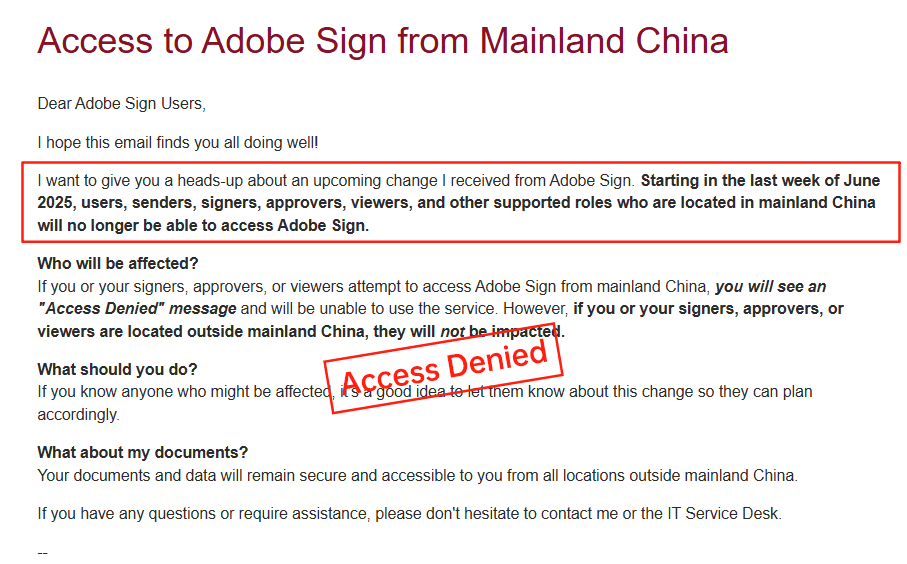
A significant issue arose in 2023 when Adobe announced its withdrawal from the Chinese mainland market, citing regulatory complexities and data localization challenges. This move disrupted businesses operating in APAC, forcing migrations and highlighting Adobe's limited adaptability in emerging regions. For multinational healthcare firms with cross-border needs, such as sharing patient records between U.S. and Asian facilities, this exit amplifies risks around data sovereignty and compliance continuity.
DocuSign's Drawbacks: High Costs, Opacity, and Regional Service Gaps
DocuSign, a market leader in e-signatures, shares similar pain points that impact user experience, especially in healthcare and beyond. Pricing is notoriously high and non-transparent; plans like Business Pro start at $40 per user per month annually ($480/year), but enterprise HIPAA setups demand custom negotiations, often pushing costs above $60 per user with add-ons for identity verification or bulk sends. Envelope quotas—capped at around 100 per user annually—can lead to overage fees, making it expensive for high-volume healthcare scenarios like mass patient onboarding.
In long-tail regions like APAC, DocuSign's services falter on speed and localization. Cross-border latency causes slower document loading, and compliance tools for areas like China or Southeast Asia require extra governance features at premium prices. Data residency surcharges and limited local ID verification options further inflate effective costs, frustrating users who need reliable, region-specific support. While DocuSign offers a BAA for HIPAA, its API plans (e.g., Advanced at $5,760/year) add layers of complexity for integrations, often leaving smaller healthcare providers feeling nickel-and-dimed.
Comparing Adobe Sign, DocuSign, and eSign.AI
To aid decision-making, here's a neutral comparison of these platforms across key factors relevant to healthcare and global operations. This table draws from public documentation and market analyses, highlighting trade-offs without endorsing any single option.
| Aspect | Adobe Sign | DocuSign | eSign.AI |
|---|---|---|---|
| HIPAA Compliance | Yes, via BAA for enterprise plans; strong encryption and audits | Yes, via BAA; robust but quota-limited | Yes, with BAA; tailored for global healthcare with ePHI focus |
| Pricing Transparency | Low; custom quotes, starts ~$40/user/mo | Low; tiered but high (~$40-60/user/mo) + overages | High; flexible, region-optimized plans without hidden fees |
| APAC/Regional Support | Withdrew from China; latency issues | Inconsistent speed, high surcharges | Optimized for CN/SEA/HK; low latency, local compliance |
| Envelope Quotas | Unlimited in enterprise, but metered add-ons | ~100/user/year; strict caps on automation | Scalable; higher volumes at lower cost |
| API & Integrations | Good EHR support (Epic, Cerner); API add-on costs | Advanced API (~$600-5,760/year); feature-rich but pricey | Flexible API; cost-effective for mid-size integrations |
| Healthcare Suitability | Solid for U.S.-centric; setup complexity | Versatile but expensive for volume | Region-native; easier for cross-border PHI handling |
| Overall User-Friendliness | Moderate; opaque costs hinder planning | Low in APAC; service gaps | High; transparent and adaptive |
This overview shows eSign.AI edging out in regional flexibility and cost predictability, particularly for APAC healthcare users, while Adobe and DocuSign excel in established U.S. markets—choices depend on specific operational needs.
Healthcare organizations are already applying it to cross-border work: Winner Medical signs overseas board resolutions online, and Beikang Health cut overseas signing from weeks to minutes. See Winner Medical's case study and Beikang Health's case study.
Exploring eSign.AI: A Regionally Optimized Alternative
eSign.AI emerges as a compelling option for businesses seeking compliant e-signatures beyond U.S.-dominated tools. Designed with APAC in mind, it offers HIPAA-equivalent protections through BAAs, emphasizing data residency in regions like China and Southeast Asia. Features include low-latency signing, native support for local ID verification (e.g., biometric checks compliant with CN/HK regs), and seamless integrations for healthcare workflows. Pricing is more straightforward, with plans avoiding the opacity of rivals, making it appealing for cost-conscious providers expanding globally.
From a business view, eSign.AI addresses pain points like Adobe's market exit and DocuSign's regional hurdles by prioritizing speed and compliance in underserved areas, without compromising core security.
FAQs