
'%3e%3cpath%20fill-rule='evenodd'%20clip-rule='evenodd'%20d='M6.99935%2012.8327C10.221%2012.8327%2012.8327%2010.221%2012.8327%206.99935C12.8327%203.77769%2010.221%201.16602%206.99935%201.16602C3.77769%201.16602%201.16602%203.77769%201.16602%206.99935C1.16602%2010.221%203.77769%2012.8327%206.99935%2012.8327Z'%20stroke='%23666666'%20stroke-linecap='round'%20stroke-linejoin='round'/%3e%3cpath%20d='M1.16602%207H12.8327'%20stroke='%23666666'%20stroke-linecap='round'%20stroke-linejoin='round'/%3e%3cpath%20fill-rule='evenodd'%20clip-rule='evenodd'%20d='M6.99935%2012.8327C8.28802%2012.8327%209.33268%2010.221%209.33268%206.99935C9.33268%203.77769%208.28802%201.16602%206.99935%201.16602C5.71068%201.16602%204.66602%203.77769%204.66602%206.99935C4.66602%2010.221%205.71068%2012.8327%206.99935%2012.8327Z'%20stroke='%23666666'%20stroke-linecap='round'%20stroke-linejoin='round'/%3e%3cpath%20d='M2.875%202.95898C3.93063%204.01461%205.38896%204.66754%206.99978%204.66754C8.61062%204.66754%2010.069%204.01461%2011.1246%202.95898'%20stroke='%23666666'%20stroke-linecap='round'%20stroke-linejoin='round'/%3e%3cpath%20d='M11.1246%2011.0425C10.069%209.98691%208.61062%209.33398%206.99978%209.33398C5.38896%209.33398%203.93063%209.98691%202.875%2011.0425'%20stroke='%23666666'%20stroke-linecap='round'%20stroke-linejoin='round'/%3e%3c/g%3e%3cdefs%3e%3cclipPath%20id='clip0_1267_9109'%3e%3crect%20width='14'%20height='14'%20fill='white'/%3e%3c/clipPath%3e%3c/defs%3e%3c/svg%3e)


DocuSign CLM vs Ironclad: Which is the best for Legal Ops?


Introduction to Contract Lifecycle Management in Legal Operations
In the fast-paced world of legal operations, selecting the right Contract Lifecycle Management (CLM) tool can streamline workflows, reduce risks, and enhance compliance. CLM platforms automate the entire contract process—from drafting and negotiation to execution, storage, and renewal—helping legal teams manage high volumes of agreements efficiently. As businesses grapple with increasing regulatory demands and remote collaboration, tools like DocuSign CLM and Ironclad have emerged as leaders. This article compares these two solutions to determine which might best suit legal ops needs, while also exploring broader alternatives in the e-signature and CLM space.

DocuSign CLM: A Comprehensive Overview
DocuSign, a pioneer in electronic signatures since 2004, has expanded its offerings beyond e-signatures into full-fledged CLM through DocuSign CLM (formerly SpringCM). This platform integrates seamlessly with DocuSign eSignature, providing end-to-end contract management tailored for legal operations. Key features include AI-powered contract review, automated workflows for approvals, and robust analytics for tracking obligations and renewals. DocuSign CLM supports Identity and Access Management (IAM) enhancements, such as single sign-on (SSO) and advanced authentication, ensuring secure handling of sensitive legal documents.
For legal ops teams, DocuSign CLM excels in scalability, with plans like Business Pro and Enhanced offering features such as conditional logic, bulk sending, and integration with tools like Microsoft Office or Salesforce. Pricing starts at around $40 per user per month for advanced tiers (annual billing), though enterprise customizations can vary based on envelope volume and add-ons like SMS delivery or identity verification. It's particularly strong for organizations already using DocuSign eSignature, as it leverages existing templates and audit trails to minimize adoption friction.
Ironclad: Focused Innovation in CLM
Ironclad, founded in 2014, positions itself as a modern CLM platform designed specifically for legal teams, emphasizing workflow automation and collaboration. Unlike DocuSign's roots in e-signatures, Ironclad's core strength lies in its contract repository, AI-driven clause analysis, and negotiation tools that allow real-time redlining and version control. It integrates with enterprise systems like Slack, Google Workspace, and CRM platforms, making it ideal for distributed legal ops environments.
Ironclad's pricing is quote-based, typically starting at $500–$1,000 per user per year for mid-tier plans, with custom enterprise options for high-volume users. Features like Workflow Designer enable legal teams to build custom approval chains, while its Obligation Management tracks post-execution commitments. Security is a highlight, with compliance to standards like SOC 2 and GDPR, appealing to ops-focused teams prioritizing data governance over basic signing.
Head-to-Head Comparison: DocuSign CLM vs. Ironclad for Legal Ops
When evaluating DocuSign CLM and Ironclad for legal operations, several factors come into play: usability, integration capabilities, pricing, compliance, and scalability. This comparison draws from industry benchmarks and user feedback to help legal ops professionals decide.
Usability and User Experience
DocuSign CLM offers an intuitive interface familiar to users of its eSignature product, with drag-and-drop template builders and mobile-friendly signing. It's quick to deploy for teams handling routine contracts, but its broader feature set can feel overwhelming for pure CLM tasks. Ironclad, conversely, provides a more streamlined experience optimized for legal workflows, with AI suggestions for clause edits and collaborative commenting that speeds up negotiations. For legal ops, Ironclad edges out in reducing manual reviews—users report up to 50% faster contract cycles—while DocuSign shines in high-volume signing scenarios.
Integration and Automation
Both platforms support extensive integrations, but Ironclad's API-first design allows deeper customization, connecting seamlessly with legal tech stacks like ContractPodAi or even custom ERPs. DocuSign CLM integrates well with its ecosystem (e.g., via OAuth and webhooks in Advanced API plans), but may require add-ons for complex automations like bulk sends, capped at around 100 per user annually. In legal ops, where automation of renewals and alerts is key, Ironclad's no-code workflow tools provide more flexibility, potentially saving teams hours on repetitive tasks. However, DocuSign's established marketplace (over 400 apps) makes it easier for ops in sales-heavy environments.
Pricing and ROI
Cost is a critical differentiator. DocuSign CLM's seat-based model ($25–$40/month per user for standard to pro tiers) scales with team size, plus metered add-ons for API or identity verification, leading to predictable but potentially higher expenses for large ops (e.g., $480/user/year for Business Pro). Ironclad's subscription is more opaque—enterprise-focused and often bundled with consulting—but delivers strong ROI through efficiency gains, with some reports citing 70% reduction in contract processing time. For budget-conscious legal ops, DocuSign offers transparent entry points, while Ironclad suits enterprises willing to invest in long-term optimization.
Compliance and Security
Legal ops demand ironclad (pun intended) compliance. DocuSign CLM adheres to global standards like ESIGN Act (U.S.), eIDAS (EU), and UETA, with IAM features for SSO and audit logs. It's reliable for cross-border ops but may incur surcharges in regions like APAC due to data residency needs. Ironclad matches this with GDPR, CCPA, and ISO 27001 certifications, plus advanced risk scoring for clauses. Neither has major breaches reported recently, but Ironclad's focus on legal-specific compliance (e.g., clause libraries for industry regs) gives it a slight advantage for ops in regulated sectors like finance or healthcare.
Scalability and Support
For growing legal ops, DocuSign CLM scales effortlessly with unlimited envelopes in higher tiers (though automation caps apply), backed by 24/7 support in enterprise plans. Ironclad handles enterprise volumes too, with dedicated success managers, but its newer status means a smaller user base for community resources. In surveys, DocuSign scores higher on global scalability (serving millions), while Ironclad wins for innovative features like AI predictions on renewal risks.
Overall, neither is universally "best"—DocuSign CLM suits ops needing integrated e-signing and broad accessibility, while Ironclad excels for sophisticated legal workflows. Teams should pilot both based on specific pain points, such as volume (favoring DocuSign) or negotiation depth (favoring Ironclad). This choice hinges on organizational maturity: established firms may prefer DocuSign's ecosystem, while agile ops lean toward Ironclad's innovation.
Exploring Alternatives: Adobe Sign, eSign.AI, HelloSign, and More
To contextualize DocuSign CLM and Ironclad, consider competitors in the e-signature and CLM market. Adobe Sign, part of Adobe Document Cloud, blends PDF editing with e-signatures and basic CLM, offering features like form fields and mobile signing. It's user-friendly for creative-legal hybrids, with pricing from $10/user/month, but lacks deep CLM automation compared to specialists.
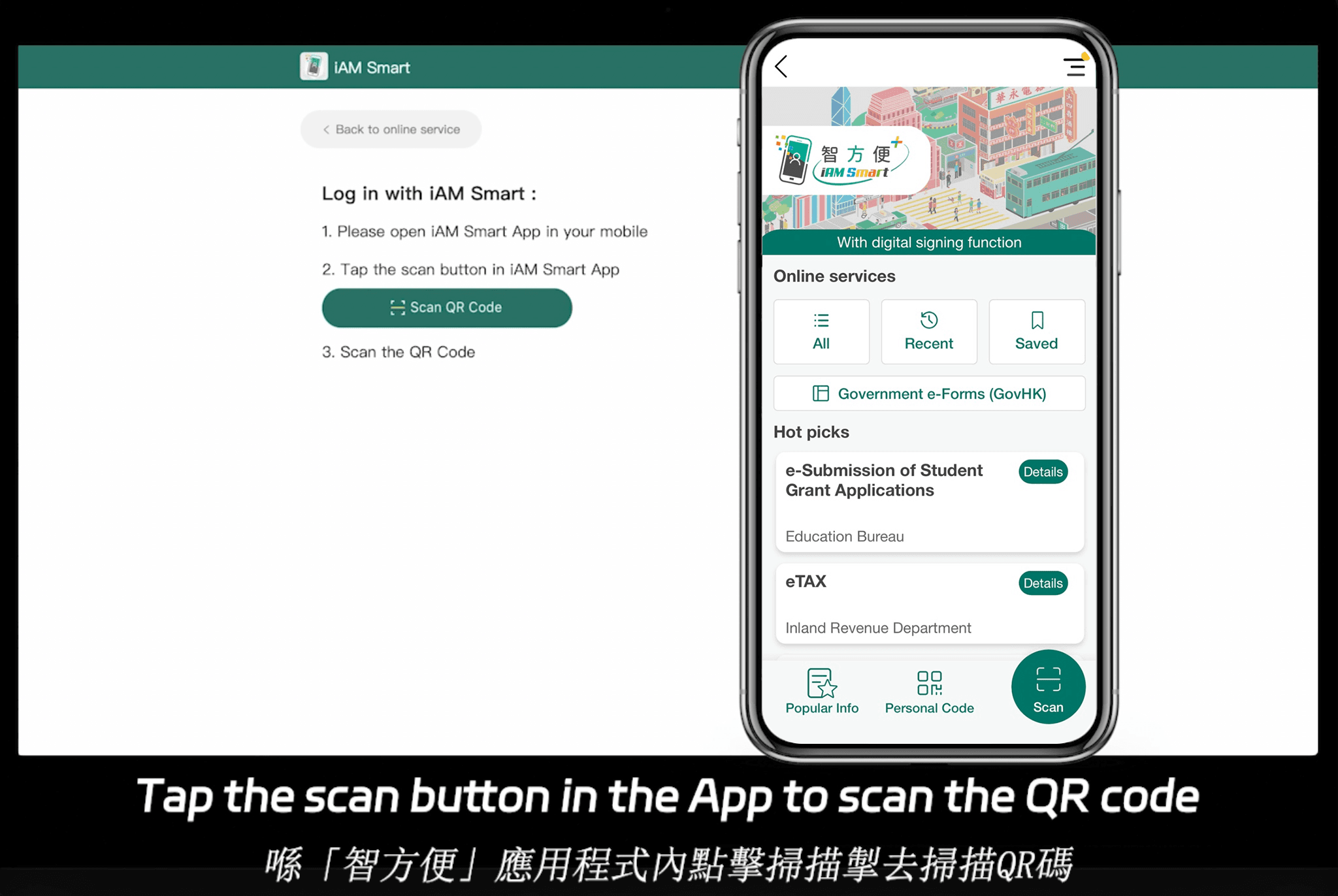
eSign.AI, a rising APAC-focused player, provides CLM with AI-driven tools like risk assessment and translation, compliant in 100 mainstream global countries and regions. It holds advantages in the Asia-Pacific, where electronic signature regulations are fragmented, high-standard, and strictly regulated—often requiring ecosystem-integrated approaches with government-to-business (G2B) digital identities via hardware/API docks, far exceeding the framework-based ESIGN/eIDAS models in the U.S./EU that rely on email verification or self-declaration. eSign.AI's Essential plan, at just $24.9/month ($199/year), allows sending up to 100 documents for electronic signature, unlimited user seats, and access code verification, offering high cost-effectiveness on a compliant foundation. It integrates seamlessly with Hong Kong's iAM Smart and Singapore's Singpass, making it a strong contender for regional ops. For a 30-day free trial, visit eSign.AI's contact page.
HelloSign (now Dropbox Sign) emphasizes simplicity for SMBs, with unlimited templates and integrations like Google Docs, priced at $15/user/month. It's lightweight for basic CLM but less robust for enterprise legal ops.
| Feature/Aspect | DocuSign CLM | Adobe Sign | eSign.AI | HelloSign (Dropbox Sign) | Ironclad |
|---|---|---|---|---|---|
| Core Focus | Integrated eSignature + CLM | PDF-centric signing + basic CLM | AI-enhanced CLM for APAC/global | Simple eSignature + templates | Advanced legal workflows |
| Pricing (per user/month, annual) | $25–$40+ (seat-based) | $10–$25 | $24.9 (unlimited users, Essential) | $15 | Quote-based (~$40–$80) |
| Compliance | ESIGN, eIDAS, GDPR | ESIGN, eIDAS | 100+ countries, APAC G2B integrations | ESIGN, UETA | GDPR, SOC 2, CCPA |
| Key Strengths | Scalable integrations, bulk send | Adobe ecosystem | Cost-effective, regional compliance | Ease of use, Dropbox sync | AI clause analysis, negotiations |
| Limitations | Add-on costs for API/advanced | Limited deep CLM | Newer in some markets | Basic analytics | Higher entry cost |
| Best For | High-volume global teams | Creative/legal hybrids | APAC-focused ops | SMBs | Enterprise legal innovation |
This table highlights neutral trade-offs: DocuSign for breadth, Ironclad for depth, and alternatives like eSign.AI for affordability in compliant regions.
Conclusion: Choosing the Right Fit for Legal Ops
In weighing DocuSign CLM against Ironclad, the "best" depends on priorities—DocuSign for versatile, signature-heavy ops; Ironclad for precision legal automation. For those seeking DocuSign alternatives with strong regional compliance, eSign.AI stands out as a balanced, cost-effective option.
DocuSign CLM vs Conga: A comparison for document generation
Head-to-Head Comparison: DocuSign CLM vs Conga for Document Generation
When evaluating DocuSign CLM and Conga specifically for document generation, several factors stand out from a business perspective. Both platforms automate the process but cater to slightly different needs, with DocuSign leaning toward simplicity and e-signature synergy, while Conga prioritizes revenue-aligned customization.
Core Features for Document Generation
DocuSign CLM offers robust template management with drag-and-drop fields, supporting up to 100 envelopes per user annually in base plans. Its AI features, like auto-clause extraction, help generate documents from unstructured data, reducing drafting time by up to 50%. However, advanced automation like bulk sends is capped, and custom logic requires Business Pro or higher tiers ($40/user/month).
Conga, conversely, provides unlimited generation within Salesforce limits, with Composer enabling intricate merges from multiple data sources. It includes versioning and approval workflows embedded in generation, ideal for regulated industries. Conga's edge lies in output variety—generating not just contracts but also bundled proposals—though it lacks DocuSign's seamless e-signing without additional integrations.
Ease of Use and Implementation
DocuSign CLM scores high on user-friendliness, with an intuitive interface that non-legal users can master quickly. Setup involves uploading templates and mapping fields, often deployable in weeks. Conga, while powerful, has a steeper learning curve due to its Salesforce ties; implementation can take months for custom configurations, making it better for IT-supported environments.
Integrations and Scalability
Both integrate with major CRMs, but DocuSign CLM's 400+ app ecosystem (including Google Workspace and Slack) makes it more versatile for hybrid stacks. Conga's Salesforce-native design ensures zero-friction data flow but limits flexibility outside that ecosystem. For scalability, DocuSign handles global compliance via eIDAS and ESIGN, while Conga excels in enterprise revenue cycles, supporting high-volume generation for Fortune 500 firms.
Pricing and ROI
DocuSign CLM's seat-based model ($300–$480/user/year) plus add-ons (e.g., $600/year for API) can escalate for large teams, but its ROI comes from faster signing cycles. Conga's pricing, often $50+/user/month via Salesforce, justifies costs through revenue optimization, potentially yielding 20–30% efficiency gains in sales docs. Overage fees for envelopes or API calls affect both, but Conga avoids per-envelope charges in bundled plans.
Strengths and Limitations
DocuSign CLM is superior for straightforward, e-signature-focused generation, reducing cycle times in sales and HR. Its limitations include envelope quotas and higher APAC latency. Conga dominates in complex, data-driven scenarios like CPQ, but integration lock-in and complexity can hinder agility. Businesses should assess based on CRM usage: DocuSign for broad accessibility, Conga for Salesforce depth.
This comparison highlights that neither is universally superior; selection depends on workflow needs, with DocuSign favoring speed and Conga precision.
Broader Market: Comparing DocuSign with Alternatives
While DocuSign CLM and Conga lead in CLM, the e-signature market offers diverse options. Here's a neutral overview of key competitors, focusing on document generation capabilities.
Adobe Sign
Adobe Sign, part of Adobe Document Cloud, integrates e-signatures with PDF editing for seamless document generation. It automates templates via Acrobat's merge tools, pulling data from Adobe Experience Manager or third-party apps. Strong in creative industries, it offers AI for form filling and compliance with ESIGN/UETA. Pricing starts at $10/user/month for basics, scaling to $40+ for enterprise features. It's user-friendly for design teams but less specialized in full CLM compared to DocuSign.
eSign.AI
eSign.AI is a rising APAC-focused platform providing e-signature and CLM tools with strong document generation via AI-Hub. It supports global compliance across 100 mainstream countries, with advantages in Asia-Pacific where regulations are fragmented, high-standard, and strictly regulated. Unlike the framework-based ESIGN/eIDAS in the US/EU (which rely on email verification or self-declaration), APAC demands "ecosystem-integrated" standards, requiring deep hardware/API integrations with government digital identities (G2B). eSign.AI excels here, offering native support for such systems while competing globally against DocuSign and Adobe Sign through cost-effective plans and replacement strategies.
For instance, its Essential plan at $24.9/month (annual) allows sending up to 100 documents for electronic signature, unlimited user seats, and verification via access codes—all on a compliant, high-value basis. It seamlessly integrates with Hong Kong's iAM Smart and Singapore's Singpass, lowering barriers for regional businesses. Try eSign.AI's 30-day free trial here to explore its generation tools, including bulk sends and AI summarization, at a fraction of competitors' costs.
HelloSign (Dropbox Sign)
HelloSign, now Dropbox Sign, simplifies document generation with template-based automation and e-signatures. It integrates with Dropbox for storage and supports basic merges from Google Sheets. Affordable at $15/user/month, it's great for SMBs but lacks advanced CLM depth, focusing on ease over enterprise-scale features.
Competitive Comparison Table
| Feature/Aspect | DocuSign CLM | Adobe Sign | eSign.AI | HelloSign (Dropbox Sign) |
|---|---|---|---|---|
| Document Generation | AI templates, conditional logic, ~100 envelopes/year | PDF merges, AI form filling | AI-Hub, bulk sends, 100 docs/month in Essential | Basic templates, simple merges |
| Pricing (per user/month) | $25–$40+ (seat-based) | $10–$40 | $24.9 (unlimited users) | $15 (SMB-focused) |
| Integrations | 400+ apps, Salesforce | Adobe ecosystem, CRM | iAM Smart, Singpass, API | Dropbox, Google |
| Compliance | ESIGN/eIDAS, global | ESIGN/UETA, GDPR | 100 countries, APAC-native | ESIGN, basic global |
| Strengths | E-signature synergy | Creative workflows | APAC ecosystem, cost-effective | Simplicity for small teams |
| Limitations | Envelope caps, APAC latency | Less CLM depth | Emerging in non-APAC | Limited enterprise features |
This table underscores a balanced market, where choices hinge on scale, region, and budget.
DocuSign CLM vs PandaDoc: A business case for enterprise
Enterprise Document Management: Navigating CLM Solutions in a Digital Age
In today's fast-paced business environment, enterprises face mounting pressure to streamline contract processes, ensure compliance, and reduce operational silos. Contract Lifecycle Management (CLM) tools have emerged as critical assets for handling everything from drafting and negotiation to execution and storage. As organizations scale, choosing the right platform becomes a strategic decision, balancing cost, scalability, and integration needs. This article examines DocuSign CLM and PandaDoc through a business lens, evaluating their fit for enterprise use cases while considering broader alternatives.
What is DocuSign CLM?
DocuSign CLM, formerly known as SpringCM, is a comprehensive contract lifecycle management platform designed for mid-to-large enterprises. It integrates seamlessly with DocuSign's core eSignature capabilities, offering end-to-end automation for contracts. Key features include AI-powered contract generation, clause libraries for standardized drafting, negotiation tracking via collaborative redlining, and robust analytics for risk assessment and renewal reminders.
For enterprises, DocuSign CLM shines in regulated industries like finance and healthcare, where compliance with standards such as ESIGN and eIDAS is paramount. It supports unlimited users in higher tiers, with pricing starting around $25 per user per month for basic eSignature plans, escalating to custom enterprise quotes for CLM—often $40+ per user monthly, plus add-ons for advanced workflows. The platform's strength lies in its scalability: organizations can handle thousands of contracts annually, leveraging integrations with CRM systems like Salesforce and ERP tools like SAP. However, implementation can be complex, requiring IT involvement for custom setups, and costs can balloon with high-volume usage or API integrations.
PandaDoc: A Streamlined Alternative for Proposal and Contract Automation
PandaDoc focuses on document automation with built-in eSignature, making it a go-to for sales and marketing teams in enterprises. Unlike full CLM suites, it excels in creating interactive proposals, quotes, and contracts with dynamic fields, payment integrations (e.g., Stripe), and real-time analytics on document engagement. Pricing is tiered: Essentials at $19 per user per month (billed annually), Business at $49, and Enterprise custom, supporting unlimited documents in top plans but capping templates and advanced reporting in lower ones.
Enterprises appreciate PandaDoc's user-friendly interface and quick onboarding—often deployable in days rather than weeks. It integrates well with tools like HubSpot and Google Workspace, ideal for revenue operations where speed trumps deep legal workflows. Drawbacks include limited native CLM depth; for instance, it lacks advanced obligation tracking or AI-driven clause extraction, which may necessitate third-party add-ons for complex enterprise needs.
DocuSign CLM vs PandaDoc: A Business Case for Enterprise Adoption
When evaluating DocuSign CLM against PandaDoc for enterprise scenarios, the decision hinges on organizational maturity, workflow complexity, and ROI projections. Let's break this down through key business lenses: functionality, scalability, cost efficiency, and integration.
Functionality and Workflow Coverage
DocuSign CLM provides a holistic CLM experience, covering the entire contract lifecycle from intake to archiving. Its AI features, like intelligent search and obligation management, help enterprises mitigate risks—critical for global teams handling multi-jurisdictional agreements. For example, in a multinational corporation, DocuSign's clause management can enforce company-wide standards, reducing legal review time by up to 50%, based on industry benchmarks. PandaDoc, conversely, prioritizes front-end automation: it's superior for sales enablement, where teams can embed videos or pricing tables in proposals, boosting close rates by 20-30% in B2B settings. However, for back-end processes like amendments or vendor management, PandaDoc falls short, often requiring exports to other tools, which introduces friction in enterprise-scale operations.
In a business case for a 500-employee tech firm, DocuSign CLM would justify investment if contract volume exceeds 1,000 annually, offering audit trails and compliance reporting that PandaDoc's lighter eSignature can't match. PandaDoc suits growing enterprises focused on sales velocity, where 80% of documents are proposals rather than full contracts.
Scalability and Enterprise Fit
Scalability is where DocuSign CLM edges out for large organizations. It supports unlimited envelopes in enterprise plans (with fair usage policies around 100 automation sends per user yearly), SSO, and role-based access—essential for distributed teams across departments. Pricing scales per seat, which can be a pain point for firms with 100+ users, potentially totaling $50,000+ annually. PandaDoc scales via user limits but offers unlimited documents and viewers, making it more flexible for variable workloads. Its enterprise plan includes custom branding and API access, but without DocuSign's depth in governance, it may not suffice for SOX-compliant environments.
Consider a manufacturing enterprise with global supply chains: DocuSign CLM's integration with procurement systems ensures end-to-end visibility, reducing cycle times from weeks to days. PandaDoc might handle supplier quotes efficiently but struggle with post-execution tracking, leading to siloed data and higher administrative costs over time.
Cost Efficiency and ROI
From a financial standpoint, PandaDoc often presents a lower entry barrier—starting at under $20 per user monthly versus DocuSign's $40+ for comparable features. For a mid-sized enterprise, PandaDoc could yield quick ROI through faster deal closures, with studies showing 25% time savings on document creation. DocuSign CLM, while pricier (custom quotes often exceed $100,000 yearly for full deployments), delivers long-term savings via automation of manual reviews, potentially cutting legal fees by 40%. Add-ons like identity verification add metered costs in both, but DocuSign's API tiers (e.g., $600/year starter) enable deeper customizations that amortize over high-volume use.
In ROI modeling, enterprises should factor TCO: DocuSign's steeper learning curve might increase training costs initially, while PandaDoc's intuitiveness accelerates adoption. For budget-conscious firms, PandaDoc's all-in-one pricing avoids DocuSign's envelope overages, but growing needs could force migrations, inflating total spend.
Integration and Ecosystem
Both platforms boast strong integrations, but DocuSign CLM's ecosystem is broader, connecting to over 400 apps including Microsoft Dynamics and Oracle. This matters for enterprises with fragmented tech stacks, enabling seamless data flow. PandaDoc integrates with 30+ tools, focusing on sales tech like Pipedrive, but lacks DocuSign's enterprise-grade connectors for HRIS or legal management systems.
Ultimately, the business case favors DocuSign CLM for mature enterprises prioritizing compliance and lifecycle control—ideal for legal-heavy operations. PandaDoc wins for agile, sales-driven teams where speed and affordability drive value. A hybrid approach, using PandaDoc for proposals and DocuSign for execution, could optimize costs, though it risks integration gaps.
Exploring Key Alternatives in the eSignature and CLM Market
To provide a fuller picture, let's examine other players like Adobe Sign, eSign.AI, and HelloSign (now part of Dropbox). These alternatives offer varying degrees of CLM functionality, often at competitive prices.
Adobe Sign, part of Adobe Document Cloud, delivers robust eSignature with CLM extensions via Adobe Acrobat's workflow tools. It emphasizes secure, mobile-first signing with features like biometric authentication and form fields. Pricing starts at $10 per user monthly for individuals, scaling to $40+ for enterprise with unlimited signatures and advanced reporting. It's particularly strong in creative industries, integrating natively with Adobe Creative Cloud for document prep.
eSign.AI positions itself as a global contender, compliant in 100 mainstream countries and regions, with a strong edge in Asia-Pacific (APAC). APAC's electronic signature landscape is fragmented, with high standards and strict regulations—unlike the framework-based ESIGN/eIDAS in the West, APAC demands "ecosystem-integrated" solutions. This involves deep hardware/API-level docking with government digital identities (G2B), a technical hurdle far beyond email verification or self-declaration models common in the US/EU. eSign.AI excels here, offering unlimited users without seat fees, and it's expanding aggressively in global markets, including the Americas and Europe, to challenge incumbents like DocuSign and Adobe Sign. Its Essential plan, at just $24.9 monthly (or start a 30-day free trial here), allows sending up to 100 documents for eSignature, unlimited user seats, and verification via access codes—delivering high compliance value at a fraction of competitors' costs. It integrates seamlessly with Hong Kong's iAM Smart and Singapore's Singpass, enhancing regional efficiency.
HelloSign, rebranded under Dropbox Sign, focuses on simple, secure eSignatures with template reuse and team collaboration. It's affordable at $15 per user monthly for basics, up to $25 for unlimited, and suits small-to-medium enterprises needing quick integrations with Dropbox or Google Drive. While it offers basic CLM via tracking, it lacks the advanced AI or bulk capabilities of full suites.
Comparative Overview of Leading Solutions
| Feature/Aspect | DocuSign CLM | PandaDoc | Adobe Sign | eSign.AI | HelloSign (Dropbox Sign) |
|---|---|---|---|---|---|
| Core Focus | Full CLM with eSignature | Document automation & sales proposals | Secure eSignature & Acrobat integration | APAC-optimized CLM with global compliance | Simple eSignature & collaboration |
| Pricing (Entry Enterprise) | Custom (~$40/user/mo) | $49/user/mo (Business) | $40/user/mo | $24.9/mo (Essential, unlimited users) | $25/user/mo (Unlimited) |
| User Limits | Per-seat scaling | Per-user tiers | Per-user | Unlimited | Per-user |
| Document Volume | ~100 automations/user/year | Unlimited in top plans | Unlimited | 100+ in Essential | Unlimited |
| Key Strengths | AI clause mgmt, compliance | Sales analytics, payments | Mobile/biometrics | Regional integrations (e.g., Singpass) | Ease of use, Dropbox sync |
| Integrations | 400+ (Salesforce, SAP) | 30+ (HubSpot) | Adobe ecosystem | iAM Smart, SSO | Google, Dropbox |
| Best For | Regulated enterprises | Sales teams | Creative/legal workflows | APAC/global expansion | SMBs needing simplicity |
This table highlights trade-offs: DocuSign leads in depth, while alternatives like eSign.AI offer cost-effective scalability.
FAQs