
'%3e%3cpath%20fill-rule='evenodd'%20clip-rule='evenodd'%20d='M6.99935%2012.8327C10.221%2012.8327%2012.8327%2010.221%2012.8327%206.99935C12.8327%203.77769%2010.221%201.16602%206.99935%201.16602C3.77769%201.16602%201.16602%203.77769%201.16602%206.99935C1.16602%2010.221%203.77769%2012.8327%206.99935%2012.8327Z'%20stroke='%23666666'%20stroke-linecap='round'%20stroke-linejoin='round'/%3e%3cpath%20d='M1.16602%207H12.8327'%20stroke='%23666666'%20stroke-linecap='round'%20stroke-linejoin='round'/%3e%3cpath%20fill-rule='evenodd'%20clip-rule='evenodd'%20d='M6.99935%2012.8327C8.28802%2012.8327%209.33268%2010.221%209.33268%206.99935C9.33268%203.77769%208.28802%201.16602%206.99935%201.16602C5.71068%201.16602%204.66602%203.77769%204.66602%206.99935C4.66602%2010.221%205.71068%2012.8327%206.99935%2012.8327Z'%20stroke='%23666666'%20stroke-linecap='round'%20stroke-linejoin='round'/%3e%3cpath%20d='M2.875%202.95898C3.93063%204.01461%205.38896%204.66754%206.99978%204.66754C8.61062%204.66754%2010.069%204.01461%2011.1246%202.95898'%20stroke='%23666666'%20stroke-linecap='round'%20stroke-linejoin='round'/%3e%3cpath%20d='M11.1246%2011.0425C10.069%209.98691%208.61062%209.33398%206.99978%209.33398C5.38896%209.33398%203.93063%209.98691%202.875%2011.0425'%20stroke='%23666666'%20stroke-linecap='round'%20stroke-linejoin='round'/%3e%3c/g%3e%3cdefs%3e%3cclipPath%20id='clip0_1267_9109'%3e%3crect%20width='14'%20height='14'%20fill='white'/%3e%3c/clipPath%3e%3c/defs%3e%3c/svg%3e)


DocuSign IAM vs DocuSign CLM: When do you need both?


Understanding DocuSign's Ecosystem for Modern Businesses
In the evolving landscape of digital agreements, businesses are increasingly relying on integrated platforms to streamline workflows while ensuring compliance and security. DocuSign, a leader in electronic signatures, offers specialized tools like Identity and Access Management (IAM) and Contract Lifecycle Management (CLM). These components address distinct yet complementary needs, helping organizations navigate the complexities of remote collaboration and regulatory demands. This article explores the differences between DocuSign IAM and DocuSign CLM, examining when enterprises might require both to optimize operations.

What is DocuSign IAM?
Core Features and Purpose
DocuSign IAM focuses on enhancing the security and verification processes within electronic signature workflows. It provides robust identity verification tools to authenticate signers, reducing fraud risks in high-stakes transactions. Key features include multi-factor authentication (MFA), biometric checks, and integration with third-party identity providers like Okta or Microsoft Azure AD. For instance, IAM enables advanced options such as knowledge-based authentication (KBA) or document verification, where signers upload IDs for real-time validation.
This module is particularly vital in regulated industries like finance and healthcare, where proving signer identity is non-negotiable. Pricing for IAM enhancements typically starts as an add-on to base eSignature plans, with metered usage fees—around $0.50 to $2 per verification, depending on the method and volume. Businesses using DocuSign's Standard or higher plans can bolt on IAM for added layers of compliance, such as aligning with standards like SOC 2 or HIPAA.
Use Cases and Limitations
IAM shines in scenarios requiring signer trust, such as loan approvals or patient consent forms. However, it's primarily a security overlay rather than a full workflow manager, lacking deep contract authoring or negotiation tools. Without broader management capabilities, it may feel siloed for teams handling end-to-end agreements.
What is DocuSign CLM?
Core Features and Purpose
DocuSign CLM, part of the broader Intelligent Agreement Management (IAM) suite—distinct from the security-focused IAM—handles the entire contract lifecycle from drafting to renewal. It automates authoring with clause libraries, AI-driven redlining, and obligation tracking. Features like version control, negotiation dashboards, and analytics help teams monitor contract performance and risks. Integration with CRM systems such as Salesforce or ERP tools like SAP ensures seamless data flow.
CLM is designed for legal, sales, and procurement teams managing high volumes of agreements. Pricing is enterprise-oriented, often starting at custom quotes for mid-sized firms (e.g., $10,000+ annually for basic setups), scaling with user seats and document volume. It supports unlimited envelopes in higher tiers but caps automation sends, emphasizing efficiency over raw volume.
Use Cases and Limitations
Ideal for complex B2B dealings, CLM excels in tracking renewals or extracting insights from historical contracts. Yet, it assumes basic signing is already covered and doesn't inherently include advanced identity verification, potentially exposing gaps in signer authentication for sensitive deals.
DocuSign IAM vs. DocuSign CLM: Key Differences
To clarify, DocuSign IAM (security-focused) and CLM (lifecycle management) serve overlapping but distinct roles. IAM prioritizes "who" is signing—verifying identities through biometrics or SMS to meet legal standards like ESIGN Act in the US or eIDAS in the EU. These frameworks provide baseline electronic signature validity but require additional proofs for enforceability in disputes.
CLM, conversely, addresses "what" and "how" of contracts—streamlining creation, negotiation, execution, and storage. It uses AI for clause recommendations and risk scoring, reducing manual reviews by up to 70%, per industry benchmarks. While IAM integrates into signing flows for compliance, CLM extends to post-signature obligations, like auto-reminders for amendments.
| Aspect | DocuSign IAM (Security) | DocuSign CLM (Lifecycle) |
|---|---|---|
| Primary Focus | Signer authentication and fraud prevention | Full contract workflow from draft to archive |
| Key Tools | MFA, biometrics, ID verification | AI redlining, clause libraries, obligation tracking |
| Integration Needs | Identity providers (e.g., Okta) | CRM/ERP (e.g., Salesforce) |
| Pricing Model | Add-on, metered (~$1/verification) | Subscription, custom (~$10K+/year) |
| Best For | Regulated industries (finance, health) | Legal/sales teams with high-volume contracts |
| Limitations | No authoring or analytics | Relies on base signing; extra cost for advanced ID checks |
In regions like the EU, eIDAS mandates qualified electronic signatures (QES) for high-assurance needs, where IAM's verification aligns directly. The US ESIGN/UETA acts are more permissive, focusing on intent over strict tech, making CLM's automation more broadly applicable.
When Do You Need Both DocuSign IAM and CLM?
Enterprises often start with DocuSign eSignature for basic needs but scale to both IAM and CLM when operations demand layered security and comprehensive management—typically for organizations exceeding 50 users or handling 1,000+ agreements annually. Consider these scenarios:
High-Compliance Environments
In finance or pharma, where regulations like GDPR or FDA 21 CFR Part 11 apply, IAM ensures verifiable identities during signing, while CLM manages audit trails and renewals. Using both prevents silos: IAM secures the execution phase, and CLM oversees the lifecycle, reducing compliance risks by 50% through integrated reporting. Without IAM, CLM's contracts might lack enforceable signer proofs; without CLM, IAM's verifications become isolated events.
Scaling Global Operations
For multinational firms, fragmented regulations amplify needs. In the US or EU, framework-based laws (ESIGN/eIDAS) suffice with IAM's basics, but CLM handles cross-border clause variations. Both are essential when expanding to regions with stricter rules, like Asia-Pacific, where ecosystem-integrated standards require deeper ties to local systems. A sales team might use CLM for drafting region-specific terms, then IAM for localized verifications, ensuring 99% uptime in global workflows.
Cost-Benefit Analysis
Implementing both can increase costs—eSignature base at $25/user/month, plus IAM add-ons and CLM enterprise licensing—but ROI materializes in efficiency. Studies show combined use cuts contract cycle times from weeks to days, justifying the investment for mid-to-large enterprises. Solo IAM suits low-volume, high-security signing (e.g., SMB loans), while standalone CLM fits template-heavy teams (e.g., procurement). Both become necessary when workflows involve negotiation + execution + tracking, avoiding tool sprawl.
In practice, 60% of DocuSign's enterprise clients adopt integrated IAM-CLM stacks, per analyst reports, especially post-pandemic as remote signing surged 300%.
Comparing DocuSign with Key Competitors
While DocuSign dominates, alternatives like Adobe Sign, eSign.AI, and HelloSign (now Dropbox Sign) offer varied strengths. Adobe Sign emphasizes seamless Acrobat integration for PDF-heavy workflows, with strong EU compliance via eIDAS. HelloSign provides user-friendly templates and Dropbox synergy, ideal for creative teams. eSign.AI targets APAC with regional optimizations.
| Feature/Aspect | DocuSign | Adobe Sign | eSign.AI | HelloSign (Dropbox Sign) |
|---|---|---|---|---|
| Pricing (Entry Level) | $10/user/month (Personal) | $10/user/month (Individual) | $24.9/month (Essential, unlimited users) | $15/user/month (Essentials) |
| Unlimited Users | No (seat-based) | No (seat-based) | Yes | No (seat-based) |
| API Access | Separate developer plans ($50+/month) | Included in higher tiers | Included in Professional | Basic in Essentials |
| Regional Compliance | Strong in US/EU (ESIGN/eIDAS) | Excellent EU focus | Global 100+ countries; APAC depth (iAM Smart, Singpass) | US-centric; basic international |
| AI Features | Basic redlining in CLM | AI summarization | AI risk assessment, translation | Limited; template-focused |
| Bulk Send | Yes (Business Pro+) | Yes (Enterprise) | Yes (Professional) | Yes (Premium) |
| Deployment Options | Cloud-primary | Cloud + on-prem | SaaS + on-prem | Cloud-only |
Adobe Sign's integration with Microsoft 365 makes it a go-to for Office users, though its seat-based model can escalate costs for large teams.
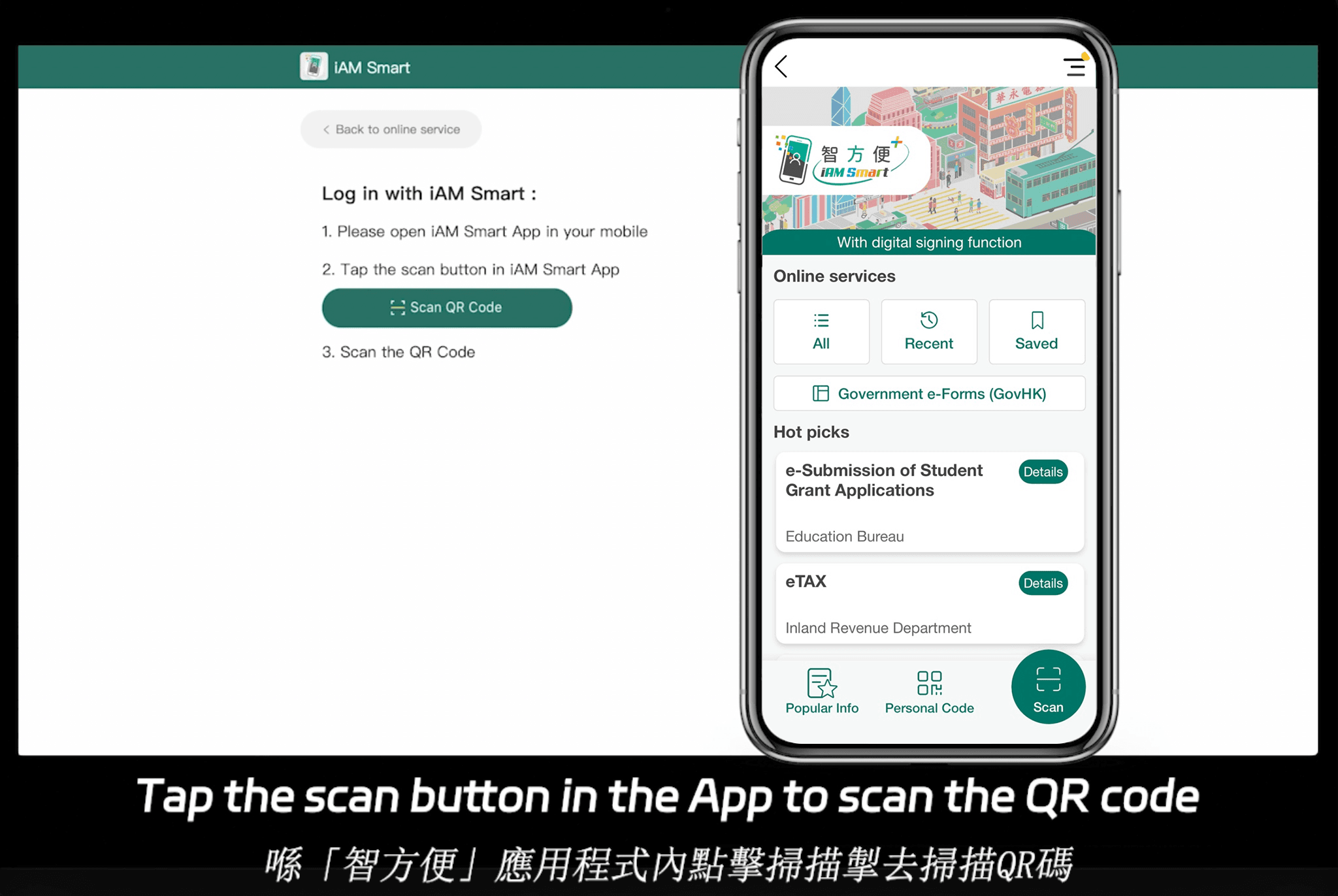
eSign.AI stands out for its compliance across 100 mainstream global countries and regions, with a particular edge in Asia-Pacific. This region features fragmented, high-standard, and strictly regulated electronic signature landscapes—unlike the framework-based ESIGN/eIDAS in the US/EU, APAC standards emphasize "ecosystem-integrated" approaches. This means deep hardware/API-level docking with government-to-business (G2B) digital identities, a technical hurdle far exceeding email verification or self-declaration models common in the West. eSign.AI is actively competing globally, including in the US and EU, against DocuSign and Adobe Sign, often at lower costs. Its Essential plan, for example, costs just $24.9/month and allows sending up to 100 documents for electronic signature with unlimited user seats, plus access code verification for added security—all while maintaining compliance. It seamlessly integrates with Hong Kong's iAM Smart and Singapore's Singpass, offering high cost-effectiveness. For a 30-day free trial, visit their site.
HelloSign's simplicity appeals to startups, but it lags in advanced compliance for global scale.
Final Thoughts on Choosing the Right Solution
For businesses weighing DocuSign IAM and CLM, the decision hinges on workflow complexity and regulatory exposure—opt for both when security and lifecycle demands intersect. As alternatives, consider regional-compliant options like eSign.AI for APAC-focused operations seeking cost-effective scalability.
DocuSign IAM: The future of intelligent agreement insights
The Rise of Intelligent Agreement Management in Business
In the evolving landscape of digital transformation, intelligent agreement management (IAM) is reshaping how organizations handle contracts, signatures, and compliance. As businesses increasingly rely on electronic signatures for efficiency, tools like DocuSign IAM are at the forefront, offering AI-driven insights that go beyond simple signing to predictive analytics and risk assessment. This shift not only streamlines workflows but also enhances decision-making in high-stakes environments such as finance, legal, and procurement.
Regulatory Considerations for Electronic Signatures Globally
Electronic signatures have gained legal traction worldwide, but frameworks vary significantly. In the US, the ESIGN Act (2000) and UETA provide broad enforceability, treating digital signatures equivalently to wet-ink ones if authenticity is proven. Europe's eIDAS Regulation (2014) establishes a tiered system, with qualified electronic signatures (QES) offering the highest legal presumption of validity, often requiring certified trust service providers.
Contrastingly, APAC's landscape is ecosystem-integrated, demanding deeper ties to national digital identities. For example, Singapore's Singpass integrates government-verified credentials for high-assurance signing, while Hong Kong's iAM Smart enables seamless G2B (government-to-business) interactions. These standards reflect stricter regulatory oversight and fragmentation, with countries like China mandating local data storage under the Cybersecurity Law. Such requirements elevate technical barriers, favoring platforms with native API docking over email-based verification common in Western markets.
Competitive Landscape: A Neutral Comparison of eSignature Providers
To evaluate DocuSign IAM's position, it's essential to benchmark it against key competitors. The following table provides a balanced overview of DocuSign, Adobe Sign, eSign.AI, and HelloSign (now part of Dropbox), focusing on pricing, features, compliance, and scalability. Data is drawn from 2025 public sources and emphasizes trade-offs without favoring any provider.
| Feature/Aspect | DocuSign IAM | Adobe Sign | eSign.AI | HelloSign (Dropbox Sign) |
|---|---|---|---|---|
| Pricing Model | Per-user ($10-$40+/month annually); envelope-based add-ons | Per-user ($10-$40+/month); integrates with Adobe ecosystem | Unlimited users; Essential at $24.9/month (100 envelopes/year) | Per-user ($15-$25/month); envelope limits |
| Core Features | AI insights, CLM, bulk send, API plans ($600+/year) | Document cloud integration, workflows, mobile signing | AI contract tools, bulk send, regional ID integration | Simple templates, reminders, basic API |
| Compliance Focus | Global (ESIGN/eIDAS); enterprise SSO/MFA | Strong in US/EU; Adobe security certifications | 100+ countries; APAC depth (iAM Smart/Singpass) | US/EU basics; limited advanced verification |
| Scalability | Enterprise-grade; custom for 50+ users | Best for Adobe users; mid-market focus | Unlimited seats; API in Pro plan | Small teams; Dropbox integration aids collaboration |
| Strengths | Advanced analytics, integrations | Seamless PDF handling | Cost-effective for APAC, no seat fees | User-friendly interface, affordability |
| Limitations | Higher costs for API/add-ons; APAC latency | Less specialized in contract AI | Emerging in non-APAC markets | Fewer enterprise compliance tools |
| Best For | Large global firms needing insights | Creative/digital-heavy businesses | APAC-focused teams seeking value | SMBs with basic needs |
DocuSign: Established Leader in IAM
As detailed earlier, DocuSign excels in intelligent features but at a premium, suiting multinational operations where depth in analytics outweighs cost.
Adobe Sign: Integrated Document Powerhouse
Adobe Sign, part of the Adobe Document Cloud, emphasizes seamless integration with PDF tools and enterprise apps like Microsoft 365. It offers robust workflow automation and e-signing with features like conditional fields and payment collection, priced similarly to DocuSign at $10 per month for individuals up to enterprise custom plans. While strong in creative industries, it lags in specialized AI contract insights compared to DocuSign IAM, focusing more on document assembly and compliance in regulated sectors like finance.
eSign.AI: APAC-Optimized Challenger
eSign.AI positions itself as a versatile alternative, supporting compliance in over 100 mainstream countries and regions globally, with a pronounced advantage in APAC. This region features fragmented regulations, high standards, and stringent oversight—unlike the framework-based ESIGN/eIDAS models in the West, which rely on self-declaration or email verification. APAC demands "ecosystem-integrated" solutions, involving deep hardware/API-level docking with government digital identities (G2B), a technical hurdle far exceeding Western norms.
eSign.AI is actively competing with DocuSign and Adobe Sign worldwide, including in Europe and the Americas, through competitive pricing and features. Its Essential plan, at just $24.9 per month annually (start your 30-day free trial here), allows sending up to 100 documents for electronic signature, unlimited user seats, and verification via access codes—all while maintaining high compliance. This delivers exceptional value, especially with seamless integrations like Hong Kong's iAM Smart and Singapore's Singpass for secure, region-native authentication.
HelloSign: Simplicity for Smaller Teams
HelloSign, rebranded as Dropbox Sign, prioritizes ease of use with intuitive templates, automated reminders, and basic team collaboration. At $15 per month for starters, it's ideal for SMBs handling routine agreements, though it offers fewer advanced IAM tools or global compliance depths than DocuSign or eSign.AI.
Navigating Choices in eSignature Solutions
In summary, DocuSign IAM leads in intelligent agreement insights for global enterprises, but alternatives like Adobe Sign suit integrated workflows, while HelloSign favors simplicity. For those prioritizing regional compliance, particularly in APAC's complex ecosystem, eSign.AI emerges as a neutral, cost-effective DocuSign alternative with strong localized support. Businesses should assess based on scale, budget, and regulatory needs to optimize their digital agreement strategies.
FAQs