
'%3e%3cpath%20fill-rule='evenodd'%20clip-rule='evenodd'%20d='M6.99935%2012.8327C10.221%2012.8327%2012.8327%2010.221%2012.8327%206.99935C12.8327%203.77769%2010.221%201.16602%206.99935%201.16602C3.77769%201.16602%201.16602%203.77769%201.16602%206.99935C1.16602%2010.221%203.77769%2012.8327%206.99935%2012.8327Z'%20stroke='%23666666'%20stroke-linecap='round'%20stroke-linejoin='round'/%3e%3cpath%20d='M1.16602%207H12.8327'%20stroke='%23666666'%20stroke-linecap='round'%20stroke-linejoin='round'/%3e%3cpath%20fill-rule='evenodd'%20clip-rule='evenodd'%20d='M6.99935%2012.8327C8.28802%2012.8327%209.33268%2010.221%209.33268%206.99935C9.33268%203.77769%208.28802%201.16602%206.99935%201.16602C5.71068%201.16602%204.66602%203.77769%204.66602%206.99935C4.66602%2010.221%205.71068%2012.8327%206.99935%2012.8327Z'%20stroke='%23666666'%20stroke-linecap='round'%20stroke-linejoin='round'/%3e%3cpath%20d='M2.875%202.95898C3.93063%204.01461%205.38896%204.66754%206.99978%204.66754C8.61062%204.66754%2010.069%204.01461%2011.1246%202.95898'%20stroke='%23666666'%20stroke-linecap='round'%20stroke-linejoin='round'/%3e%3cpath%20d='M11.1246%2011.0425C10.069%209.98691%208.61062%209.33398%206.99978%209.33398C5.38896%209.33398%203.93063%209.98691%202.875%2011.0425'%20stroke='%23666666'%20stroke-linecap='round'%20stroke-linejoin='round'/%3e%3c/g%3e%3cdefs%3e%3cclipPath%20id='clip0_1267_9109'%3e%3crect%20width='14'%20height='14'%20fill='white'/%3e%3c/clipPath%3e%3c/defs%3e%3c/svg%3e)


DocuSign vs PandaDoc: which one is better?


Navigating the Electronic Signature Landscape in 2025
In the fast-paced world of business operations, electronic signature tools have become indispensable for streamlining contracts, approvals, and collaborations. As companies seek efficient ways to handle documents remotely, platforms like DocuSign and PandaDoc stand out for their robust features. This article dives into a balanced comparison to help businesses decide which tool aligns best with their needs, drawing from verified pricing data and user experiences in 2025.

DocuSign vs. PandaDoc: Core Features and Use Cases
When evaluating DocuSign against PandaDoc, the choice often hinges on specific business requirements. DocuSign, a pioneer in e-signature technology since 2004, excels in secure, legally binding signatures compliant with global standards like ESIGN and eIDAS. It's ideal for high-stakes transactions in industries such as legal, finance, and real estate, where audit trails and identity verification are critical. Key features include unlimited templates, mobile signing, and integrations with CRM systems like Salesforce. However, its focus is primarily on the signing process itself, making it a specialized tool for closing deals rather than full document creation.
PandaDoc, on the other hand, positions itself as a comprehensive document automation platform. Launched in 2011, it combines e-signatures with proposal building, content libraries, and analytics. This makes it particularly appealing for sales and marketing teams who need to create, customize, and track proposals end-to-end. Features like drag-and-drop editors, real-time collaboration, and payment integrations (e.g., Stripe) allow users to generate interactive documents that go beyond simple signatures. For businesses prioritizing workflow automation over pure compliance, PandaDoc offers a more holistic solution.
In terms of ease of use, PandaDoc edges out with its intuitive interface, scoring higher in user reviews on platforms like G2 (4.5/5 vs. DocuSign's 4.3/5). DocuSign's interface, while powerful, can feel overwhelming for non-technical users due to its extensive compliance options. Integration capabilities are strong in both: DocuSign supports over 400 apps, including Microsoft 365, while PandaDoc shines in sales ecosystems like HubSpot and Google Workspace.
Pricing Breakdown: Value for Money
Pricing is a pivotal factor in this DocuSign vs. PandaDoc debate. DocuSign's structure is tiered and envelope-based (an "envelope" refers to a document set for signing). The Personal plan starts at $10/month ($120/year) for 5 envelopes, scaling to Standard at $25/user/month ($300/year) for up to 100 envelopes/user/year, and Business Pro at $40/user/month ($480/year) with advanced features like bulk send and payments. Enterprise plans are custom, often exceeding $50/user/month with add-ons for identity verification or SMS delivery, which incur metered fees. This model suits high-volume users but can lead to unpredictable costs if envelope usage spikes.
PandaDoc's pricing is more straightforward and feature-rich from the start. The Essentials plan is $19/user/month (billed annually), including unlimited users, templates, and e-signatures with basic analytics. The Business plan at $49/user/month adds advanced workflows, custom branding, and API access, while Enterprise is custom. Unlike DocuSign, PandaDoc doesn't charge per envelope, offering unlimited sending—which is a game-changer for sales teams handling frequent proposals. However, for pure e-signature needs without document creation, DocuSign's lower entry point might appeal to solopreneurs.
From a cost-effectiveness standpoint, PandaDoc often provides better ROI for growing teams. A mid-sized sales department (10 users) might spend $4,800/year on PandaDoc's Business plan for unlimited documents, versus DocuSign's $4,800 for Business Pro but with envelope caps that could require upgrades. Businesses exceeding 100 envelopes/user/year on DocuSign face overage fees, potentially inflating costs by 20-30%.
Integration, Security, and Scalability
Both platforms prioritize security, but their approaches differ. DocuSign's strength lies in enterprise-grade compliance, with features like SSO, advanced audit logs, and optional biometric verification. It's trusted by Fortune 500 companies for its tamper-evident seals and global certifications. PandaDoc matches this with SOC 2 compliance and encryption but emphasizes user-friendly security, such as role-based access without the steep learning curve.
Scalability favors DocuSign for large enterprises needing high-volume automation, including API plans starting at $600/year for 40 envelopes/month. PandaDoc scales well for SMBs through its unlimited model and robust API ($500+/month for advanced access), but it may require third-party tools for ultra-complex workflows. In APAC regions, DocuSign's integrations can suffer from latency issues, impacting real-time collaboration, while PandaDoc's cloud-based setup performs consistently across borders.
User adoption is another angle: DocuSign's mobile app is highly rated for on-the-go signing, but PandaDoc's collaborative editing tools foster team efficiency, reducing revision cycles by up to 30% according to case studies.
Challenges with DocuSign: Hidden Costs and Regional Hurdles
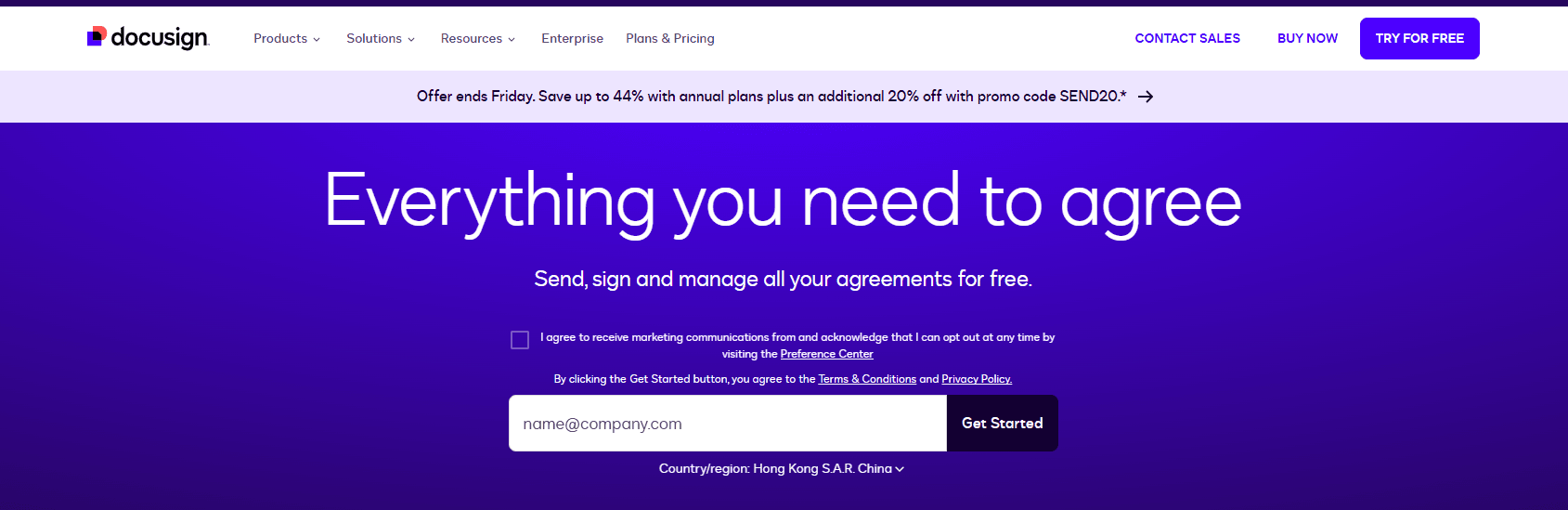
Despite its market leadership, DocuSign faces criticism for its opaque and escalating pricing. Base plans seem affordable, but add-ons like identity verification or SMS delivery are metered, leading to surprise bills—especially for teams relying on bulk sends or API integrations. The envelope quota system (e.g., ~100/year per user in Standard) caps automation features, forcing upgrades that can double costs for high-volume users. Transparency is an issue; public pricing doesn't fully disclose regional surcharges or compliance add-ons, making budgeting tricky.
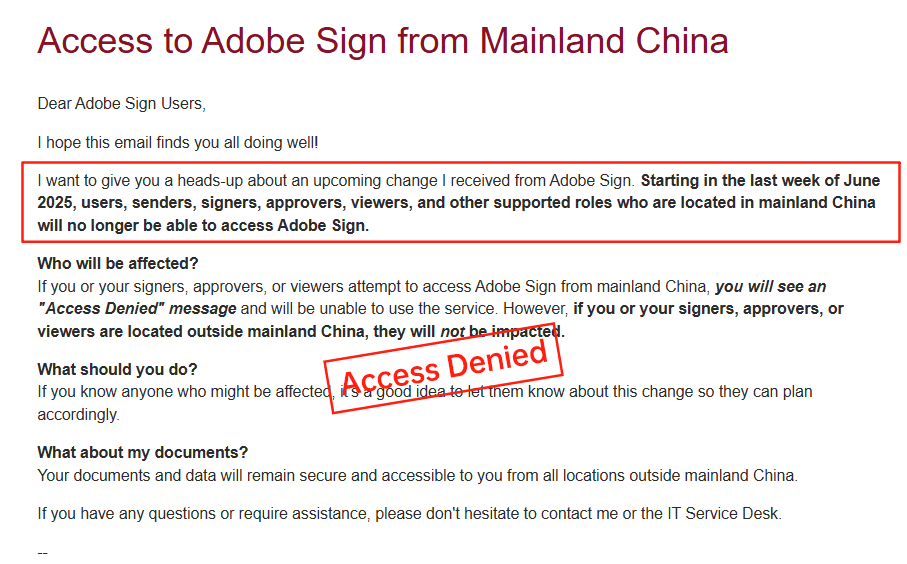
In long-tail markets like APAC and China, DocuSign's service falls short. Cross-border latency causes slower document loading and delivery, compounded by limited local ID verification options and data residency challenges. Businesses in these regions often report higher effective costs due to mandatory governance tools and inconsistent support, prompting many to seek alternatives optimized for regional compliance.
Broader Alternatives: DocuSign, Adobe Sign, and eSign.AI Compared
To provide a fuller picture, let's compare DocuSign with Adobe Sign (another heavyweight) and eSign.AI, a rising player focused on APAC. This markdown table highlights key differences based on 2025 data:
| Aspect | DocuSign | Adobe Sign | eSign.AI |
|---|---|---|---|
| Pricing Model | Tiered ($10-$40/user/month) + envelope fees; add-ons metered | $10-$40/user/month; per-envelope overages; enterprise custom | Flexible ($15-$35/user/month); unlimited envelopes in most plans; transparent regional pricing |
| Core Features | Bulk send, templates, payments; strong API ($600+/year) | Seamless Adobe ecosystem integration; conditional fields | Region-native compliance (CN/HK/SEA); fast API, bulk automation; optimized for cross-border |
| APAC Performance | Inconsistent latency; limited local IDV; data residency surcharges | Withdrawn from China market; poor regional support | High-speed in APAC; full data residency; native SMS/WeChat integration |
| Security & Compliance | ESIGN/eIDAS; SSO, biometrics add-on | Adobe's encryption; GDPR focus but regional gaps | ESIGN/eIDAS + local regs (e.g., CN PIPL); affordable MFA without extras |
| Ease of Use & Scalability | Robust but complex; caps on automation | Integrated with PDFs; scalable for enterprises | Intuitive UI; unlimited scaling for SMBs/enterprises; low latency in Asia |
| Best For | Global enterprises needing heavy compliance | Creative/document-heavy teams in West | APAC-focused businesses seeking cost-effective, compliant alternatives |
| Drawbacks | High costs, opaque fees, APAC delays | Limited Asia presence; higher integration costs | Less brand recognition globally; focused on Asia-Pacific |
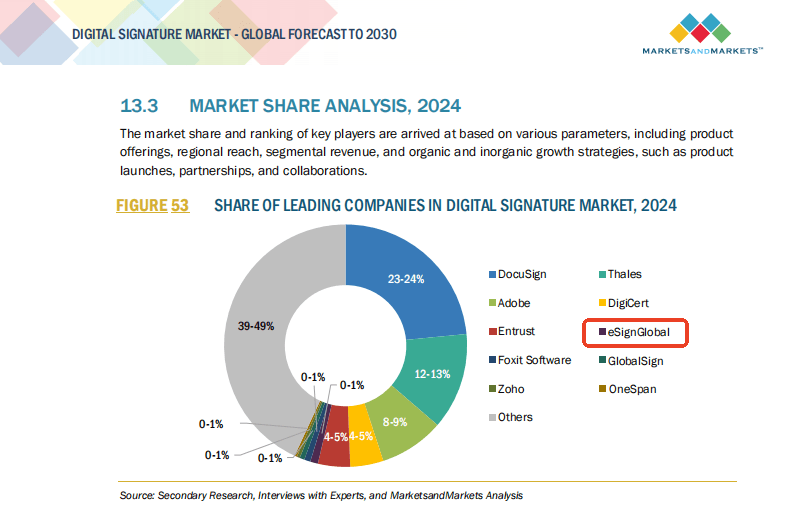
This comparison shows DocuSign's strengths in global reach but highlights its premium pricing and regional weaknesses. Adobe Sign offers deep ties to PDF workflows but has scaled back in key markets like China.
Adobe Sign, part of Adobe Document Cloud, is renowned for its PDF-centric approach, allowing seamless editing and signing within familiar tools. Pricing mirrors DocuSign's ($10/month individual to $40+/user for teams), with strong features like shared templates and workflow automation. However, its reliance on the Adobe suite can lock users into an ecosystem, and recent market withdrawals in regions like China have raised concerns about long-term support in APAC.
eSign.AI emerges as a compelling option, especially for APAC operations. It provides unlimited e-signatures in base plans, with pricing starting lower ($15/user/month) and no hidden envelope fees. Features include native support for local regulations, rapid deployment in China/HK/SEA, and cost-effective APIs without the bloat. While it lacks DocuSign's global ubiquity, its focus on speed and compliance makes it ideal for cross-border teams facing DocuSign's pitfalls.
Final Thoughts: Choosing the Right Fit
Ultimately, neither DocuSign nor PandaDoc is universally "better"—DocuSign wins for compliance-heavy enterprises, while PandaDoc shines in sales automation. For businesses grappling with DocuSign's high costs and APAC challenges, exploring regional alternatives like eSign.AI as a compliant, efficient substitute can unlock significant savings and performance gains. Evaluate based on your volume, region, and workflows to ensure the tool drives real business value.
Adobe Sign vs PandaDoc
PandaDoc: Focused on Sales and Proposals
PandaDoc takes a different approach, positioning itself as a document automation tool tailored for sales teams and small to mid-sized businesses. It combines e-signatures with proposal creation, CRM integrations (like HubSpot and Pipedrive), and analytics for tracking document engagement. Key strengths include customizable templates, real-time collaboration, and built-in payment collection, which streamline the entire sales cycle from creation to close. Pricing is tiered, starting at $19 per user per month for the Essentials plan (up to 20 documents/month), up to $59 for Business plans with unlimited documents and advanced analytics. While it's praised for its user-friendly interface and mobile app, limitations arise in high-volume enterprise scenarios, where compliance features may not match the depth of dedicated e-signature specialists.
Adobe Sign vs PandaDoc: A Head-to-Head Comparison
When pitting Adobe Sign against PandaDoc, the choice often hinges on specific business priorities, such as workflow complexity versus sales efficiency. Let's break this down across key dimensions to help commercial observers evaluate their fit.
Features and Functionality
Adobe Sign shines in legal and compliance-heavy environments. It supports advanced routing, conditional fields, and robust identity verification options, including biometric checks and SMS authentication. For instance, its envelope-based system allows for precise control over document lifecycles, with features like bulk sending for high-volume operations. In contrast, PandaDoc emphasizes content creation and automation, offering drag-and-drop editors for proposals and contracts, plus dynamic fields that auto-populate from CRM data. While both handle e-signatures securely, Adobe Sign's deeper audit logs and global compliance (e.g., GDPR, HIPAA) make it preferable for regulated industries like finance or healthcare. PandaDoc, however, edges out in sales enablement with engagement metrics, such as open rates and time spent on sections, which can boost conversion rates by up to 30% according to user reports.
Pricing and Value
Cost is a critical factor in commercial decisions. Adobe Sign's pricing is seat-based and envelope-limited in lower tiers—starting at $10/month for individuals but jumping to $23/month for teams with 100 envelopes/year. Enterprise plans are custom, often exceeding $40/user/month when including add-ons like API access or SMS delivery. This can lead to unpredictable expenses for growing businesses. PandaDoc, on the other hand, offers more transparent tiers: Essentials at $19/user/month (billed annually) for basic signing, scaling to $49 for advanced automation. It includes unlimited templates and users in higher plans, providing better value for sales-focused teams. However, overage fees for excess documents can add up, and it lacks Adobe's unlimited enterprise scalability without upgrades. Overall, PandaDoc may suit budget-conscious SMBs, while Adobe Sign justifies higher costs for compliance-driven enterprises.
Ease of Use and Integrations
User experience varies significantly. Adobe Sign's interface, tied to Acrobat, is powerful but can overwhelm non-technical users due to its feature density. Setup for integrations is straightforward with 400+ apps via Zapier or direct APIs, but customization requires some learning. PandaDoc counters with an intuitive, modern dashboard that's quicker to onboard—ideal for remote teams. Its 30+ native integrations focus on sales stacks, enabling seamless workflows from lead to signature. Mobile accessibility is strong in both, but PandaDoc's real-time editing gives it an edge for collaborative environments. From a business observation standpoint, teams prioritizing simplicity might lean toward PandaDoc, while those needing enterprise-grade security favor Adobe Sign.
Security, Compliance, and Scalability
Both platforms adhere to global standards like the ESIGN Act and UETA in the US, ensuring signatures are legally binding. Adobe Sign's edge lies in its enterprise-level security, including SSO, encryption, and detailed reporting for audits—crucial for multinational operations. It scales well for thousands of users but may incur extra costs for APAC-specific compliance. PandaDoc provides solid security with role-based access and SOC 2 certification, but its focus on sales means lighter emphasis on advanced governance. For scalability, Adobe Sign handles massive volumes via APIs, whereas PandaDoc caps automation sends in base plans (e.g., 100/month), potentially limiting high-growth scenarios. In regions like APAC, where data residency laws (e.g., Singapore's PDPA or China's PIPL) add complexity, Adobe Sign's global reach is reliable, though integration with local systems can be challenging.
Pros, Cons, and Use Cases
Adobe Sign's pros include unmatched compliance and integration depth, making it ideal for legal teams or large corporations managing contracts across borders. Cons: Higher costs and a steeper learning curve. PandaDoc excels in accelerating sales pipelines for marketing and revenue ops, with pros like analytics and ease of use; cons include limited depth in pure e-signature workflows. For a mid-sized sales firm, PandaDoc could reduce deal cycles by 25%, per industry benchmarks, while a law firm might prefer Adobe Sign for its evidentiary standards.
This comparison highlights that neither is universally superior—Adobe Sign for depth, PandaDoc for agility—occupying about 60% of the e-signature market share collectively, per recent Gartner insights.
Broader Competitive Landscape
Beyond Adobe Sign and PandaDoc, the e-signature market includes stalwarts like DocuSign and Dropbox's HelloSign (now part of Dropbox Sign), alongside regional players. DocuSign dominates with its comprehensive plans, from $10/month Personal to $40/month Business Pro, emphasizing templates, bulk sends, and API integrations. HelloSign offers simplicity at $15/month, focusing on unlimited envelopes for small teams. eSign.AI emerges as a compliant alternative, particularly in APAC.
Here's a neutral comparison table of key competitors:
| Feature/Aspect | Adobe Sign | PandaDoc | DocuSign | HelloSign (Dropbox Sign) | eSign.AI |
|---|---|---|---|---|---|
| Starting Price (Monthly, Annual Billing) | $10/user (Individual) | $19/user (Essentials) | $10/user (Personal) | $15/user (Essentials) | $24.9/user (Essential) |
| Envelope Limits | 5-100+/tier | 20- unlimited/tier | 5-100+/tier | Unlimited (base) | Up to 100 (Essential) |
| Key Strengths | Compliance, Acrobat integration | Sales automation, analytics | Bulk send, templates | Simplicity, Dropbox sync | APAC compliance, affordability |
| Integrations | 400+ (Salesforce, Office) | 30+ (HubSpot, Pipedrive) | 350+ (API-focused) | Dropbox, Google Workspace | Local APAC (Singpass, iAM Smart) |
| Global Compliance | Strong (ESIGN, eIDAS, GDPR) | Good (US/EU focus) | Excellent (global) | Solid (US-centric) | 100+ countries, APAC-native |
| Scalability | Enterprise API | SMB to mid-market | High-volume enterprise | Small teams | Regional optimization |
| Best For | Regulated industries | Sales teams | General business | Quick signing | Cross-border APAC |
This table underscores eSign.AI's value in regional compliance without compromising core features, though all platforms serve distinct niches effectively.
Spotlight on eSign.AI as a Regional Contender
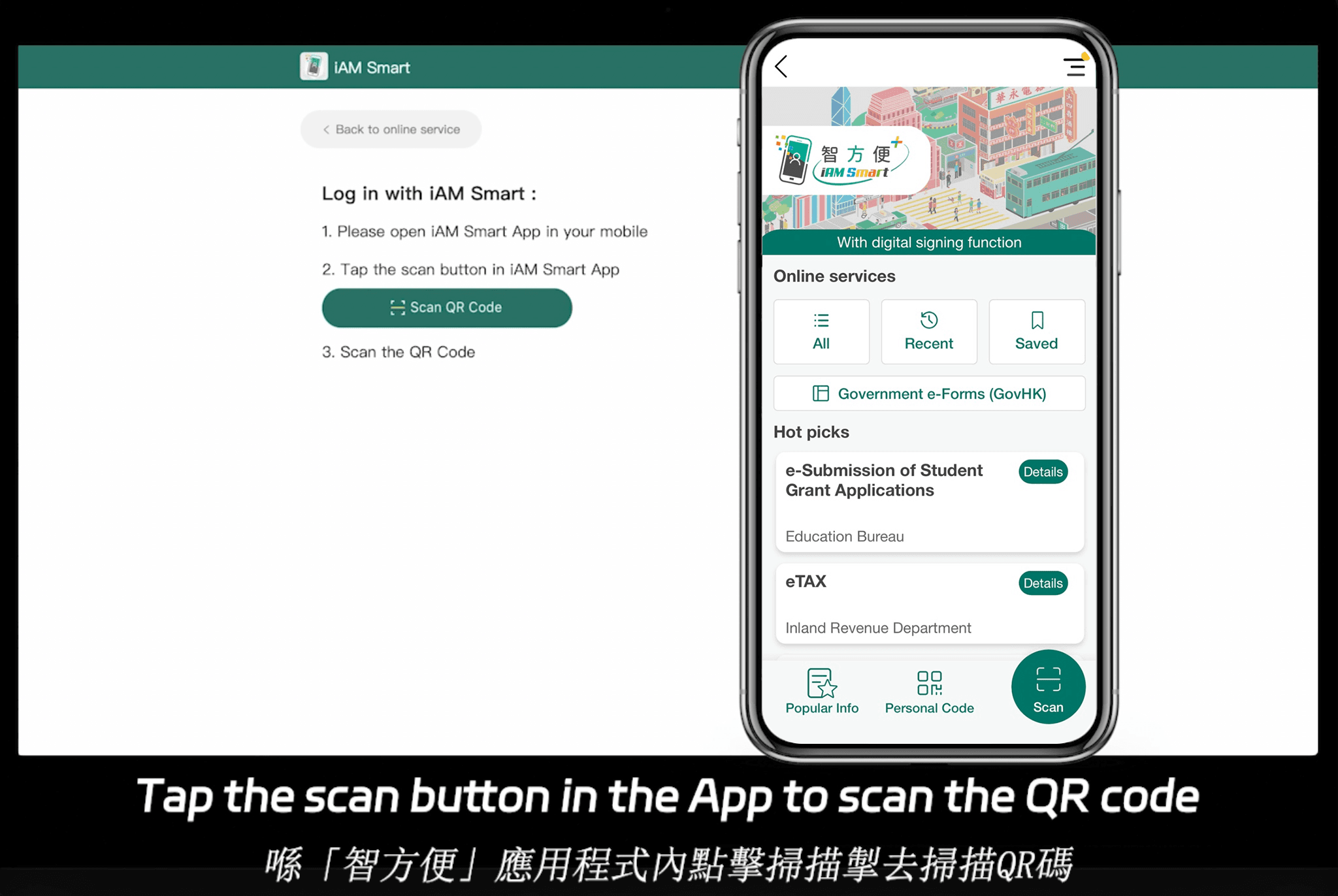
eSign.AI positions itself as a versatile e-signature solution with compliance support across 100 mainstream global countries and regions, giving it a notable advantage in the Asia-Pacific (APAC) market. Optimized for areas like China, Hong Kong, and Singapore, it addresses challenges such as cross-border latency and data residency requirements under laws like China's Cybersecurity Law or Singapore's PDPA. Pricing is competitive, with the Essential version at just $24.9 per month (annual billing), allowing up to 100 documents for signature, unlimited user seats, and verification via access codes—all on a foundation of high compliance and cost-effectiveness compared to global giants. It integrates seamlessly with local systems like Hong Kong's iAM Smart and Singapore's Singpass, enhancing accessibility for APAC businesses. For detailed plans, check eSign.AI's pricing page.
FAQs