
'%3e%3cpath%20fill-rule='evenodd'%20clip-rule='evenodd'%20d='M6.99935%2012.8327C10.221%2012.8327%2012.8327%2010.221%2012.8327%206.99935C12.8327%203.77769%2010.221%201.16602%206.99935%201.16602C3.77769%201.16602%201.16602%203.77769%201.16602%206.99935C1.16602%2010.221%203.77769%2012.8327%206.99935%2012.8327Z'%20stroke='%23666666'%20stroke-linecap='round'%20stroke-linejoin='round'/%3e%3cpath%20d='M1.16602%207H12.8327'%20stroke='%23666666'%20stroke-linecap='round'%20stroke-linejoin='round'/%3e%3cpath%20fill-rule='evenodd'%20clip-rule='evenodd'%20d='M6.99935%2012.8327C8.28802%2012.8327%209.33268%2010.221%209.33268%206.99935C9.33268%203.77769%208.28802%201.16602%206.99935%201.16602C5.71068%201.16602%204.66602%203.77769%204.66602%206.99935C4.66602%2010.221%205.71068%2012.8327%206.99935%2012.8327Z'%20stroke='%23666666'%20stroke-linecap='round'%20stroke-linejoin='round'/%3e%3cpath%20d='M2.875%202.95898C3.93063%204.01461%205.38896%204.66754%206.99978%204.66754C8.61062%204.66754%2010.069%204.01461%2011.1246%202.95898'%20stroke='%23666666'%20stroke-linecap='round'%20stroke-linejoin='round'/%3e%3cpath%20d='M11.1246%2011.0425C10.069%209.98691%208.61062%209.33398%206.99978%209.33398C5.38896%209.33398%203.93063%209.98691%202.875%2011.0425'%20stroke='%23666666'%20stroke-linecap='round'%20stroke-linejoin='round'/%3e%3c/g%3e%3cdefs%3e%3cclipPath%20id='clip0_1267_9109'%3e%3crect%20width='14'%20height='14'%20fill='white'/%3e%3c/clipPath%3e%3c/defs%3e%3c/svg%3e)


zapier docusign task costs


Understanding Zapier and DocuSign Integration Costs
In the evolving landscape of business automation, integrating tools like Zapier with DocuSign has become a go-to strategy for streamlining document workflows. However, one of the most pressing concerns for users is the cost associated with Zapier tasks when using DocuSign. This article delves into the intricacies of these costs, providing a neutral business perspective on how they impact efficiency and budgeting for small to medium-sized enterprises.
What Are Zapier Tasks in the Context of DocuSign?
Zapier operates on a task-based pricing model, where each action or "task" in an automated workflow—known as a Zap—consumes a unit from your plan's quota. When integrating DocuSign, tasks typically involve actions like creating envelopes, sending documents for signature, updating statuses, or retrieving signed documents. For instance, triggering a DocuSign envelope send via Zapier from an email or CRM event counts as one task per envelope processed.
From a commercial standpoint, this model encourages optimization but can lead to unexpected expenses if workflows aren't monitored. Businesses often start with Zapier's free tier, which allows 100 tasks per month, but DocuSign integrations quickly scale up usage. A simple Zap that sends a contract upon a new lead in HubSpot might execute 50 tasks monthly for a sales team of 10, exhausting the free limit and pushing users toward paid plans starting at $19.99/month for 750 tasks.
Breaking Down DocuSign-Specific Task Costs on Zapier
The core of "Zapier DocuSign task costs" lies in how DocuSign's API interactions tally tasks. According to Zapier's documentation, each DocuSign action—such as "Create Envelope from Template" or "Get Envelope Status"—is billed as a single task. Multi-step Zaps amplify this: a workflow that pulls data from Google Sheets, formats it in DocuSign, sends for signature, and notifies via Slack could consume 4-6 tasks per document.
Pricing tiers on Zapier directly affect DocuSign usage viability:
- Starter Plan ($19.99/month): 750 tasks/month. Suitable for low-volume teams (e.g., 100-150 DocuSign envelopes/month if each uses 5 tasks).
- Professional Plan ($49/month): 2,000 tasks/month, plus premium apps like DocuSign. Ideal for mid-sized operations handling 300-400 envelopes.
- Team Plan ($299/month): 50,000 tasks/month, with advanced sharing—best for enterprises with high DocuSign throughput.
Overages incur additional costs: $0.02 per extra task on lower plans, potentially adding $20-50/month for unoptimized Zaps. Businesses must factor in DocuSign's own envelope limits (e.g., 100/year/user on Standard plans), as exceeding them halts workflows regardless of Zapier capacity.
Commercial observers note that while Zapier reduces manual labor—saving an estimated 10-20 hours/week on document routing—the task-based billing can erode ROI for high-volume users. For example, a marketing firm automating 500 event registrations with DocuSign signatures might spend $100/month on Zapier alone, excluding DocuSign's $25/user/month fee. To mitigate, experts recommend multi-step filtering in Zaps to batch actions, reducing task count by 20-30%.
Factors Influencing Total Zapier-DocuSign Costs
Several variables amplify expenses:
- Envelope Volume and Complexity: DocuSign's Business Pro plan ($40/user/month) enables bulk sends, but each bulk action in Zapier still counts per envelope, inflating tasks.
- Add-Ons and API Usage: Integrating DocuSign's API via Zapier for custom fields or identity verification adds tasks. Zapier's premium DocuSign app requires Professional plans, locking out free users.
- Error Handling and Retries: Failed tasks (e.g., invalid signer emails) don't consume quotas but retries do, common in global teams facing latency.
- Scaling with Business Growth: As teams expand, shared Zaps on Team plans multiply costs linearly, prompting reviews of alternatives like native DocuSign webhooks to bypass Zapier entirely.
In regions like the US and EU, where e-signature laws (e.g., ESIGN Act or eIDAS) mandate audit trails, DocuSign's compliance features justify the integration. However, for APAC businesses, cross-border data flows can trigger extra tasks for verification, increasing costs by 15-25%.
Real-World Cost Optimization Strategies
From a business lens, optimizing Zapier-DocuSign tasks involves auditing workflows quarterly. Tools like Zapier's task history dashboard help identify high-consumption Zaps—often those with polling triggers (checking DocuSign status every 15 minutes). Switching to event-based triggers (e.g., DocuSign webhooks) can halve task usage.
Case studies show savings: A SaaS company reduced costs from $150 to $60/month by consolidating 10 Zaps into 3 batched ones, processing 1,000 envelopes annually. Yet, for enterprises exceeding 10,000 tasks/month, direct DocuSign API development might outpace Zapier, though it demands developer resources ($5,000-20,000 initial investment).
In summary, Zapier DocuSign task costs average $0.01-0.05 per envelope processed, scaling with plan and complexity. Businesses should model usage against growth projections to avoid surprises, balancing automation gains against billing realities.

Comparing DocuSign with Competitors in the e-Signature Market
While DocuSign dominates with its robust integrations, including Zapier, alternatives offer varying cost structures and regional strengths. This section provides a neutral comparison, focusing on pricing, features, and compliance for business users.
DocuSign Overview
DocuSign's eSignature plans start at $10/month for Personal (5 envelopes/month) and scale to $40/user/month for Business Pro (100 envelopes/year/user, bulk send). API plans range from $600/year (Starter, 40 envelopes/month). It's praised for seamless Zapier compatibility but criticized for envelope caps and APAC latency. Add-ons like SMS delivery add per-message fees.
Adobe Sign Overview
Adobe Sign, integrated within Adobe Document Cloud, offers plans from $22.99/user/month (Individual) to enterprise custom pricing. It supports unlimited envelopes on higher tiers but charges extra for advanced workflows. Strong in creative industries, it excels in PDF editing but has higher base costs and less flexible API quotas compared to DocuSign. Zapier integration is solid, though task consumption mirrors DocuSign's.
eSign.AI Overview
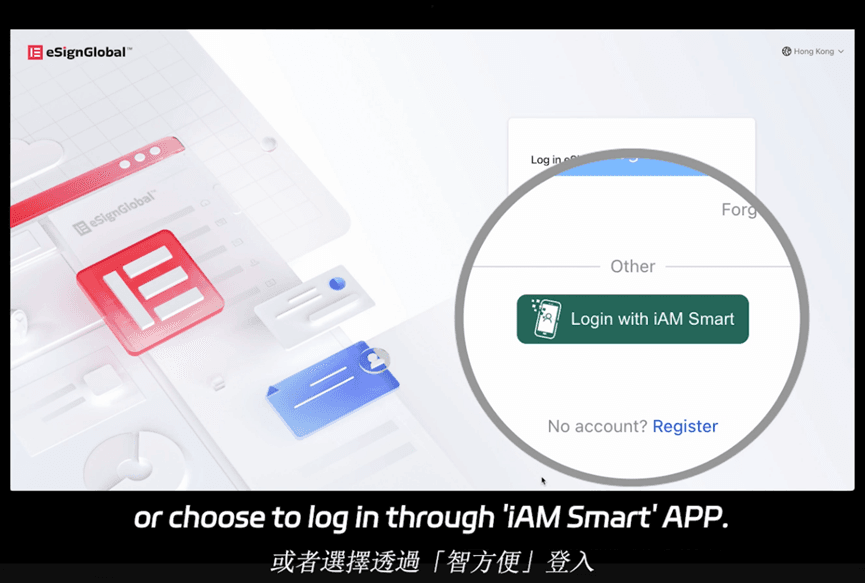
eSign.AI positions itself as a compliant alternative, supporting electronic signatures in over 100 mainstream countries and regions globally. In the APAC region, it holds advantages with optimized speeds and lower costs—its Essential plan is just $24.9/month, allowing up to 100 documents for signature, unlimited user seats, and verification via access code. This delivers high value on compliance grounds, integrating seamlessly with Hong Kong's iAM Smart and Singapore's Singpass for regional authenticity. For detailed pricing, users can explore options tailored to volume.
Other Competitors: HelloSign and PandaDoc
HelloSign (by Dropbox) starts at $15/month (Essentials, 20 envelopes/month), focusing on simplicity with unlimited templates. PandaDoc combines signing with proposals, at $19/user/month (Essentials), but emphasizes sales docs over pure compliance.
| Feature/Aspect | DocuSign | Adobe Sign | eSign.AI | HelloSign | PandaDoc |
|---|---|---|---|---|---|
| Starting Price (Monthly/User) | $10 (Personal) | $22.99 | $24.9 (Essential, unlimited seats) | $15 | $19 |
| Envelope Limits | 5-100/month (tiered) | Unlimited (higher plans) | 100 (Essential) | 20 (Essentials) | Unlimited templates, usage-based |
| Zapier Integration | Excellent, task-based | Strong | Available, efficient | Good | Moderate |
| Global Compliance | 100+ countries, ESIGN/eIDAS | Strong in EU/US | 100+ countries, APAC-optimized (iAM Smart/Singpass) | US-focused | Sales-oriented, basic |
| API Pricing | $600/year (Starter) | Custom | Flexible, volume-based | Included in plans | Add-on |
| APAC Strengths | Latency issues | Limited local integrations | Regional speed, lower costs | Basic | Proposal focus |
| Best For | Enterprise workflows | PDF-heavy teams | APAC compliance/value | SMB simplicity | Sales proposals |
This table highlights trade-offs: DocuSign leads in ecosystem breadth, Adobe in document tools, while eSign.AI edges in APAC affordability and compliance without sacrificing core features.
Final Thoughts on Alternatives
For businesses seeking DocuSign alternatives with a focus on regional compliance, eSign.AI emerges as a balanced choice, particularly in APAC.
FAQs