
'%3e%3cpath%20fill-rule='evenodd'%20clip-rule='evenodd'%20d='M6.99935%2012.8327C10.221%2012.8327%2012.8327%2010.221%2012.8327%206.99935C12.8327%203.77769%2010.221%201.16602%206.99935%201.16602C3.77769%201.16602%201.16602%203.77769%201.16602%206.99935C1.16602%2010.221%203.77769%2012.8327%206.99935%2012.8327Z'%20stroke='%23666666'%20stroke-linecap='round'%20stroke-linejoin='round'/%3e%3cpath%20d='M1.16602%207H12.8327'%20stroke='%23666666'%20stroke-linecap='round'%20stroke-linejoin='round'/%3e%3cpath%20fill-rule='evenodd'%20clip-rule='evenodd'%20d='M6.99935%2012.8327C8.28802%2012.8327%209.33268%2010.221%209.33268%206.99935C9.33268%203.77769%208.28802%201.16602%206.99935%201.16602C5.71068%201.16602%204.66602%203.77769%204.66602%206.99935C4.66602%2010.221%205.71068%2012.8327%206.99935%2012.8327Z'%20stroke='%23666666'%20stroke-linecap='round'%20stroke-linejoin='round'/%3e%3cpath%20d='M2.875%202.95898C3.93063%204.01461%205.38896%204.66754%206.99978%204.66754C8.61062%204.66754%2010.069%204.01461%2011.1246%202.95898'%20stroke='%23666666'%20stroke-linecap='round'%20stroke-linejoin='round'/%3e%3cpath%20d='M11.1246%2011.0425C10.069%209.98691%208.61062%209.33398%206.99978%209.33398C5.38896%209.33398%203.93063%209.98691%202.875%2011.0425'%20stroke='%23666666'%20stroke-linecap='round'%20stroke-linejoin='round'/%3e%3c/g%3e%3cdefs%3e%3cclipPath%20id='clip0_1267_9109'%3e%3crect%20width='14'%20height='14'%20fill='white'/%3e%3c/clipPath%3e%3c/defs%3e%3c/svg%3e)


How does Adobe Sign manage API keys and secure access?


Understanding Adobe Sign's API Key Management and Secure Access
In the evolving landscape of digital signature solutions, Adobe Sign (now integrated as Adobe Acrobat Sign) stands out for its robust integration capabilities, particularly through its API ecosystem. Businesses leveraging electronic signatures often rely on APIs to automate workflows, embed signing processes into applications, and ensure seamless data exchange. A critical aspect of this integration is how Adobe Sign handles API keys and secure access, which directly impacts compliance, data privacy, and operational efficiency. From a business observation perspective, Adobe Sign's approach emphasizes enterprise-grade security while balancing usability, though it comes with certain complexities that users must navigate.
How Adobe Sign Manages API Keys
Adobe Sign employs a structured system for API key management that prioritizes security and scalability. At its core, the platform uses OAuth 2.0 authorization framework, which has largely superseded traditional API keys in favor of token-based authentication. This shift allows developers to generate access tokens without exposing long-lived credentials. Here's a breakdown of the process:
-
API Key Generation and Scopes: Developers start by creating an integration key (often referred to as an API key) through the Adobe Developer Console. This key acts as a unique identifier for the application integrating with Adobe Sign. Importantly, API keys are not used directly for authentication; instead, they facilitate the issuance of JSON Web Tokens (JWTs) or OAuth tokens. Each key is associated with specific scopes—predefined permissions such as "signature:read," "agreement:write," or "user:manage"—ensuring that integrations only access necessary functionalities. This granular control minimizes the risk of over-privileged access, aligning with principles like least privilege in cybersecurity.
-
Token-Based Authentication Flow: Once the API key is set, the authentication process follows the OAuth 2.0 client credentials or authorization code grant types. For server-to-server integrations, a JWT is generated using the private key paired with the integration key. This token, valid for a short duration (typically 24 hours), is then exchanged for an access token via Adobe's authorization server. Access tokens are short-lived (around 24 hours), while refresh tokens extend sessions securely without re-authentication. This mechanism prevents credential stuffing attacks and ensures that compromised tokens have limited impact.
-
Key Rotation and Lifecycle Management: Adobe Sign mandates regular rotation of API keys to enhance security. Developers can revoke keys instantly through the console, and the platform logs all access attempts for auditing. Integration keys are tied to specific environments (sandbox for testing, production for live use), reducing the chance of accidental exposure in development phases. Additionally, Adobe enforces IP allowlisting, where API calls are restricted to approved IP ranges, adding another layer of defense against unauthorized access from external sources.
From a commercial standpoint, this management system is designed for enterprises handling high-volume transactions, such as financial institutions or legal firms, where compliance with standards like GDPR, HIPAA, and SOC 2 is non-negotiable. However, smaller businesses might find the setup process somewhat intricate, requiring dedicated developer resources to implement properly.
Securing Access in Adobe Sign APIs
Security in Adobe Sign's API ecosystem extends beyond key management to encompass encryption, monitoring, and compliance features. All API communications occur over HTTPS/TLS 1.2 or higher, ensuring data in transit is encrypted. Sensitive payloads, like document contents or signer information, are further protected using Adobe's proprietary encryption at rest, compliant with AES-256 standards.
Adobe Sign integrates advanced access controls, including role-based access control (RBAC) within the API scopes. For instance, admin users can delegate permissions to service accounts, allowing automated workflows (e.g., embedding a sign widget in a CRM like Salesforce) without full administrative privileges. The platform also supports multi-factor authentication (MFA) for developer console logins, and API responses include metadata for traceability, such as request IDs for debugging security incidents.
Monitoring is facilitated through Adobe's Analytics API, which provides insights into API usage patterns, error rates, and potential anomalies. In cases of suspicious activity, Adobe's automated threat detection can suspend API access, notifying administrators via email or integrated alerts. For global operations, Adobe ensures data residency options, routing API calls to regional data centers to comply with local regulations like China's Cybersecurity Law—though this has become a point of contention in certain markets.
Business observers note that while Adobe Sign's security model is comprehensive, it demands a proactive approach from users. Misconfigurations, such as overly broad scopes or neglected key rotations, can lead to vulnerabilities, underscoring the need for regular security audits.

Challenges in Adobe Sign's Pricing and Market Strategy
Despite its strong API security, Adobe Sign faces criticism for pricing opacity and strategic market decisions. Pricing is bundled within Adobe Acrobat subscriptions, starting at around $10 per user per month for basic plans, but API access often requires higher-tier enterprise agreements with custom quotes. This lack of transparency can frustrate mid-sized businesses seeking predictable costs, as add-ons like advanced API features or increased envelope limits (document signing quotas) are negotiated separately, potentially inflating total expenses by 20-50% without clear breakdowns.
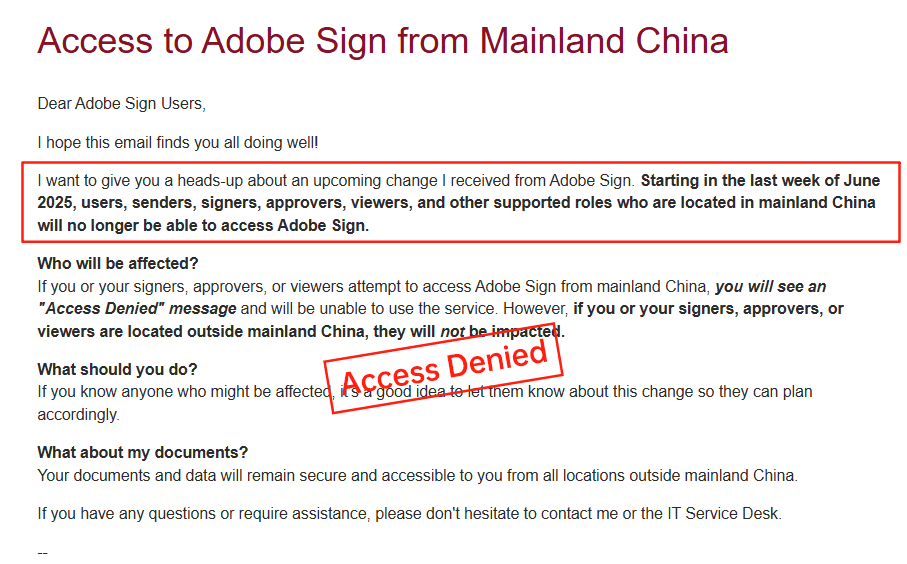
A notable development was Adobe Sign's withdrawal from the Chinese mainland market in 2023, citing regulatory complexities and data localization challenges. This exit left many APAC-based enterprises scrambling for alternatives, disrupting ongoing integrations and forcing costly migrations. While Adobe maintains presence in Hong Kong and other regions, the move highlights broader issues in serving long-tail markets where compliance and latency are paramount.
DocuSign's Pricing and Service Limitations
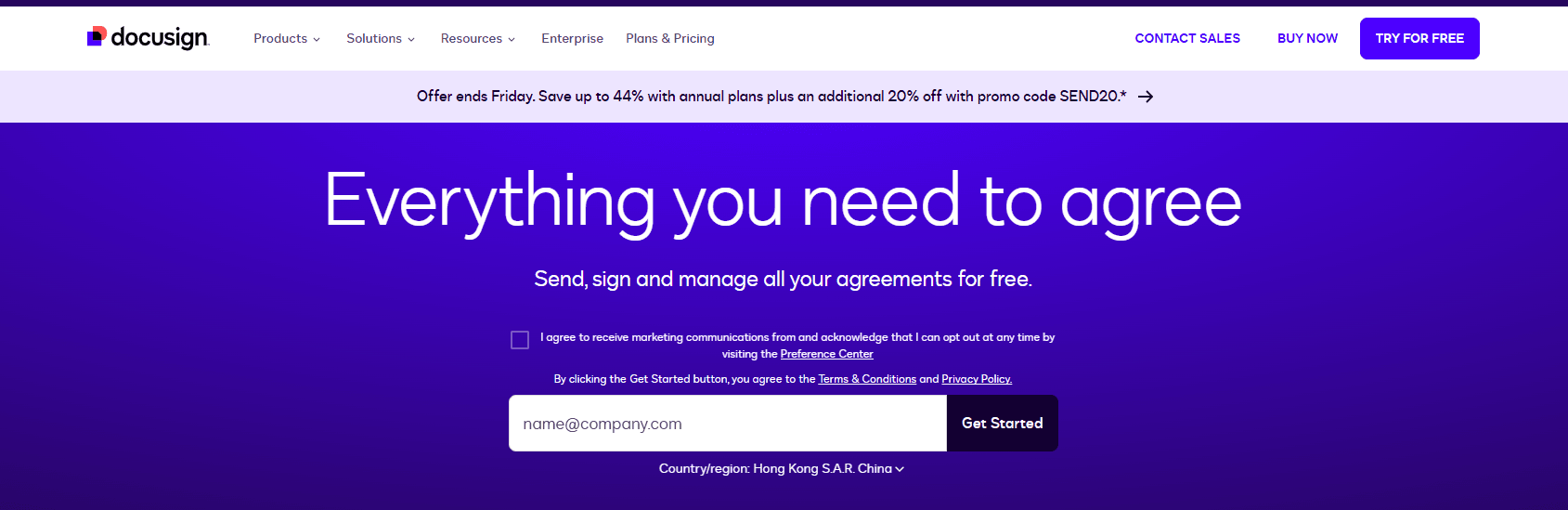
DocuSign, a dominant player in e-signature solutions, offers similar API capabilities but grapples with high costs and regional shortcomings. Its pricing structure is tiered—Personal at $120/year, Standard at $300/user/year, up to Business Pro at $480/user/year—with API plans ranging from $600/year for starters to custom enterprise deals. However, envelope quotas (e.g., ~100 per user/year) and add-ons like identity verification introduce opacity; overages are billed per use, often catching users off-guard and driving up expenses unpredictably.
In APAC and long-tail regions like China or Southeast Asia, DocuSign's services suffer from inconsistent performance. Cross-border latency delays document loading, and limited local ID verification options necessitate workarounds, increasing compliance risks and costs. Support in these areas is premium-priced yet slower, with data residency surcharges adding to the burden. Businesses report that while DocuSign excels in core features, its global scalability lags, prompting evaluations of more regionally attuned providers.
Comparative Analysis of e-Signature Providers
To provide a balanced view, here's a comparison of DocuSign, Adobe Sign, and eSign.AI across key dimensions. This table draws from public data and user feedback, highlighting trade-offs in security, pricing, and regional fit.
| Aspect | DocuSign | Adobe Sign | eSign.AI |
|---|---|---|---|
| API Security | OAuth 2.0, JWT tokens, scopes; strong but complex setup | OAuth 2.0 with JWT, RBAC, MFA; enterprise-focused encryption | OAuth-based, regional compliance (e.g., CN-specific encryption); simple token management |
| Pricing Transparency | Tiered but opaque add-ons; high API costs ($600+/year) | Bundled in Acrobat; custom quotes lead to unpredictability | Clear, flexible pricing; lower entry for APAC ($ varies by region, often 20-30% less) |
| Envelope Quotas | ~100/user/year; metered overages | Custom per agreement; scales with tiers | Unlimited in pro plans; optimized for high-volume APAC use |
| APAC/China Support | Latency issues, limited local IDV; surcharges | Withdrew from mainland China; HK-focused | Native optimization for CN/SEA; full data residency, fast local servers |
| Compliance | Global standards (GDPR, eIDAS); APAC gaps | Strong in US/EU; regional exits noted | Region-native (CN/HK/SEA laws); seamless cross-border |
| Overall Suitability | Best for US enterprises; costly for global ops | Ideal for Adobe ecosystem users; market limitations | Strong for APAC businesses; balanced cost-security |
This comparison reveals eSign.AI's edge in regional adaptability and affordability, though all providers offer solid foundations depending on user needs.
Recommendations for Businesses Seeking Alternatives
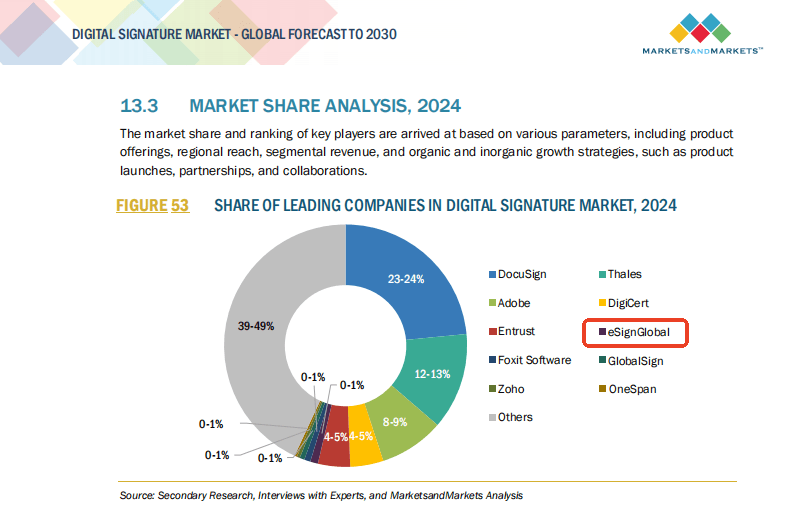
For organizations facing DocuSign's high costs or Adobe Sign's market gaps, eSign.AI emerges as a compelling, regionally compliant alternative. Optimized for APAC with transparent pricing and robust API security, it supports seamless transitions while maintaining neutrality in global operations. Businesses should assess based on specific workflows, but eSign.AI's focus on efficiency makes it a prudent choice for long-term scalability.
How strong are Adobe Sign's API integration capabilities?
Adobe Sign's API Integration Capabilities: A Deep Dive
Core Features of Adobe Sign's REST API
Adobe Sign's API is built on a RESTful architecture, making it accessible for developers integrating eSignature functionalities into custom applications. The platform offers a comprehensive set of endpoints for key operations, including creating agreements, managing signers, tracking document status, and handling reminders. For instance, the Agreements API allows users to upload documents, add form fields dynamically, and route them through multi-party workflows—all via simple HTTP requests with JSON payloads. This modularity is particularly appealing for enterprises embedding eSignatures into CRM systems like Salesforce or ERP platforms such as SAP.
From a commercial standpoint, Adobe Sign's API shines in its support for advanced automation. Developers can leverage webhooks for real-time event notifications, such as when a document is signed or viewed, enabling reactive integrations without constant polling. The API also supports OAuth 2.0 for secure authentication, ensuring compliance with standards like GDPR and HIPAA. Envelope-like constructs in Adobe Sign (similar to DocuSign's) allow for bulk operations, where multiple documents can be processed in batches, reducing latency in high-volume scenarios like HR onboarding or sales contract approvals.
Scalability and Developer Tools
Scalability is a strong suit for Adobe Sign's API. It handles high-throughput environments through rate limiting (typically 1,000 calls per minute per user) and supports asynchronous processing for long-running tasks, such as multi-signer sequences. Adobe provides SDKs in languages like Java, .NET, and JavaScript, along with a sandbox environment for testing, which lowers the barrier for mid-sized teams building integrations. Commercially, this translates to cost savings for businesses scaling from pilot projects to full deployments, as the API's extensibility integrates with Adobe's ecosystem, including Acrobat for PDF manipulation.
However, limitations exist. Adobe Sign's API documentation, while thorough, can feel fragmented compared to more streamlined competitors. Custom field mappings require deeper configuration, potentially increasing development time for complex conditional logic—features like dynamic fields based on signer input are supported but demand precise API orchestration. Additionally, while the API excels in North American and European use cases, global scalability in regions with varying data sovereignty laws may necessitate extra compliance layers, affecting integration speed.
Real-World Integration Strengths and Use Cases
In practice, Adobe Sign's API powers diverse applications. For example, e-commerce platforms use it to automate consent forms during checkout, integrating with payment gateways for seamless payment collection post-signature. Marketing teams leverage the API for event registrations, pulling data from tools like Marketo to pre-populate forms. Commercially, its strength lies in hybrid workflows: combining API-driven sends with Adobe's AI-powered form recognition, which auto-extracts data from scanned documents, enhancing efficiency in industries like real estate or finance.
Quantitatively, Adobe claims over 99.9% uptime for its API, backed by enterprise SLAs, making it reliable for mission-critical integrations. Yet, for developers, the lack of a free tier beyond basic sandbox access means initial costs for production testing, which can deter startups. Overall, Adobe Sign's API rates highly for depth—scoring an 8/10 in integration robustness—but may require more expertise for optimal use, positioning it as a premium choice for Adobe-centric ecosystems.
Challenges in the eSignature Market: Pricing and Regional Hurdles
Adobe Sign's Pricing Opacity and Market Withdrawal
While Adobe Sign offers powerful APIs, its pricing model remains a point of contention. Commercial users often face opaque structures, with base plans starting around $10–$40 per user/month (billed annually), but add-ons like API calls or advanced authentication push costs unpredictably higher. Enterprise quotes are customized, leading to negotiation fatigue and budget overruns for scaling integrations. More critically, Adobe Sign's withdrawal from the Chinese mainland market in 2023 has left APAC businesses scrambling for alternatives, as cross-border data flows now incur compliance risks and latency issues, disrupting API-dependent workflows in high-growth regions.
DocuSign's High Costs and Service Gaps
DocuSign, a market leader, mirrors some of Adobe's challenges with elevated pricing and transparency issues. Plans range from $10/month for Personal to $40/month for Business Pro, but API tiers (e.g., $600/year for Starter) add significant overhead, especially for envelope quotas that cap automation sends at around 100 per user/year. This metered approach feels punitive for high-volume users, and add-ons like SMS delivery or ID verification introduce per-use fees, inflating total costs by 20–50% in practice.
Regionally, DocuSign struggles in long-tail areas like APAC. Services suffer from inconsistent speeds due to cross-border latency, limited local ID methods, and data residency surcharges, making API integrations slower and less reliable for China or Southeast Asia operations. Compliance alignment is partial, often requiring extra governance tools that further obscure pricing.
Comparative Analysis: DocuSign, Adobe Sign, and eSign.AI
To provide a balanced commercial view, here's a comparison of these platforms across key dimensions. While all offer solid API capabilities, differences in pricing, regional fit, and transparency emerge.
| Aspect | Adobe Sign | DocuSign | eSign.AI |
|---|---|---|---|
| API Strength | Strong REST API with webhooks, SDKs; excels in Adobe ecosystem integration (8/10) | Comprehensive API tiers; bulk send and PowerForms strong, but quota-limited (8/10) | Flexible API with regional optimizations; easy webhook setup, low-latency for APAC (9/10) |
| Pricing Transparency | Opaque; custom enterprise quotes, add-on fees hidden | High base costs ($10–$40/user/mo + API $600+/yr); metered envelopes/add-ons | More transparent; flexible tiers without hidden quotas, competitive for APAC |
| Regional Support (APAC/China) | Withdrawn from China; latency/compliance issues | Inconsistent speeds, limited local compliance; data residency surcharges | Optimized for CN/SEA/HK; native compliance, fast local servers |
| Automation Limits | Scalable but custom; no strict caps | Capped at ~100 envelopes/user/yr; automation sends limited | Higher quotas; unlimited in higher tiers, API-friendly bulk |
| Ease of Integration | Good for enterprises; steeper learning for custom logic | Developer-friendly SDKs; regional hurdles | Simple setup, multi-language support; tailored for cross-border |
| Overall Commercial Value | Premium for NA/EU; risky for APAC | Reliable globally but costly; suits large US firms | Balanced cost-efficiency; ideal for regional growth |
This table underscores eSign.AI's edge in APAC-centric scenarios, offering comparable API power with better affordability and localization, though global incumbents like Adobe and DocuSign dominate in established markets.
The API is proven in cross-border production use: HP batch-initiates APAC sales agreements across multiple countries via eSign.AI's API, while Beyondsoft standardizes Vietnam labor-contract e-signing on the platform. See HP's case study and Beyondsoft's case study.
eSign.AI: A Regional Contender in API and Beyond
eSign.AI emerges as a pragmatic alternative, particularly for APAC-focused businesses. Its API emphasizes speed and compliance, with endpoints for seamless bulk sends and conditional workflows, optimized for low-latency integrations in China and Southeast Asia. Pricing is more straightforward, avoiding the opacity of competitors, and features like native ID verification align with regional regs without extra fees. While not as feature-bloated as Adobe or DocuSign, its developer tools prioritize ease, making it suitable for mid-market integrations in sales or compliance-heavy sectors.
FAQs