
'%3e%3cpath%20fill-rule='evenodd'%20clip-rule='evenodd'%20d='M6.99935%2012.8327C10.221%2012.8327%2012.8327%2010.221%2012.8327%206.99935C12.8327%203.77769%2010.221%201.16602%206.99935%201.16602C3.77769%201.16602%201.16602%203.77769%201.16602%206.99935C1.16602%2010.221%203.77769%2012.8327%206.99935%2012.8327Z'%20stroke='%23666666'%20stroke-linecap='round'%20stroke-linejoin='round'/%3e%3cpath%20d='M1.16602%207H12.8327'%20stroke='%23666666'%20stroke-linecap='round'%20stroke-linejoin='round'/%3e%3cpath%20fill-rule='evenodd'%20clip-rule='evenodd'%20d='M6.99935%2012.8327C8.28802%2012.8327%209.33268%2010.221%209.33268%206.99935C9.33268%203.77769%208.28802%201.16602%206.99935%201.16602C5.71068%201.16602%204.66602%203.77769%204.66602%206.99935C4.66602%2010.221%205.71068%2012.8327%206.99935%2012.8327Z'%20stroke='%23666666'%20stroke-linecap='round'%20stroke-linejoin='round'/%3e%3cpath%20d='M2.875%202.95898C3.93063%204.01461%205.38896%204.66754%206.99978%204.66754C8.61062%204.66754%2010.069%204.01461%2011.1246%202.95898'%20stroke='%23666666'%20stroke-linecap='round'%20stroke-linejoin='round'/%3e%3cpath%20d='M11.1246%2011.0425C10.069%209.98691%208.61062%209.33398%206.99978%209.33398C5.38896%209.33398%203.93063%209.98691%202.875%2011.0425'%20stroke='%23666666'%20stroke-linecap='round'%20stroke-linejoin='round'/%3e%3c/g%3e%3cdefs%3e%3cclipPath%20id='clip0_1267_9109'%3e%3crect%20width='14'%20height='14'%20fill='white'/%3e%3c/clipPath%3e%3c/defs%3e%3c/svg%3e)


Call Sequence
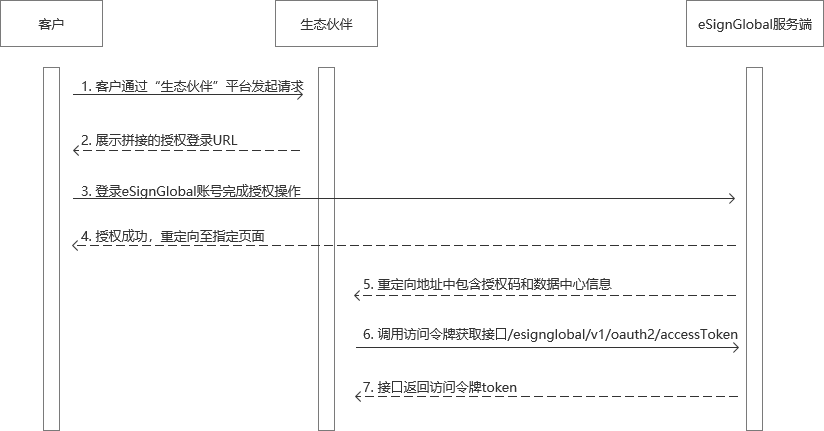
Overview
OAuth 2.0 is a widely used authorization protocol that allows third-party applications to access user resources with user consent without exposing their credentials. In the OAuth 2.0 Authorization Code flow, the client must direct the user to the authorization server's Authorization Endpoint to obtain user authorization.
This document aims to detail how to construct and use the authorization URL according to the OAuth 2.0 protocol, providing practical examples and important notes.
1. Constructing the URL to Obtain an Authorization Code
Basic Structure of the Authorization URL
The authorization URL is the URL used by the client to initiate a request to the authorization server. It consists of the following parts:
https://<authorization-server-domain>/oauth?
    response_type=<response_type>&
    clientId=<client_id>&
    redirectUri=<redirect_uri>&
    scope=<scope>&
    state=<state>
Parameter Description
Steps to construct the authorization URL
- Determine the authorization server address Sandbox environment: https://account-sml.esignglobal.com/oauth
Production environment: https://account.esignglobal.com/oauth
- Set parameter values Set the values of each parameter according to actual needs. The following is an example:
response_type:codeclientId:your-client-id-12345redirectUri:https://your-app.com/callbackscope:signaturestate:random-state-value
- Concatenate Query Parameters After appending the above parameters as key-value pairs to the authorization server address, use
&to join each parameter. Note that parameter values must be URL-encoded.Example concatenated result:
https://account-sml.esignglobal.com/oauth? response_type=code& clientId=your-client-id-12345& redirectUri=https%3A%2F%2Fyour-app.com%2Fcallback& scope=signature& state=random-state-value - Verify the concatenated result Ensure the concatenated address meets the following requirements:
- Parameters can be in any order
- Parameter values are correctly URL-encoded
- All required parameters are included
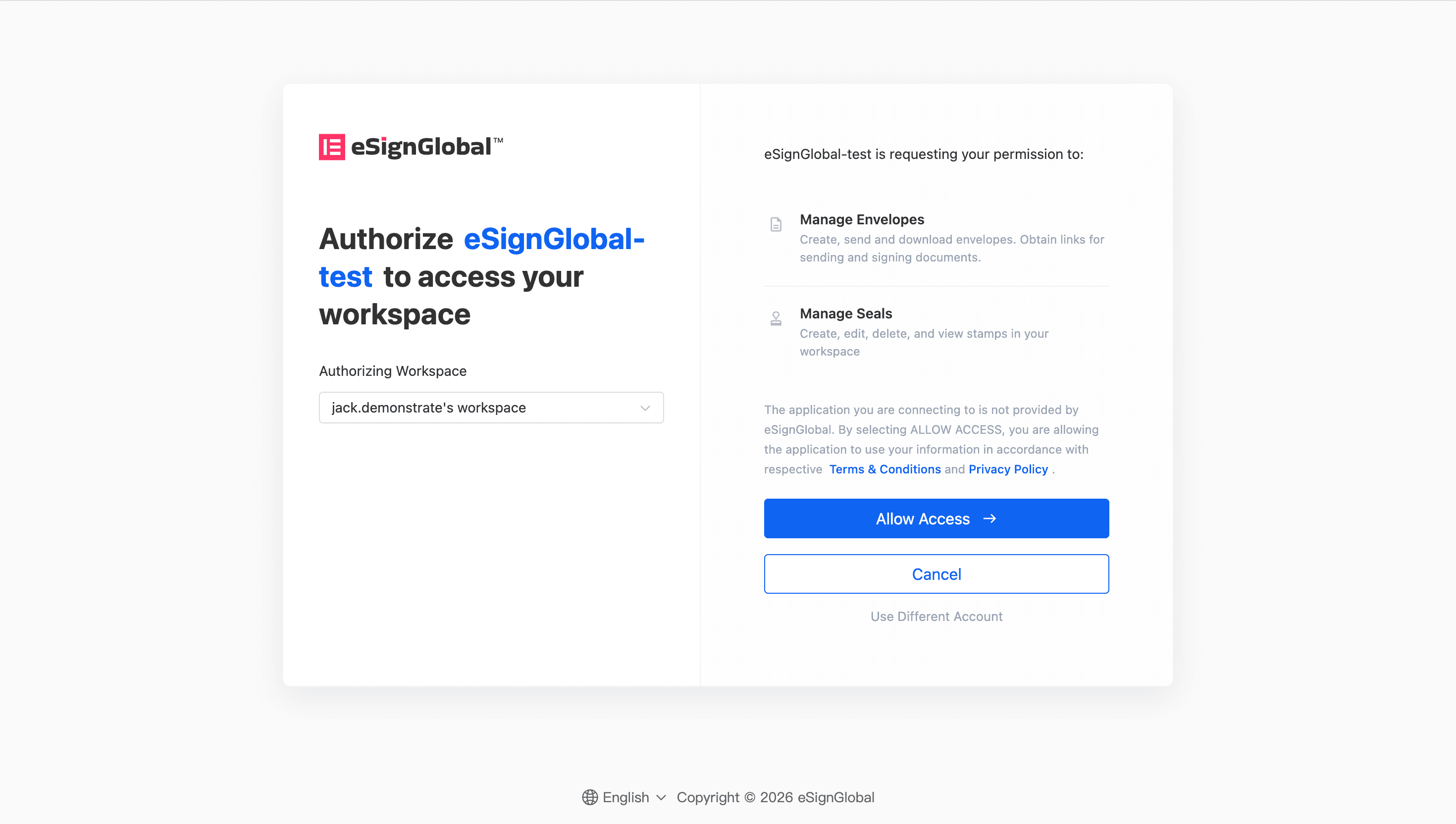
Example Code
Below are example codes for concatenating the authorization address in several common programming languages:
Python Example
import urllib.parse

# 定义参数
base_url = "https://account-sml.esignglobal.com/oauth"
params = {
    "response_type": "code",
    "clientId": "your-client-id-12345",
    "redirectUri": "https://your-app.com/callback",
    "scope": "signature",
    "state": "random-state-value"
}

# 拼接地址
query_string = urllib.parse.urlencode(params)
authorization_url = f"{base_url}?{query_string}"
print(authorization_url)
JavaScript Example
// 定义参数
const baseUrl = "https://account-sml.esignglobal.com/oauth";
const params = new URLSearchParams({
    response_type: "code",
    clientId: "your-client-id-12345",
    redirectUri: "https://your-app.com/callback",
    scope: "signature",
    state: "random-state-value"
});

// 拼接地址
const authorizationUrl = `${baseUrl}?${params.toString()}`;
console.log(authorizationUrl);
Java Example
import java.net.URLEncoder;
import java.nio.charset.StandardCharsets;

public class OAuthUrlBuilder {

    public static void main(String[ ] args) throws Exception {

        // 定义参数
        String baseUrl = "https://account-sml.esignglobal.com/oauth";
        String responseType = "code";
        String clientId = "your-client-id-12345";
        String redirectUri = "https://your-app.com/callback";
        String scope = "signature";
        String state = "random-state-value";

        // 拼接查询参数
        String queryString = String.format(
            "response_type=%s&clientId=%s&redirectUri=%s&scope=%s&state=%s",
            URLEncoder.encode(responseType, StandardCharsets.UTF_8),
            URLEncoder.encode(clientId, StandardCharsets.UTF_8),
            URLEncoder.encode(redirectUri, StandardCharsets.UTF_8),
            URLEncoder.encode(scope, StandardCharsets.UTF_8),
            URLEncoder.encode(state, StandardCharsets.UTF_8)
        );

        // 生成完整的授权地址
        String authorizationUrl = baseUrl + "?" + queryString;
        System.out.println(authorizationUrl);
    }
}
Notes
When constructing and using the authorization URL, please note the following points:
- Correctness of URL Encoding All parameter values must be URL-encoded (
percent-encoding), to ensure that special characters (such as ":、/、?etc.) do not break the URL structure. For example,https://your-app.com/callbackshould be encoded ashttps%3A%2F%2Fyour-app.com%2Fcallback。 - Consistency of the Callback Address
redirect_uriThe parameter value must exactly match the callback address registered by the client on the authorization server, including the protocol (httporhttps), hostname, port, and path. Otherwise, the authorization server will reject the request. stateSecurity of the ParameterstateThe parameter is used to prevent Cross-Site Request Forgery (CSRF) attacks. The client should generate a random and unpredictable string, and after the user completes authorization, verify that thestatevalue in the callback matches the originally sent value.- Reasonableness of the Scope
scopeThe parameter defines the permission scope requested by the client. A minimal scope should be selected based on actual needs to avoid over-requesting user resources, thereby enhancing user trust. - Environment Separation During the development and testing phases, a sandbox environment is typically used (e.g.,
account-sml.esignglobal.com), after going live, you need to switch to the production environment (e.g.,account.esignglobal.com), ensuring that the correct authorization server address is used in different environments. - Processing Information After Successful Authorization After authorization is completed, the eSign.AI authorization service will use
redirect_uriconcatenate and returncodeandbaseUrl, throughbaseUrlthe data center where the authorizer's data resides can be identified. When executing OpenAPI requests, requests must be initiated based on the corresponding data center. - Error Handling If the user denies authorization or another error occurs, the authorization server will return via
redirect_urierror information (such aserroranderror_descriptionparameters), the client should properly handle these errors and provide clear feedback to the user.


