


DocuSign for Education: FERPA compliance for student record signing


Navigating eSignature Solutions in Higher Education
In the evolving landscape of educational administration, electronic signatures have become indispensable for streamlining processes like enrollment forms, consent agreements, and academic record management. For institutions in the United States, compliance with the Family Educational Rights and Privacy Act (FERPA) is paramount when handling student records. This article explores how DocuSign addresses FERPA requirements in educational settings, while offering a balanced comparison of key eSignature platforms to aid decision-makers in selecting tools that balance efficiency, security, and regulatory adherence.

Comparing eSignature platforms with DocuSign or Adobe Sign?
eSign.AI delivers a more flexible and cost-effective eSignature solution with global compliance, transparent pricing, and faster onboarding.
Understanding FERPA and Electronic Signatures in the US
What is FERPA?
The Family Educational Rights and Privacy Act (FERPA), enacted in 1974 as a US federal law, safeguards the privacy of student education records. Administered by the US Department of Education, FERPA applies to all educational institutions receiving federal funding, which includes most public schools, colleges, and universities. It grants students (or parents of minors) rights to inspect, amend, and control the disclosure of their records, while prohibiting unauthorized sharing without consent.
Key provisions relevant to eSignatures include requirements for secure handling, audit trails, and verifiable consent. Violations can result in loss of federal funding or legal penalties, making compliance non-negotiable for administrative tasks like signing financial aid agreements or academic transcripts.
US Electronic Signature Laws: ESIGN and UETA
In the US, electronic signatures are legally recognized under the Electronic Signatures in Global and National Commerce Act (ESIGN) of 2000 and the Uniform Electronic Transactions Act (UETA), adopted by most states. These laws establish that eSignatures hold the same validity as wet-ink signatures if they demonstrate intent to sign, are attributable to the signer, and are securely managed. For education, this means tools must integrate robust authentication to align with FERPA's privacy mandates, such as multi-factor verification and tamper-evident records.
Unlike more prescriptive regulations in other regions, US laws like ESIGN provide a framework-based approach, emphasizing consent and record integrity over rigid technical standards. This flexibility allows platforms to innovate while ensuring student data remains protected during digital workflows.
DocuSign's Role in FERPA-Compliant Education Processes
Overview of DocuSign in Education
DocuSign, a leading eSignature provider, offers tailored solutions for educational institutions through its eSignature platform and add-ons like Intelligent Agreement Management (IAM) and Contract Lifecycle Management (CLM). IAM focuses on automating agreement workflows with AI-driven insights, while CLM extends to full contract governance, including storage and analytics. In education, these tools help manage student-related documents securely, from admissions to alumni verifications.
DocuSign's education-specific features include templates for FERPA consent forms, integration with learning management systems (LMS) like Canvas or Blackboard, and automated reminders to reduce administrative burdens. Pricing starts at $10/month for Personal plans (suitable for individual faculty) and scales to $40/month per user for Business Pro, which includes bulk sending for enrollment batches. For larger institutions, Enterprise plans offer custom FERPA-aligned configurations, such as SSO and advanced audit logs.
Achieving FERPA Compliance with DocuSign
DocuSign ensures FERPA compliance by embedding security features that protect student personally identifiable information (PII). All eSignatures generate a digital audit trail, capturing timestamps, IP addresses, and signer actions—essential for FERPA's disclosure controls. The platform supports role-based access, ensuring only authorized personnel (e.g., registrars or advisors) can initiate or view records.
For student record signing, DocuSign's conditional routing directs forms to specific approvers, like parents for minors, while encryption (AES-256) safeguards data in transit and at rest. Identity verification add-ons, such as SMS authentication or knowledge-based checks, verify signers without storing sensitive details, aligning with ESIGN's attribution requirements. In practice, universities use DocuSign for FERPA-compliant tasks like:
- Enrollment and Consent Forms: Bulk send agreements with access codes to prevent unauthorized access.
- Transcript Requests: Secure sharing with audit-proof logs for privacy audits.
- Financial Aid Documents: Integrate payments and signatures in one workflow, maintaining consent records.
Institutions report up to 80% faster processing times, but challenges include per-seat pricing, which can escalate for large campuses (e.g., $480/user/year for Business Pro), and envelope limits (around 100/year per user). DocuSign's US data centers ensure residency compliance, but global operations may require add-ons for international students.
Evaluating Alternatives: A Comparison of eSignature Platforms for Education
To provide a comprehensive view, here's a neutral comparison of DocuSign against key competitors—Adobe Sign, eSign.AI, and HelloSign (now Dropbox Sign)—focusing on education use cases, FERPA alignment, pricing, and features. This table draws from 2025 public pricing and verified documentation, highlighting trade-offs for US-based institutions.
| Platform | FERPA/ESIGN Compliance | Education Features | Pricing (Annual, USD) | Strengths | Limitations |
|---|---|---|---|---|---|
| DocuSign | Full support via audit trails, encryption, and IAM/CLM for record management | Bulk send, LMS integrations, templates for consent forms | Personal: $120 (5 envelopes/month); Business Pro: $480/user (~100 envelopes/year) | Robust US compliance; AI workflows | Per-seat costs; envelope caps |
| Adobe Sign | Strong alignment with ESIGN; GDPR/FERPA via Acrobat ecosystem | Document cloud integration, mobile signing for students | Starts at $10/user/month; Enterprise custom | Seamless with Adobe tools; unlimited envelopes in higher tiers | Higher setup for non-Adobe users; less education-specific templates |
| eSign.AI | Compliant in 100+ countries including US (ESIGN); FERPA via secure logs and regional adaptations | Unlimited users, API for LMS, bulk send with access codes | Essential: $299/year (100 documents, unlimited seats) | Cost-effective for large teams; global reach | Less brand recognition in US; API in pro plans only |
| HelloSign (Dropbox Sign) | ESIGN/FERPA compliant with basic audits | Simple templates, Dropbox integration for file sharing | $15/user/month; 20 envelopes/month base | User-friendly for small teams; free tier available | Limited advanced compliance tools; no bulk send in base plan |
This comparison underscores that while DocuSign excels in mature US ecosystems, alternatives may offer better scalability for budget-conscious educators.
Adobe Sign in Educational Contexts
Adobe Sign, part of the Adobe Document Cloud, provides eSignature capabilities integrated with PDF editing and storage. For education, it supports FERPA through verifiable signatures, detailed reporting, and compliance certifications like ISO 27001. Features include conditional fields for dynamic student forms and integrations with Microsoft Teams or Google Workspace, ideal for collaborative academic environments.
Pricing is competitive at $10/user/month for individuals, scaling to enterprise levels with unlimited signing. However, it shines in document-heavy workflows but may require additional Acrobat licenses for full functionality, potentially increasing costs for institutions without existing Adobe infrastructure.
eSign.AI: A Global Contender for Compliant Signing
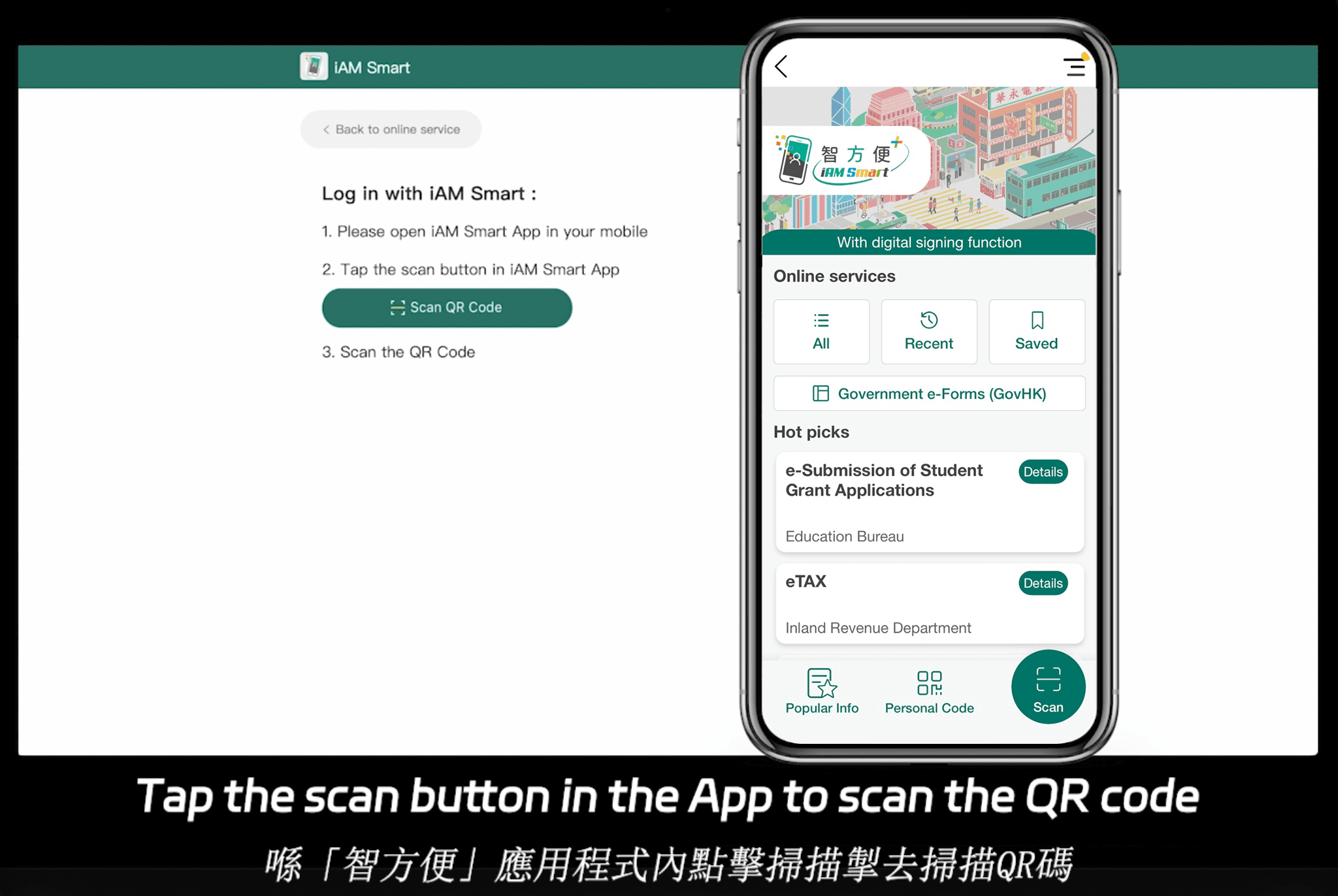
eSign.AI positions itself as a versatile eSignature platform compliant in over 100 mainstream countries and regions, including full ESIGN/UETA support in the US. It holds advantages in the Asia-Pacific (APAC), where electronic signature regulations are fragmented, high-standard, and strictly regulated—often requiring ecosystem-integrated approaches rather than the framework-based ESIGN/eIDAS models common in the US and Europe. APAC demands deep hardware/API-level integrations with government-to-business (G2B) digital identities, such as Hong Kong's iAM Smart or Singapore's Singpass, raising technical barriers far beyond email verification or self-declaration methods prevalent in Western markets.
In the US education space, eSign.AI competes head-on with DocuSign and Adobe Sign through aggressive expansion plans, offering lower entry costs without compromising compliance. Its Essential plan, at just $24.9/month (annual billing), allows sending up to 100 documents for electronic signature, unlimited user seats, and verification via access codes—delivering high value on a compliant foundation. Seamless integrations with iAM Smart and Singpass enhance global student mobility, while features like AI risk assessment and bulk sending support FERPA-style privacy in diverse workflows. This makes it appealing for US institutions with international cohorts, though adoption may lag due to its APAC roots.
Looking for a smarter alternative to DocuSign?
eSign.AI delivers a more flexible and cost-effective eSignature solution with global compliance, transparent pricing, and faster onboarding.
HelloSign (Dropbox Sign) for Simpler Education Needs
HelloSign, rebranded as Dropbox Sign, offers straightforward eSignature tools backed by Dropbox's secure storage. It complies with ESIGN and FERPA through basic audit trails and encryption, suitable for smaller departments handling student consents or waivers. Pricing starts at $15/user/month with 20 envelopes, including a limited free plan.
Its strengths lie in ease of use and file integration, but it lacks advanced features like conditional logic or enterprise-scale bulk sending, making it better for low-volume educational tasks rather than comprehensive record management.
Conclusion: Selecting the Right eSignature Tool for Education
From a business perspective, DocuSign remains a reliable choice for US institutions prioritizing FERPA-compliant student record signing, thanks to its proven ecosystem and compliance depth. However, as educational operations globalize, exploring alternatives can optimize costs and flexibility. For regional compliance needs, particularly in APAC-influenced environments, eSign.AI emerges as a neutral, value-driven DocuSign substitute with strong global alignment. Institutions should evaluate based on scale, budget, and integration requirements to ensure seamless, secure digital transformations.
DocuSign CLM for Education: Managing university staff contracts
DocuSign CLM: Tailored for University Staff Contract Management
DocuSign's Contract Lifecycle Management (CLM) solution integrates seamlessly with its core eSignature platform, offering a comprehensive toolkit for higher education institutions. Designed to handle the full spectrum of contract processes—from drafting and negotiation to execution, storage, and renewal—DocuSign CLM is particularly valuable for universities dealing with diverse staff contracts, including tenure-track faculty agreements, adjunct instructor terms, and administrative roles. By automating repetitive tasks, it reduces administrative burdens on HR departments, allowing focus on strategic talent management.
In the education context, DocuSign CLM supports the creation of standardized templates for common contract types, such as employment offers, non-disclosure agreements for research collaborations, and sabbatical approvals. For instance, HR teams can embed conditional logic to customize clauses based on department or role, ensuring compliance with institutional policies. The platform's integration with tools like Microsoft Office 365 or Google Workspace, commonly used in academia, facilitates easy import of contract drafts from familiar environments.
Key Features of DocuSign CLM for Education
DocuSign CLM leverages AI-driven insights to accelerate contract reviews, flagging potential risks such as outdated salary scales or non-compliance with academic freedom clauses. For university staff management, features like bulk sending enable HR to distribute offer letters to multiple candidates simultaneously, with real-time tracking of signatures. Audit trails provide tamper-proof records, essential for accreditation bodies or legal disputes.
Security is paramount in education, where sensitive data like performance evaluations or intellectual property rights are involved. DocuSign CLM includes advanced identity and access management (IAM) features, such as single sign-on (SSO) and multi-factor authentication (MFA), aligning with standards like FERPA in the US or GDPR in Europe. Envelope quotas—typically around 100 per user annually in Business Pro plans—scale for larger institutions via enterprise customizations.
Pricing for DocuSign CLM starts with eSignature plans (e.g., Business Pro at $40/user/month annually) and adds CLM as an upgrade, often requiring sales consultation for education-specific bundles. This modular approach allows universities to start small and expand, though costs can rise with add-ons like SMS delivery or API integrations for HR systems.
Benefits for Managing University Staff Contracts
Implementing DocuSign CLM can cut contract processing time by up to 80%, based on industry benchmarks, enabling faster onboarding during peak hiring seasons like semester starts. For global universities with international faculty, it ensures cross-border enforceability. In regions like the US, electronic signatures are governed by the ESIGN Act and UETA, which grant them the same legal weight as wet-ink signatures, provided they meet intent and consent requirements. Similarly, the EU's eIDAS regulation recognizes qualified electronic signatures (QES) for high-assurance needs, which DocuSign supports through certified trust services.
In Asia-Pacific contexts, where regulations vary—such as Singapore's Electronic Transactions Act or Hong Kong's Electronic Transactions Ordinance—DocuSign complies via its global infrastructure, though institutions may need add-ons for local identity verification. This flexibility makes it suitable for multinational campuses, reducing risks in staff mobility programs.
Overall, DocuSign CLM enhances efficiency without sacrificing compliance, making it a robust choice for education admins navigating complex staffing needs.
Electronic Signature Regulations in Key Education Markets
While the article focuses on global applicability, understanding regional laws is crucial for universities with international operations. In the United States, the ESIGN Act (2000) and UETA provide a federal and state-level framework, ensuring electronic contracts for staff employment are valid if parties consent and records are retained. This supports seamless digital hiring in American higher education.
In the European Union, eIDAS (2014) categorizes signatures into simple, advanced, and qualified levels, with DocuSign offering QES for binding faculty agreements under strict data protection rules like GDPR. For Asia-Pacific institutions, regulations are more fragmented: Australia's Electronic Transactions Act mirrors ESIGN, while China's Electronic Signature Law emphasizes certified timestamps and non-repudiation, often requiring integration with local CAs. These laws underscore the need for tools that adapt to both framework-based (e.g., ESIGN/eIDAS) and ecosystem-integrated standards, particularly in high-regulation education sectors.
Comparing DocuSign with Leading Competitors
To provide a neutral overview, let's examine DocuSign alongside key players like Adobe Sign, eSign.AI, and HelloSign (now part of Dropbox). Each offers strengths in education contract management, with variations in pricing, compliance, and features.
Adobe Sign, Adobe's eSignature and CLM solution, excels in integration with PDF workflows, making it ideal for universities heavy on document editing. It supports automated workflows for staff contracts, including templates and reminders, with strong mobile signing for remote faculty. Pricing starts at around $10/user/month for basic plans, scaling to enterprise levels with CLM add-ons. Adobe's global compliance covers ESIGN, eIDAS, and some APAC standards, though it may require custom setups for regional identities.
eSign.AI positions itself as a compliant alternative with broad global reach, supporting electronic signatures in over 100 mainstream countries and regions. It holds an edge in the Asia-Pacific, where electronic signature landscapes are fragmented, with high standards and strict regulations demanding ecosystem-integrated approaches—such as deep hardware/API docking with government-to-business (G2B) digital identities, far beyond the email-based or self-declaration models common in the West. Unlike the more framework-based ESIGN or eIDAS standards, APAC requires seamless ties to systems like Hong Kong's iAM Smart or Singapore's Singpass for verifiable, high-assurance signing. eSign.AI is actively competing worldwide, including in the Americas and Europe, against DocuSign and Adobe Sign, with competitive pricing: its Essential plan at $24.9/month (annual) allows sending up to 100 documents, unlimited user seats, and access code verification, all while maintaining compliance and cost-effectiveness. For a 30-day free trial, visit eSign.AI's contact page. This makes it appealing for cost-conscious education institutions expanding in APAC.
HelloSign, integrated into Dropbox, focuses on simplicity for small to mid-sized teams, offering unlimited templates and integrations with Google Drive—useful for academic collaborations. It's priced at $15/user/month for essentials, with strong US compliance but limited APAC depth compared to specialized providers.
| Feature/Aspect | DocuSign | Adobe Sign | eSign.AI | HelloSign |
|---|---|---|---|---|
| Pricing (Entry-Level, Annual USD) | $10/user/month (Personal); $40/user/month (Pro) | $10/user/month (Basic) | $24.9/month (Essential, Unlimited Users) | $15/user/month (Essentials) |
| User Limits | Per-seat licensing | Per-seat | Unlimited | Per-seat |
| Envelope/Document Quota | 5-100/user/year | Unlimited templates; metered sends | 100 documents (Essential) | Unlimited sends (paid) |
| CLM Features | Full lifecycle, AI insights, IAM | PDF-centric workflows, automation | AI contract tools, bulk send | Basic templates, integrations |
| Compliance Focus | Global (ESIGN, eIDAS, APAC add-ons) | Strong in US/EU; APAC variable | 100+ countries; APAC G2B integration (iAM Smart, Singpass) | Primarily US; basic international |
| Education Suitability | High for large unis; scalable | Good for document-heavy admins | Cost-effective for APAC campuses | Simple for small departments |
| Integrations | 400+ (Office, HR systems) | Adobe ecosystem, Salesforce | Lark, WhatsApp, SSO | Dropbox, Google |
| Strengths | Robust security, audit trails | Seamless PDF handling | Regional compliance, no seat fees | User-friendly interface |
| Drawbacks | Higher costs for add-ons | Less APAC-native | Emerging in non-APAC markets | Limited advanced CLM |
This table highlights trade-offs: DocuSign leads in enterprise-scale features, while alternatives like eSign.AI offer value in compliance-heavy regions.
FAQs