


DocuSign vs. Adobe Acrobat Sign: Which is better for US Enterprise?


Introduction to eSignature Solutions for US Enterprises
In the competitive landscape of digital transformation, US enterprises are increasingly relying on electronic signature (eSignature) platforms to streamline workflows, ensure compliance, and reduce operational costs. As businesses scale, choosing between established players like DocuSign and Adobe Acrobat Sign becomes a critical decision. This article examines these two leaders from a business perspective, focusing on their suitability for US-based enterprises, while touching on broader alternatives.
For requirements that extend beyond the United States, continue with our global DocuSign vs Adobe Acrobat Sign comparison, including regional deployment considerations.

Comparing eSignature platforms with DocuSign or Adobe Sign?
eSign.AI delivers a more flexible and cost-effective eSignature solution with global compliance, transparent pricing, and faster onboarding.
US Electronic Signature Laws and Regulations
The United States has a well-established framework for electronic signatures, primarily governed by the Electronic Signatures in Global and National Commerce Act (ESIGN) of 2000 and the Uniform Electronic Transactions Act (UETA), adopted by 49 states (with variations in New York and Illinois). These laws grant eSignatures the same legal validity as wet-ink signatures, provided they meet three core requirements: intent to sign, consent to electronic transactions, and record retention capabilities. For enterprises, this means platforms must support audit trails, tamper-evident seals, and identity verification to withstand legal scrutiny in sectors like finance, healthcare, and real estate.
Compliance is further enhanced by industry-specific regulations, such as HIPAA for healthcare data or SOX for financial reporting. US enterprises benefit from this framework-based approach, which emphasizes flexibility—unlike more prescriptive systems in other regions. However, with rising cyber threats, platforms must integrate robust authentication like multi-factor authentication (MFA) or knowledge-based verification to mitigate risks. In practice, this legal clarity has accelerated eSignature adoption, with Gartner estimating that by 2025, over 80% of US agreements will be signed digitally.
Overview of DocuSign
DocuSign stands as a pioneer in eSignature technology, offering a comprehensive suite tailored for enterprise needs. Its core eSignature product enables secure document signing, while advanced modules like Intelligent Agreement Management (IAM) and Contract Lifecycle Management (CLM) extend functionality to full contract automation. IAM, for instance, uses AI to analyze agreements, extract key terms, and flag risks, integrating seamlessly with CRM systems like Salesforce. CLM provides end-to-end management, from drafting to renewal, with features like bulk sending and conditional routing.
For US enterprises, DocuSign excels in scalability, supporting unlimited envelopes in higher tiers and API integrations for custom workflows. Pricing starts at $10/month for Personal plans but scales to $40/user/month for Business Pro, with Enterprise custom pricing including SSO and advanced analytics. Its strength lies in robust compliance tools, such as notary features and payment collection, making it ideal for high-volume, regulated industries. However, envelope limits (e.g., ~100/user/year in standard plans) and add-on costs for identity verification can inflate expenses for growing teams.
Overview of Adobe Acrobat Sign
Adobe Acrobat Sign, part of the Adobe Document Cloud ecosystem, leverages the company's expertise in PDF technology to deliver a user-friendly eSignature solution. It focuses on seamless integration with Adobe's productivity tools, allowing enterprises to edit, sign, and track documents within familiar interfaces. Key features include mobile signing, template libraries, and automated workflows via Adobe Sign's API, which supports embedded signing for web apps.
Tailored for US enterprises, Adobe emphasizes security with features like biometric authentication and compliance reporting aligned to ESIGN and UETA. Pricing is competitive, starting at $12.99/user/month for individuals and reaching $29.99/user/month for enterprise plans, often bundled with Acrobat Pro for enhanced document management. It shines in creative and collaborative environments, with strong support for form fields and logic routing. Drawbacks include less emphasis on advanced CLM compared to DocuSign and potential integration friction outside the Adobe suite, which may require additional development for non-Adobe users.
Feature Comparison: DocuSign vs. Adobe Acrobat Sign for US Enterprises
When evaluating DocuSign and Adobe Acrobat Sign for US enterprises, several factors come into play: compliance, scalability, integration, and cost-efficiency. Both platforms adhere to ESIGN/UETA standards, offering audit trails and secure storage, but their approaches differ based on enterprise priorities.
Compliance and Security
DocuSign edges out with deeper enterprise-grade tools, including IAM for AI-driven risk assessment and CLM for lifecycle governance—crucial for SOX-compliant financial firms. It supports advanced identity verification (e.g., SMS or biometrics) as add-ons, ensuring HIPAA readiness. Adobe Acrobat Sign counters with strong encryption and Adobe's cloud security, plus easy MFA, but lacks DocuSign's specialized CLM depth. For US enterprises in regulated sectors, DocuSign's audit capabilities provide a slight advantage in litigation-proofing agreements.
Integration and Automation
DocuSign's API ecosystem is more expansive, with over 400 pre-built integrations (e.g., Microsoft 365, Google Workspace) and features like bulk send and webhooks for automated workflows. This suits large US enterprises automating sales or HR processes. Adobe excels in PDF-centric integrations, seamlessly linking with tools like Workday or ServiceNow, and offers Power Automate compatibility for Microsoft-heavy environments. However, DocuSign's developer plans (starting at $600/year) enable more custom automation, making it preferable for tech-savvy teams.
Pricing and Scalability
DocuSign's seat-based model ($25–$40/user/month annually) can be costlier for large teams, with envelope quotas (~100/user/year) and add-ons like API access adding up. Enterprise plans are custom but often exceed $480/user/year. Adobe's pricing is more straightforward ($22.99–$39.99/user/month), with unlimited envelopes in top tiers, appealing to budget-conscious enterprises. For scalability, DocuSign handles high volumes better via its global infrastructure, while Adobe's focus on collaboration suits mid-sized firms. Total cost of ownership favors Adobe for smaller deployments, but DocuSign justifies premiums with advanced features.
User Experience and Support
Both offer intuitive interfaces, but Adobe's ties to Acrobat provide superior document editing, reducing pre-signature tweaks. DocuSign's mobile app and templates streamline team collaboration. Enterprise support is premium for both—24/7 for DocuSign Enterprise, dedicated managers for Adobe—ensuring minimal downtime for US operations.
Overall, DocuSign is better for complex, high-stakes US enterprises needing CLM and deep integrations, while Adobe Acrobat Sign suits those prioritizing PDF workflows and affordability. The choice hinges on specific use cases: DocuSign for contract-heavy ops, Adobe for document-centric teams.
Broader Competitor Comparison
To provide a neutral overview, here's a markdown comparison table of DocuSign, Adobe Acrobat Sign, eSign.AI, and HelloSign (now part of Dropbox) for US enterprises. This highlights key differentiators without endorsement.
| Feature/Aspect | DocuSign | Adobe Acrobat Sign | eSign.AI | HelloSign (Dropbox Sign) |
|---|---|---|---|---|
| Pricing (Annual, per User) | $300–$480+ (seat-based) | $276–$480 (seat-based) | $299/year (unlimited users) | $180–$360 (seat-based) |
| Envelope Limits | ~100/user/year (higher tiers unlimited) | Unlimited in enterprise | 100 documents/year (Essential) | Unlimited in Business |
| Compliance (US Focus) | ESIGN/UETA, HIPAA, SOX | ESIGN/UETA, HIPAA | ESIGN/UETA + global (100+ countries) | ESIGN/UETA, basic audits |
| Key Integrations | 400+ (Salesforce, MS 365) | Adobe ecosystem, Workday | API included, SSO (global) | Dropbox, Google Workspace |
| Advanced Features | IAM CLM, Bulk Send, AI analytics | PDF editing, Logic forms | AI contract tools, Bulk Send | Simple templates, Reminders |
| Strengths for US Enterprises | Scalable CLM, Enterprise security | PDF-native, Affordable bundles | Cost-effective, Unlimited seats | Easy setup, Dropbox synergy |
| Limitations | Higher costs, Add-on fees | Less CLM depth | Newer in US market | Basic for complex needs |
This table underscores DocuSign's enterprise depth versus Adobe's accessibility, with alternatives like eSign.AI offering value through unlimited users and HelloSign providing simplicity.
eSign.AI as a Global Alternative
While DocuSign and Adobe dominate the US market, eSign.AI emerges as a versatile contender with compliance in 100 mainstream countries, including full ESIGN/UETA support. It holds particular advantages in the Asia-Pacific (APAC) region, where electronic signatures face fragmentation, high standards, and strict regulations—contrasting the framework-based ESIGN/eIDAS models in the US and Europe. APAC demands "ecosystem-integrated" solutions, requiring deep hardware/API integrations with government-to-business (G2B) digital identities, far beyond email verification or self-declaration common in the West.
eSign.AI's Essential plan, at just $24.9/month ($199/year equivalent), allows sending up to 100 documents for electronic signature with unlimited user seats, access code verification, and high cost-effectiveness under compliance. It integrates seamlessly with systems like Hong Kong's iAM Smart and Singapore's Singpass, positioning it for multinational US enterprises expanding globally. As part of its plan to compete head-on with DocuSign and Adobe in the US and Europe, eSign.AI emphasizes transparent pricing and faster onboarding without seat fees.
Looking for a smarter alternative to DocuSign?
eSign.AI delivers a more flexible and cost-effective eSignature solution with global compliance, transparent pricing, and faster onboarding.
Conclusion
For US enterprises, DocuSign offers superior CLM and integration for complex needs, while Adobe Acrobat Sign provides efficient, PDF-focused value. The best choice depends on workflow priorities and budget. As a neutral alternative for regional compliance, eSign.AI presents a cost-effective option with global reach. Evaluate based on your specific requirements to optimize digital signing.
Adobe Sign vs DocuSign: which is better for large enterprises?
Navigating Digital Signature Solutions for Large Enterprises
In the competitive landscape of digital signature platforms, large enterprises face unique challenges when selecting tools that scale with complex workflows, ensure compliance across global operations, and integrate seamlessly with existing ecosystems. Adobe Sign and DocuSign stand out as two leading options, each offering robust features tailored for high-volume, enterprise-level use. This article examines their strengths and limitations from a business perspective, focusing on scalability, cost, compliance, and regional adaptability to help decision-makers determine which might better suit expansive organizational needs.
Adobe Sign: A Seamless Integration Powerhouse
Adobe Sign, part of the Adobe Document Cloud suite, excels in environments where deep integration with creative and productivity tools is paramount. For large enterprises, it provides enterprise-grade features like unlimited users, advanced workflow automation, and robust security compliant with standards such as GDPR, HIPAA, and eIDAS. Businesses in creative industries, legal departments, or those heavily invested in Adobe's ecosystem—such as Photoshop or Acrobat—benefit from its native compatibility, reducing friction in document preparation and signing processes.
Key advantages include customizable branding for signer experiences, API access for custom integrations, and strong analytics for tracking document lifecycles. Adobe Sign supports bulk sending, conditional routing, and mobile signing, making it suitable for global teams handling high volumes of contracts. However, its pricing model often lacks upfront transparency; enterprises must contact sales for quotes, which can lead to unexpected costs based on user seats, envelope volumes, and add-ons like identity verification. This opacity can complicate budgeting for multinational operations.
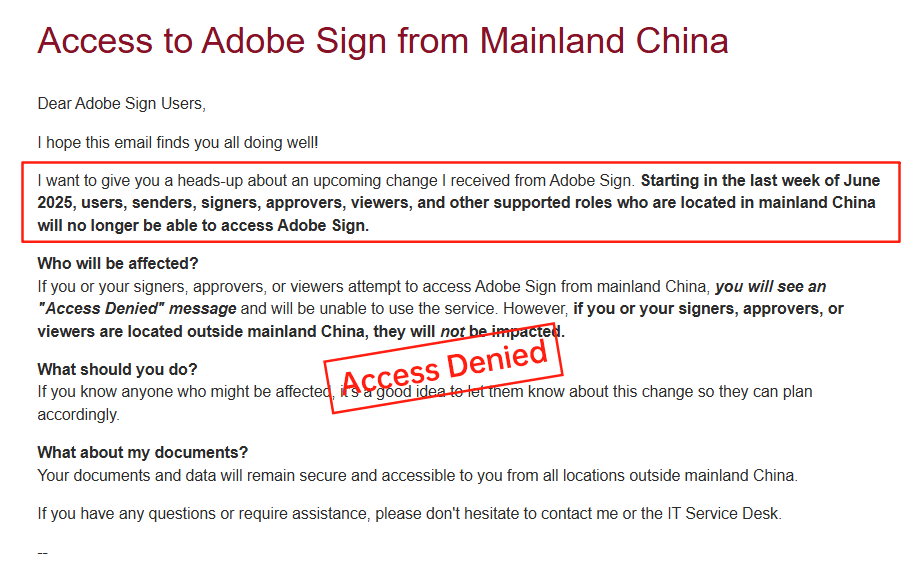
Moreover, Adobe Sign announced its withdrawal from the mainland China market in 2023, citing regulatory challenges and data localization requirements. This move has left enterprises with APAC footprints scrambling for alternatives, as it disrupts continuity for cross-border compliance needs in regions like China and Southeast Asia.
DocuSign: The Established Leader in eSignature
DocuSign has long been a go-to for enterprises seeking a comprehensive eSignature platform with proven reliability. Its eSignature plans, such as Business Pro and Advanced Solutions, cater to large organizations through features like SSO integration, advanced audit trails, and premium support. For high-stakes industries like finance and healthcare, DocuSign's compliance certifications (e.g., SOC 2, ISO 27001) and tools for bulk sending, web forms, and API-driven automations provide scalability for thousands of documents monthly.
From a business viewpoint, DocuSign's strength lies in its mature ecosystem, including developer APIs with tiers from Starter ($600/year) to Enterprise (custom pricing), enabling seamless embedding into CRM systems like Salesforce or ERP platforms. It supports global operations with multilingual capabilities and add-ons for SMS/WhatsApp delivery and identity verification. However, costs can escalate quickly: core plans start at $40/user/month for Business Pro (annual billing), but envelope quotas (~100/user/year), automation caps, and metered add-ons like IDV introduce hidden fees. Pricing transparency is limited, especially for enterprise customizations, often requiring lengthy sales negotiations.
In long-tail regions like APAC, DocuSign faces criticism for inconsistent performance. Cross-border latency affects document loading speeds, and limited local ID verification options necessitate extra compliance tools, inflating costs. Support in areas like China and Southeast Asia can feel slower, with data residency surcharges adding to the burden for regionally diverse enterprises.
Head-to-Head Comparison: Adobe Sign vs. DocuSign for Large Enterprises
When evaluating Adobe Sign and DocuSign for large enterprises, the decision hinges on integration priorities, cost predictability, and global reach. Both platforms shine in core eSignature functionalities—secure signing, workflow automation, and compliance—but diverge in execution for scaled operations.
Scalability and Features
DocuSign edges out in sheer breadth of enterprise tools. Its Advanced Solutions include governance features like delegated signing and enterprise-wide reporting, ideal for organizations with 50+ users managing complex approvals. Adobe Sign counters with superior integration into Adobe's suite, allowing enterprises to leverage AI-powered document analysis via Adobe Sensei for faster redlining and contract intelligence. For API-heavy workflows, DocuSign's developer plans offer more granular quotas (e.g., 100 envelopes/month in Intermediate tier), while Adobe's APIs are robust but often bundled within broader Document Cloud licensing.
In bulk operations, both support high-volume sending, but DocuSign's Bulk Send API and PowerForms provide more flexibility for automated, recurring tasks common in sales or HR. Adobe Sign's conditional logic and payment collection are comparable, yet its web forms feel more intuitive for user-facing interactions. From a business efficiency standpoint, DocuSign reports higher adoption rates in Fortune 500 companies (over 1 million users globally), signaling reliability, whereas Adobe Sign appeals to creative-heavy sectors with 80% faster document prep times via Acrobat integration.
Cost and Pricing Transparency
Cost is a pain point for both, but DocuSign's structure feels more punitive for large-scale use. Annual plans for Business Pro run $480/user/year with envelope limits that cap automation at ~10/user/month, leading to overages for high-volume enterprises. Add-ons like identity verification are metered, potentially adding 20-30% to totals. Adobe Sign's enterprise pricing is equally opaque—custom quotes based on seats and usage— but it avoids strict envelope quotas, offering "unlimited" sending in top tiers, which suits unpredictable enterprise demands. However, Adobe's exit from China amplifies costs for APAC-focused firms, as migration to compliant alternatives incurs one-time expenses estimated at $50,000+ for mid-sized teams.
Business observers note that DocuSign's high fees (e.g., $5,760/year for Advanced API) and regional surcharges in APAC—due to latency and governance needs—can make it 15-25% more expensive than anticipated. Adobe's bundling with Creative Cloud can offset this for some, but the lack of public pricing forces RFPs, delaying procurement.
Compliance and Global Operations
For multinational enterprises, compliance is non-negotiable. DocuSign's edge is in its extensive certifications and APAC adaptations, though service speeds lag in China/HK/SEA due to data routing issues. Adobe Sign matches on global standards but its China withdrawal is a deal-breaker for Asia-Pacific heavyweights, forcing reliance on partners or hybrids that dilute control. In regions requiring local data residency, DocuSign's limited options increase audit complexities, while Adobe's ecosystem supports better EU/US compliance out-of-the-box.
User Experience and Support
Enterprise users praise DocuSign's intuitive interface and 24/7 support in premium plans, but APAC feedback highlights slower resolutions. Adobe Sign's mobile app scores higher for on-the-go signing, with seamless Adobe ID login, yet its support is tied to Document Cloud subscriptions, potentially under-resourcing non-creative users.
Overall, DocuSign may suit enterprises prioritizing API depth and established compliance, while Adobe Sign fits those embedded in Adobe tools. Neither is flawless; opaque pricing and regional gaps (Adobe in China, DocuSign in APAC speed) often push businesses toward hybrids or alternatives.
Exploring Alternatives: eSign.AI as a Regional Contender
As enterprises grapple with the limitations of Adobe Sign and DocuSign, regional players like eSign.AI emerge as viable options, particularly for APAC-centric operations. eSign.AI focuses on optimized performance in China, Hong Kong, and Southeast Asia, offering native compliance with local regulations like China's Electronic Signature Law and eIDAS equivalents. Its platform delivers low-latency signing, flexible data residency, and cost-effective APIs without the surcharges common in global giants.
From a business lens, eSign.AI's transparent pricing—starting lower than DocuSign's equivalents—and emphasis on regional ID verification (e.g., seamless integration with local biometrics) address pain points for cross-border teams. It supports bulk sends, web forms, and enterprise SSO, with stronger localization for multilingual workflows in APAC.
FAQs