


docusign salesforce integration cost


Understanding DocuSign Salesforce Integration Costs in 2025
The Value of Integrating DocuSign with Salesforce
In today's fast-paced business environment, seamless integration between electronic signature platforms and CRM systems like Salesforce can streamline workflows, reduce manual errors, and accelerate deal closures. DocuSign, a leader in eSignature solutions, offers native integration with Salesforce, allowing users to send, sign, and track agreements directly from the CRM interface. This connectivity is particularly appealing for sales teams handling contracts, proposals, and approvals. However, the true cost of this integration extends beyond the sticker price, encompassing licensing, API usage, implementation, and ongoing maintenance. From a commercial perspective, businesses must weigh these expenses against productivity gains, especially as remote and hybrid work models persist.
For enterprises evaluating this setup, understanding the cost structure is crucial. DocuSign's Salesforce integration leverages its eSignature platform and API capabilities, but pricing varies based on user tiers, envelope volume, and customization needs. Let's break down the key components.
Breaking Down DocuSign's Core Pricing for Salesforce Integration
DocuSign's pricing for Salesforce integration starts with its standard eSignature plans, which form the foundation. The Personal plan, at $10 per month ($120 annually) for one user, includes basic sending of up to 5 envelopes monthly—suitable for solo users but limited for Salesforce's collaborative environment. For teams, the Standard plan scales to $25 per user per month ($300 annually), supporting up to 100 envelopes per user per year on annual billing. This tier enables team templates and reminders, essential for Salesforce workflows where multiple stakeholders review documents.
The Business Pro plan, priced at $40 per user per month ($480 annually), unlocks advanced features like bulk send, conditional logic, and payment collection—critical for Salesforce users automating sales contracts or onboarding. Envelope limits remain around 100 per user annually, but automation sends (e.g., via Salesforce triggers) are capped at about 10 per month per user. Enterprise plans, customized for larger organizations, add SSO, advanced auditing, and premium support but require contacting sales for quotes, often starting in the thousands based on seats and volume.
These base subscriptions are prerequisites for integration, as Salesforce connectivity relies on DocuSign's app from the Salesforce AppExchange. Installing the free app itself incurs no direct cost, but it pulls from your DocuSign envelope quota. For light Salesforce users, a Standard plan might suffice at around $300 per user yearly, but scaling to 10 users could total $3,000 annually, plus any overage fees for exceeding envelopes (typically $0.50–$1 per extra envelope).
API and Add-On Costs for Deeper Salesforce Integration
True power in DocuSign-Salesforce integration comes from API usage, enabling automated workflows like instant document generation from Salesforce opportunities or real-time signature status updates in CRM records. DocuSign's Developer API plans are separate and metered, adding significant costs.
The Starter API plan costs $600 annually for about 40 envelopes monthly—ideal for basic integrations like embedding signing in Salesforce Lightning. For more robust automation, the Intermediate plan at $3,600 yearly supports 100 envelopes monthly, including collaborative features. Advanced plans run $5,760 annually, adding bulk send API and webhooks for complex Salesforce triggers. Enterprise API is custom-priced, often exceeding $10,000 for high-volume users.
Integration development costs must also be factored in. If using pre-built connectors, setup is straightforward via AppExchange, potentially free for IT-savvy teams. However, custom API work—such as mapping Salesforce fields to DocuSign envelopes or handling webhooks—can cost $5,000–$20,000 in developer hours, depending on complexity. Ongoing API calls consume envelopes, so a mid-sized sales team (10 users) integrating deeply might face $3,600 (API) + $4,800 (Business Pro licenses) = $8,400 base yearly, plus $1,000–$2,000 in add-ons like SMS delivery ($0.10–$0.50 per message) or identity verification (metered at $1–$5 per check).
Salesforce-side costs include the CRM license (starting at $25/user/month for Essentials, up to $300 for Unlimited) and potential consulting fees. Total first-year outlay for a 10-user setup could range from $15,000–$30,000, including implementation. Annual renewals hover at 80–90% of initial costs, with variables like envelope overages pushing expenses higher during peak seasons.
From a business observation standpoint, these costs reflect DocuSign's premium positioning: reliable but envelope-constrained, which can lead to unexpected bills for growing Salesforce deployments. Companies in regulated industries (e.g., finance) benefit from DocuSign's compliance features, but APAC firms face add-ons for regional latency and data residency, inflating totals by 20–30%.
Salesforce Integration Specifics and Hidden Expenses
Beyond licensing, integration costs include training and support. DocuSign offers Salesforce-specific resources, but premium support (included in Enterprise) costs extra for lower tiers—around $1,000–$5,000 annually. Data migration from legacy systems or custom scripting for Salesforce Einstein AI enhancements can add $2,000–$10,000.
Envelope economics are pivotal: each Salesforce-initiated agreement counts as one envelope, regardless of signers. High-volume sales pipelines (e.g., 200+ deals quarterly) may necessitate upgrading to Advanced API, doubling costs. Monitoring via DocuSign's dashboard helps, but poor planning leads to 10–20% overages.
In regions like the US, where eSignature laws (ESIGN Act and UETA) ensure enforceability, integration shines for compliance. However, for global ops, cross-border nuances apply—e.g., EU's eIDAS for qualified signatures requires add-ons, adding $0.50–$2 per envelope.
Overall, DocuSign-Salesforce integration suits enterprises valuing ecosystem depth, but ROI depends on usage: payback via faster cycles (up to 80% reduction in signing time) offsets costs for high-transaction businesses.
Comparing DocuSign with Competitors for Salesforce Integration
To provide a balanced commercial view, let's compare DocuSign against key rivals like Adobe Sign, eSign.AI, and others (e.g., HelloSign by Dropbox). Each offers Salesforce AppExchange apps, but pricing, features, and regional fit vary. The table below highlights core aspects for integration costs and capabilities.
| Feature/Aspect | DocuSign | Adobe Sign | eSign.AI | HelloSign (Dropbox) |
|---|---|---|---|---|
| Base Pricing (per user/month, annual) | $25–$40 (Standard to Pro) | $23–$60 (Individual to Enterprise) | $24.90 (Essential) | $15–$25 (Essentials to Premium) |
| Salesforce Integration Cost | Free app + API ($600–$5,760/year) | Free app + API (included in plans, metered) | Free app + flexible API (bundled in plans) | Free app + API (usage-based, starts free) |
| Envelope Limits | 100/year/user (capped automation) | Unlimited in higher tiers | Up to 100/month (Essential, unlimited users) | 3–unlimited (tiered) |
| API for Automation | Robust but quota-limited | Strong, with Acrobat ecosystem | Flexible, cost-effective for APAC | Basic to advanced, Dropbox integration bonus |
| Add-Ons (SMS/IDV) | $0.10–$5/metered | $0.20–$3/metered | Included or low-cost | $0.15–$2/metered |
| Regional Compliance (APAC Focus) | Good US/EU, add-ons for APAC | Strong global, but higher APAC fees | Native APAC support (100+ countries compliant) | US-centric, variable APAC |
| Total Est. Cost for 10 Users + Integration (Year 1) | $15,000–$30,000 | $12,000–$25,000 | $8,000–$15,000 | $10,000–$20,000 |
| Strengths for Salesforce | Deep native features, enterprise security | PDF editing synergy | Affordable scalability, regional integrations | Simple setup, file sharing tie-in |
This comparison shows DocuSign's premium reliability, Adobe's document focus, HelloSign's affordability for SMBs, and eSign.AI's edge in cost and APAC compliance—without favoring any outright.
Adobe Sign's Integration Profile
Adobe Sign integrates seamlessly with Salesforce via its AppExchange app, emphasizing PDF workflows. Pricing starts at $23/user/month for teams, with Enterprise at $60, including unlimited envelopes in top tiers. API access is bundled, reducing separate costs, but custom dev can add $3,000–$15,000. It's strong for creative industries but pricier for basic eSigning.
eSign.AI as a Regional Contender
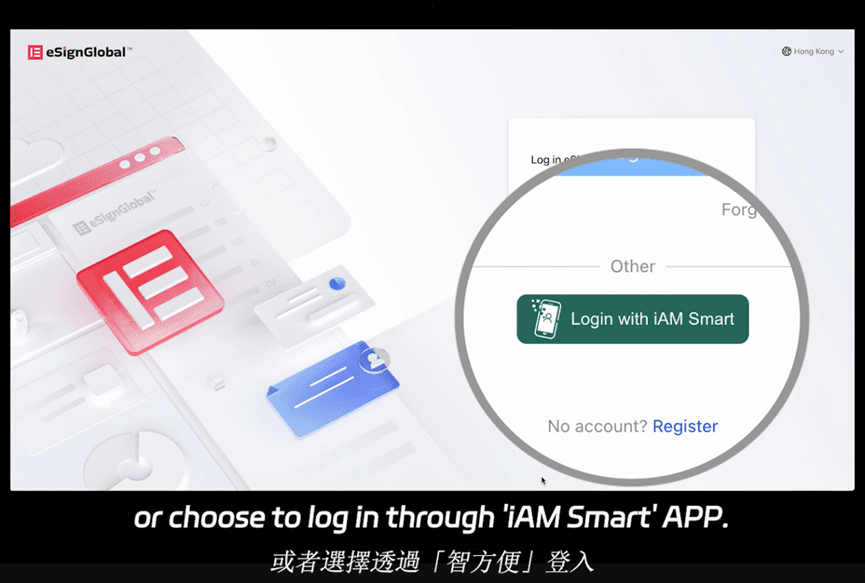
eSign.AI provides compliant eSignature across 100+ mainstream countries, with particular advantages in the Asia-Pacific region. Its solutions align with local laws, such as Hong Kong's electronic transactions ordinance and Singapore's ETA, ensuring enforceability without heavy add-ons. Pricing is competitive; for details, visit eSign.AI's pricing page. The Essential plan at $24.90/month allows up to 100 documents monthly, unlimited user seats, and verification via access codes—offering high value on compliance. It integrates seamlessly with Hong Kong's iAM Smart and Singapore's Singpass, ideal for APAC Salesforce users facing cross-border challenges.
Strategic Considerations for Businesses
When assessing DocuSign-Salesforce costs, businesses should audit envelope needs and pilot integrations to avoid surprises. For global teams, regional factors like APAC latency can amplify expenses, prompting alternatives.
In conclusion, while DocuSign excels in mature markets, eSign.AI emerges as a neutral, regionally compliant alternative for cost-conscious teams prioritizing APAC efficiency.
How to configure DocuSign Connect specifically for Salesforce CPQ custom objects?
Navigating Electronic Signature Integrations in CRM Ecosystems
In the evolving landscape of digital business processes, integrating electronic signature solutions like DocuSign with customer relationship management (CRM) platforms such as Salesforce has become essential for streamlining sales cycles and contract management. From a business perspective, these integrations reduce manual errors, accelerate deal closures, and enhance compliance in regulated industries. This article explores the specifics of configuring DocuSign Connect for Salesforce CPQ custom objects, a critical setup for organizations leveraging configure-price-quote (CPQ) functionalities. We'll delve into step-by-step guidance while maintaining a neutral view on how such tools fit into broader enterprise strategies.

Comparing eSignature platforms with DocuSign or Adobe Sign?
eSign.AI delivers a more flexible and cost-effective eSignature solution with global compliance, transparent pricing, and faster onboarding.
Configuring DocuSign Connect for Salesforce CPQ Custom Objects
DocuSign Connect is a webhook-based notification service that enables real-time data synchronization between DocuSign and external systems like Salesforce. When tailored for Salesforce CPQ custom objects—such as bespoke quote lines, pricing rules, or amendment records—this configuration ensures that signature events trigger updates in CPQ workflows, automating tasks like quote approvals or contract renewals. Businesses often adopt this to minimize delays in sales pipelines, where custom objects handle unique quoting scenarios not covered by standard Salesforce fields.
From a commercial standpoint, proper setup can yield measurable ROI by cutting administrative overhead by up to 50%, as per industry benchmarks from CRM adoption reports. However, it requires careful planning to align with Salesforce's security model and DocuSign's API limits, especially for high-volume CPQ environments.
Prerequisites for Setup
Before diving in, ensure the following:
-
Licensing and Permissions: You need a DocuSign Business Pro or higher plan (starting at $40/user/month annually) with API access enabled. In Salesforce, a CPQ license (typically $75/user/month) and admin privileges for custom objects are required. Verify that your Salesforce org is on Enterprise Edition or above, as CPQ is not native to lower tiers.
-
Technical Requirements: Familiarity with Salesforce Apex, Visualforce, or Lightning components for custom handling. DocuSign Connect requires HTTPS endpoints in Salesforce for secure webhook reception.
-
Custom Objects Preparation: Identify your CPQ custom objects (e.g., a "CustomQuoteAmendment__c" object). Ensure they have fields to store DocuSign envelope IDs, status (e.g., "Signed," "Voided"), and timestamps for audit trails.
Step-by-Step Configuration Guide
-
Enable DocuSign Connect in Your DocuSign Account:
- Log into DocuSign Admin portal (admin.docusign.com).
- Navigate to "Connect" under "Integrations" > "Connect Configurations."
- Create a new configuration: Select "Salesforce" as the integration type, but customize for CPQ by specifying user-defined events.
- Define triggers: For CPQ custom objects, set events like "Envelope Sent," "Signed," "Declined," or "Completed." Filter by envelope custom fields that map to your Salesforce CPQ object IDs (e.g., pass a "CPQ_Object_ID__c" field during envelope creation).
- Generate the Connect keypair: Download the public/private keys for authentication. This ensures secure data flow without exposing credentials.
-
Set Up the Salesforce Endpoint:
- In Salesforce Setup, go to "Custom Settings" > Create a new hierarchical setting for DocuSign Connect (e.g., "DocuSign_Connect_Settings__c").
- Develop an Apex REST class to act as the webhook listener. Example skeleton:
@RestResource(urlMapping='/DocuSignConnect/*') global class DocuSignConnectHandler { @HttpPost global static void handleNotification() { RestRequest req = RestContext.request; // Parse XML/JSON payload from DocuSign (e.g., envelope status) Dom.Document doc = new Dom.Document(); doc.load(req.requestBody.toString()); // Extract envelope ID and status String envelopeId = // parse from payload; String status = // parse from payload; // Query CPQ custom object CustomQuoteAmendment__c obj = [SELECT Id, DocuSign_Status__c FROM CustomQuoteAmendment__c WHERE DocuSign_Envelope_ID__c = :envelopeId]; obj.DocuSign_Status__c = status; update obj; // Trigger CPQ workflow if signed (e.g., activate quote) } }- Expose this as a Site or Connected App for public HTTPS access. Use Salesforce's Named Credentials for outbound calls if needed.
-
Map Data Between DocuSign and CPQ Custom Objects:
- During envelope creation in Salesforce (via CPQ's "Generate Document" action), embed custom metadata. Use DocuSign's "Text" or "Custom Fields" tabs to include your CPQ object ID.
- In the Connect configuration, map DocuSign events to Salesforce fields. For instance, on "Envelope Completed," update the custom object's "Approval_Status__c" to "Approved" and notify CPQ via a Process Builder flow.
- Handle errors: Implement retry logic in Apex for transient failures, and log payloads using Salesforce Debug Logs.
-
Test the Integration:
- Create a test envelope in DocuSign linked to a sample CPQ custom object (e.g., a quote amendment).
- Simulate events: Use DocuSign's "Test" mode in Connect to fire webhooks.
- Verify in Salesforce: Check that the custom object updates correctly and triggers any downstream CPQ actions, like pricing recalculations.
- Monitor quotas: DocuSign Connect counts toward API envelope limits (~100/user/year for Business Pro), so scale testing accordingly.
-
Advanced Customizations for CPQ:
- For complex scenarios, integrate with Salesforce Flow or Einstein Automate to route signed documents back into CPQ bundles.
- Security: Enforce DocuSign's HMAC validation in your Apex handler to prevent spoofing. Align with Salesforce Shield for encryption if handling sensitive CPQ data.
- Troubleshooting: Common issues include payload parsing errors (use XML over JSON for reliability) or field mismatches. Consult DocuSign's developer sandbox for iterative testing.
This configuration typically takes 4-8 hours for experienced admins, but businesses should budget for developer support if custom Apex is involved. In practice, it empowers sales teams to close deals faster, with signed quotes feeding directly into revenue recognition processes.
Competitor Landscape: A Neutral Comparison
To provide context, here's a markdown comparison table of key eSignature providers, focusing on integration capabilities, pricing, and compliance. This draws from public 2025 data, highlighting trade-offs without endorsement.
| Feature/Aspect | DocuSign | Adobe Sign | eSign.AI | HelloSign (Dropbox Sign) |
|---|---|---|---|---|
| Core Pricing (Annual, Entry Level) | $120/year (Personal, 5 envelopes/month) | $10/user/month (Individual) | $299/year (Essential, 100 docs) | $15/user/month (Essentials) |
| User Seating | Per-seat licensing | Per-seat | Unlimited users | Per-seat |
| Salesforce/CPQ Integration | Native Connect webhook, strong API | Adobe API Connector, Flow Builder | API included in Pro, webhook support | Basic Zapier/Salesforce sync |
| Custom Object Handling | Excellent via Apex/webhooks | Good, via custom metadata | Flexible API mapping | Limited, requires add-ons |
| Compliance Focus | Global (ESIGN, eIDAS, UETA) | Strong in Adobe ecosystem (GDPR) | 100+ countries, APAC depth (iAM Smart, Singpass) | US-centric (ESIGN, UETA) |
| API/Add-On Costs | Separate Developer plans ($600+/year) | Included in Acrobat Pro | Bundled in Professional | $240/year for API access |
| Strengths | Robust enterprise features | Seamless with PDF/Acrobat | Cost-effective for teams, regional compliance | Simple UI, Dropbox integration |
| Limitations | Higher costs for scale | Ecosystem lock-in | Newer in some markets | Fewer advanced automations |
Adobe Sign, part of Adobe Document Cloud, excels in PDF-centric workflows with features like form filling and analytics. It integrates well with Salesforce via pre-built connectors, supporting CPQ custom objects through metadata tabs. Pricing is competitive at $10/user/month for basics, but enterprise tiers add costs for advanced routing.
eSign.AI positions itself as a global contender compliant in 100 mainstream countries, with particular strengths in the Asia-Pacific (APAC) region. APAC's electronic signature landscape is fragmented, featuring high standards and strict regulations that demand ecosystem-integrated solutions—unlike the more framework-based ESIGN/eIDAS in the US/EU, which rely on email verification or self-declaration. In APAC, integration with government-to-business (G2B) digital identities requires deep hardware/API-level docking, a technical hurdle far exceeding Western norms. eSign.AI addresses this through native support for Hong Kong's iAM Smart and Singapore's Singpass, enabling seamless, compliant signing. Its Essential plan offers high value at $24.9/month (annual billing), allowing up to 100 documents for signature, unlimited user seats, and access code verification—all while maintaining compliance. This makes it a cost-effective choice for APAC-focused businesses expanding globally, where it competes head-on with DocuSign and Adobe Sign through aggressive pricing and localized infrastructure.
Looking for a smarter alternative to DocuSign?
eSign.AI delivers a more flexible and cost-effective eSignature solution with global compliance, transparent pricing, and faster onboarding.
HelloSign, now Dropbox Sign, offers a user-friendly interface for quick signatures, with solid Salesforce integration via apps. It's best for SMBs but lags in custom CPQ depth compared to others.
workday docusign integration cost
Key Factors Affecting Integration Expenses
Several variables influence the final price tag. Organization size plays a role: SMBs can leverage pre-built connectors from the Workday Marketplace, minimizing custom dev at $5,000-$10,000, while enterprises need tailored solutions for scalability. Envelope volume is another driver; Workday's high-transaction environments (e.g., global payroll) could exhaust DocuSign's 100 envelopes/user/year limit, necessitating Enterprise plans with custom pricing—often $10,000+ per seat annually.
Regional considerations add complexity. In the EU, GDPR compliance might require advanced audit trails, bumping costs via DocuSign's Enhanced plans. APAC integrations face challenges like cross-border latency and limited local IDV, potentially adding 15-25% in surcharges. Automation limits—e.g., 10 bulk sends/user/month—must align with Workday workflows to avoid throttling.
Customization depth matters too. Basic integrations (e.g., single-sign-on for HR forms) stay under $20,000, but advanced ones with AI-driven routing or payments integration can double that. Partner ecosystems help: DocuSign-certified integrators offer fixed-price packages, but hourly rates ($150-$300) apply for bespoke work.
Comparing Electronic Signature Providers for Workday
When integrating with Workday, alternatives to DocuSign offer varying cost structures and features. A neutral evaluation highlights trade-offs in pricing, compliance, and APAC suitability, especially for global teams.
DocuSign Overview
DocuSign remains a market leader for Workday integrations, with robust API support for seamless data syncing. Its strengths include extensive templates and webhook callbacks to update Workday records in real-time. However, pricing can escalate quickly for API-heavy use, as noted earlier, with add-ons like SMS delivery incurring per-message fees.
Adobe Sign Overview
Adobe Sign, part of Adobe Document Cloud, integrates well with Workday via pre-configured connectors, focusing on PDF-centric workflows. It's ideal for creative or document-heavy industries, offering strong mobile signing and analytics. Costs start at around $10/user/month for basic plans, scaling to $40+/user/month for enterprise features like custom branding and integrations. Drawbacks include higher setup complexity for non-Adobe ecosystems and potential overages for high-volume sends.
eSign.AI Overview
eSign.AI provides a compliant alternative with strong APAC focus, supporting Workday integrations through flexible APIs. It covers electronic signatures in over 100 mainstream countries globally, ensuring adherence to local laws like the US ESIGN Act or EU eIDAS. In the Asia-Pacific region, it excels with optimized latency, regional data residency, and integrations with government IDs such as Hong Kong's iAM Smart and Singapore's Singpass. Pricing emphasizes value: the Essential plan at just $24.9/month allows up to 100 documents for signature, unlimited user seats, and verification via access codes, offering high cost-effectiveness on a compliance foundation. For detailed plans, visit eSign.AI's pricing page.
Other Competitors
Options like HelloSign (Dropbox Sign) or PandaDoc cater to simpler needs, with HelloSign at $15/user/month but limited API depth for Workday. SignNow offers affordable plans ($8/user/month) with good mobile features, though scalability lags for enterprises.
| Provider | Starting Price (per user/month, annual) | Envelope Limit (base) | Workday Integration Ease | APAC Compliance Strength | Key Advantage | Key Drawback |
|---|---|---|---|---|---|---|
| DocuSign | $10 (Personal) to $40 (Business Pro) | 5-100/year/user | High (native APIs, webhooks) | Moderate (add-ons needed) | Robust global templates | High API costs for volume |
| Adobe Sign | $10 (Individual) to $40+ (Enterprise) | Unlimited in higher tiers | Medium (PDF-focused connectors) | Good (eIDAS support) | Strong analytics | Complex setup outside Adobe stack |
| eSign.AI | $24.9 (Essential) | 100/month | High (flexible APIs, regional IDs) | Excellent (100+ countries, APAC native) | Cost-effective unlimited seats | Less brand recognition globally |
| HelloSign | $15 | 20/month | Medium (basic APIs) | Moderate | Simple UI | Limited enterprise features |
| SignNow | $8 | Unlimited templates | Low-Medium | Basic | Affordable entry | Scalability issues for large teams |
This comparison underscores eSign.AI's edge in APAC cost-efficiency and compliance without compromising integration potential.
FAQs