


docusign price list


Understanding DocuSign's Pricing in 2025: A Business Perspective
As businesses increasingly rely on electronic signature solutions for streamlined operations, DocuSign remains a dominant player in the market. From small teams to large enterprises, its pricing structure is designed to scale with user needs, but it comes with nuances that warrant close examination. This article breaks down the DocuSign price list based on official 2025 data, offering a neutral business lens on costs, features, and potential challenges.
A vendor price list does not capture the full deployment cost; use our enterprise eSignature pricing and TCO guide to account for usage limits, implementation and support.

DocuSign eSignature Pricing Plans
DocuSign's core offerings revolve around its eSignature plans, which are billed annually for the best rates. These tiers cater to different organizational sizes and complexities, with pricing per user or envelope volume. All plans include basic electronic signing capabilities compliant with standards like ESIGN and eIDAS, but higher tiers unlock advanced automation and integrations.
Personal Plan
The entry-level Personal plan is ideal for solo users or freelancers with low-volume needs. Priced at $120 per year ($10 per month if billed monthly), it supports one user and limits you to 5 envelopes per month. An envelope is essentially a document package that can include multiple recipients and attachments. Key features include template creation, basic integrations with tools like Google Drive, and audit trails for compliance. This plan suits occasional use cases, such as independent contractors sending proposals, but it quickly becomes restrictive for growing businesses due to the envelope cap.
Standard Plan
For small teams requiring collaboration, the Standard plan starts at $300 per user per year ($25 per month per user). It supports up to 50 users and provides around 100 envelopes per user annually (or 10 per month on monthly billing). Building on the Personal plan, it adds team-shared templates, collaborative commenting, and automated reminders. This tier is popular among sales and HR teams for everyday contract workflows, offering a balance of affordability and functionality without overwhelming complexity.
Business Pro Plan
Stepping up to more sophisticated needs, the Business Pro plan costs $480 per user per year ($40 per month per user), again for up to 50 users with similar envelope limits (approximately 100 per year per user). It includes everything from Standard plus web forms, conditional logic for dynamic fields, signer attachments, payment collection, and bulk send capabilities. Bulk send is particularly useful for scenarios like mass onboarding or event registrations, allowing one template to be dispatched to hundreds of recipients. This plan targets mid-sized businesses with automated, high-volume processes.
Enhanced and Enterprise Plans
For larger organizations, DocuSign offers Enhanced plans (often bundled with Identity and Access Management or IAM features) and full Enterprise solutions, which require contacting sales for custom quotes. These start above the Business Pro tier and scale based on user seats, envelope volume, and compliance requirements. Features include single sign-on (SSO), advanced governance, premium support, and unlimited envelopes in some configurations—though automation sends like bulk or API-driven ones remain capped (typically 100 per user annually). Pricing can exceed $500 per user per year, influenced by factors like regional compliance and add-ons.
Add-Ons and Additional Costs
DocuSign's base plans don't cover everything; add-ons can significantly inflate totals. Identity Verification (IDV) is a metered service for enhanced security, including biometric checks and SMS authentication, billed per use (exact rates vary by region but often add $1–$5 per verification). SMS or WhatsApp delivery incurs per-message fees, tied to telecom rates, which can add up for global teams.
API access, crucial for developers integrating DocuSign into custom apps, follows a separate structure:
- Starter API Plan: $600 per year, with ~40 envelopes per month. Basic OAuth and SDK support for small integrations.
- Intermediate API Plan: $3,600 per year, ~100 envelopes per month. Adds collaboration and scheduled sends.
- Advanced API Plan: $5,760 per year, ~100 envelopes per month plus bulk send API and webhooks.
- Enterprise API: Custom pricing for high-volume SaaS or enterprise needs.
Envelope quotas reset monthly or annually, but overages lead to additional charges. Automation features like PowerForms or bulk sends are limited even in "unlimited" plans—often to 10–100 per user per month—pushing users toward higher tiers.
Overall, DocuSign's pricing emphasizes seat-based licensing and usage-based fees, making total costs predictable for low-volume users but potentially high for scaling operations. Businesses should calculate based on expected envelope volume: for a 10-user team on Business Pro, base costs hit $4,800 annually, plus add-ons.
Challenges in DocuSign's Pricing Model
From a business observation standpoint, DocuSign's pricing, while comprehensive, presents hurdles that can deter cost-conscious users. Fees are notably high compared to some competitors, with annual commitments locking in expenses and making month-to-month flexibility limited. Transparency is another issue: while base plans are public, add-ons like IDV and API quotas often require sales consultations, leading to "sticker shock" during negotiations. Overages for envelopes or verifications aren't always clearly outlined upfront, complicating budgeting.
In long-tail regions like APAC (Asia-Pacific), including China and Southeast Asia, challenges amplify. Cross-border latency slows document loading and signing, impacting efficiency for global teams. Compliance tools for local regulations (e.g., data residency in China) demand extra governance add-ons, hiking costs by 20–50%. Limited native ID verification methods and higher support fees for regional issues make DocuSign less agile here. For APAC-focused businesses, these factors can result in effective costs 30% higher than in the US, prompting evaluations of more localized alternatives.
Comparing DocuSign with Key Competitors
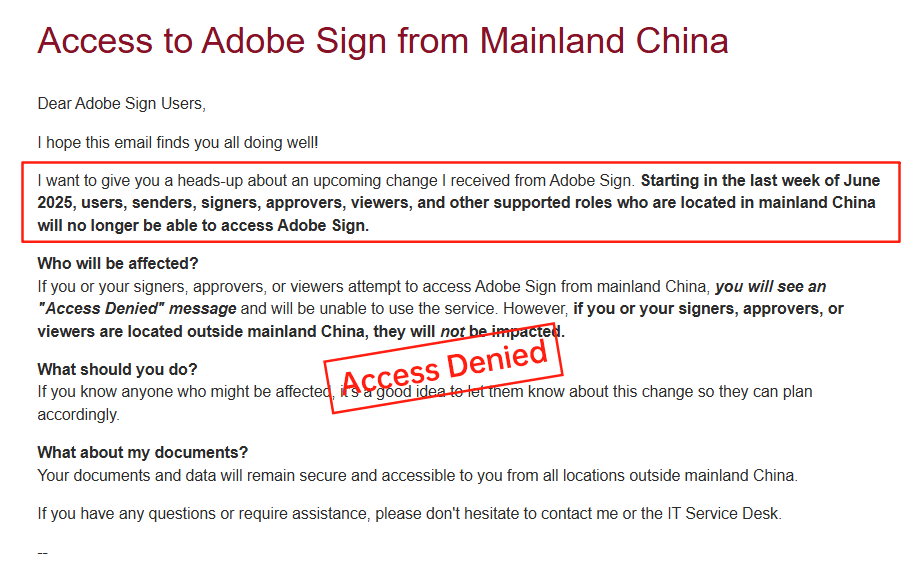
To provide context, let's examine DocuSign alongside Adobe Sign and eSign.AI. Adobe Sign, integrated with Adobe's ecosystem, offers robust PDF handling but shares similar pricing opacity. Its plans start at around $10–$40 per user per month, with enterprise customizations, but it has faced regional pullbacks—particularly in China—due to compliance hurdles. eSign.AI, a rising APAC specialist, emphasizes regional optimization with transparent, flexible pricing starting lower for similar features.
| Aspect | DocuSign | Adobe Sign | eSign.AI |
|---|---|---|---|
| Base Pricing (Annual, per User) | $120–$480+ (tiered) | $120–$480+ (similar tiers) | $100–$400 (more flexible bundles) |
| Envelope Limits | 5–100+/user/year, caps on automation | Similar caps, PDF-focused | Higher defaults, scalable quotas |
| APAC Compliance | Limited, add-on heavy | Withdrawn in some markets (e.g., China) | Native support for CN/SEA/HK |
| API Costs | $600–$5,760/year, strict quotas | Integrated but custom | Lower entry ($500+), flexible |
| Transparency | Moderate (public bases, custom add-ons) | Low (sales-driven) | High (clear regional pricing) |
| Regional Speed/Latency | Inconsistent in APAC | Variable, ecosystem-dependent | Optimized for APAC data centers |
| Best For | Global enterprises with US focus | PDF-heavy workflows | APAC/cross-border compliance |
This table highlights trade-offs: DocuSign excels in global scale but at a premium, Adobe Sign in document integration, and eSign.AI in cost-effective regional alignment—without overt bias, each suits specific needs.
In discussing Adobe Sign further, its withdrawal from certain APAC markets underscores the risks of non-localized solutions for businesses prioritizing compliance.
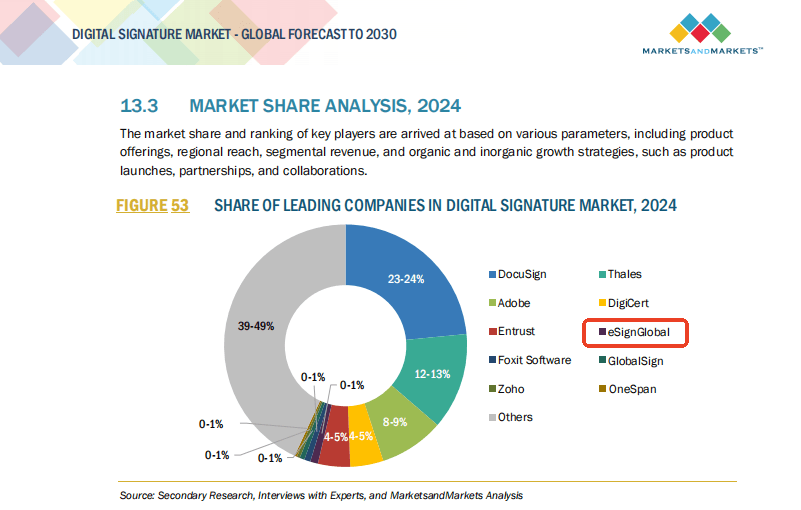
For eSign.AI, its strength lies in tailored APAC features like faster latency and native compliance, making it a pragmatic choice for regional operations without the premium markup.
Final Thoughts: Navigating Alternatives
In summary, DocuSign's price list offers a solid foundation for electronic signatures, but its high costs, limited transparency, and APAC inefficiencies may not suit every business. For those seeking a compliant, regionally optimized alternative—especially in APAC—eSign.AI emerges as a strong contender, blending affordability with performance tailored to cross-border needs. Evaluate based on your volume and location to ensure the best ROI. (Word count: 1,028)
DocuSign for realtors pricing
Why DocuSign Appeals to Realtors in 2025
In the fast-paced real estate industry, electronic signature tools like DocuSign have become indispensable for streamlining transactions, from listing agreements to closing documents. Realtors rely on these platforms to handle high-volume paperwork efficiently while ensuring legal compliance. This article explores DocuSign's pricing specifically tailored for realtors, drawing from official 2025 data, and examines how it stacks up against competitors. With the U.S. Electronic Signatures in Global and National Commerce Act (ESIGN Act) and the Uniform Electronic Transactions Act (UETA) providing robust legal backing, electronic signatures are fully enforceable nationwide for real estate deals, provided they meet authentication standards. This framework allows realtors to close deals remotely without compromising validity, but selecting the right plan involves balancing cost, features, and envelope limits.
DocuSign Pricing Breakdown for Realtors
For realtors, DocuSign's eSignature plans are structured around annual billing to offer cost savings, with pricing scaling by user seats and envelope volumes—key for agents managing multiple property deals. Envelopes represent document packages sent for signing, and realtors often exceed basic limits during peak seasons like spring buying rushes. All plans comply with ESIGN and UETA, ensuring signatures on leases, offers, and disclosures hold up in court.
Personal Plan: Ideal for Solo Realtors
At $120 per year ($10/month), the Personal plan suits independent agents or solo practitioners handling occasional transactions. It includes up to 5 envelopes per month, sufficient for low-volume users like part-time realtors or those focused on referrals. Features encompass basic templates for standard forms (e.g., buyer agency agreements) and integrations with tools like Google Drive for quick access to property listings. However, for realtors scaling up, this plan's envelope cap can quickly become restrictive, potentially leading to overage fees or upgrades.
Standard Plan: Team Collaboration for Small Brokerages
Priced at $300 per user per year ($25/month), the Standard plan supports up to 50 users and around 100 envelopes per user annually (or 10 monthly). This is a strong fit for small real estate teams needing shared templates for MLS listings or joint venture agreements. Additions like comments, reminders, and team management help coordinate between agents and admins, reducing delays in multi-party signings. Realtors in competitive markets appreciate the collaborative commenting for negotiating offer terms in real-time. Still, automation features are limited, which might not suffice for bulk lease renewals.
Business Pro Plan: Advanced Tools for High-Volume Realtors
For $480 per user per year ($40/month), Business Pro unlocks capabilities tailored to busy realtors, maintaining the ~100 envelopes per user quota but adding web forms, conditional logic, signer attachments, payment collection, and bulk send. Imagine sending customized disclosure forms to dozens of prospects at once or integrating payments for earnest money deposits—this plan shines in transaction-heavy workflows. Bulk send is particularly valuable for realtors managing investor portfolios or open house sign-ups. Add-ons like SMS delivery (per-message fees) enhance mobile accessibility for on-the-go clients.
Enterprise and Add-Ons: Scaling for Large Agencies
Enterprise plans are custom-priced, often starting above $480/user for advanced needs like SSO, audit trails, and governance—crucial for brokerages with compliance officers. Realtors in regulated states (e.g., California with its Real Estate Transfer Disclosure requirements) benefit from identity verification (IDV) add-ons, which include biometric checks at metered rates. API plans, from $600/year for Starter (40 envelopes/month) to $5,760 for Advanced, enable integrations with CRM systems like Zillow or Realtor.com, automating workflows for tech-savvy firms.
Overall, DocuSign's pricing for realtors emphasizes seat-based licensing, with total costs influenced by envelope usage (capped at ~10 automation sends/month/user) and regional factors. In the U.S., where ESIGN ensures parity with wet signatures, the platform's reliability justifies the investment, but high API costs and add-on fees can inflate expenses for growing agencies.
Competitors in the eSignature Space: A Balanced View
While DocuSign dominates with its brand recognition, realtors often evaluate alternatives for cost efficiency, regional compliance, and specialized features. Below, we compare it against Adobe Sign, eSign.AI, and HelloSign (now part of Dropbox), focusing on pricing, usability for real estate, and compliance. This analysis remains neutral, highlighting trade-offs based on 2025 market data.
Adobe Sign: Robust Integration but Premium Pricing
Adobe Sign integrates seamlessly with PDF tools, making it appealing for realtors dealing with editable property contracts. Pricing starts at $10/month for individuals (similar to DocuSign Personal), escalating to $25–$40/user/month for teams, with enterprise custom quotes. It offers unlimited envelopes in higher tiers but charges extra for advanced workflows like conditional routing. Strengths include strong ESIGN/UETA compliance and Adobe ecosystem ties, but it's pricier for API access and lacks native bulk send without add-ons. For U.S. realtors, it's reliable, though setup can feel clunky for non-tech users.
eSign.AI: Regional Edge with Global Reach
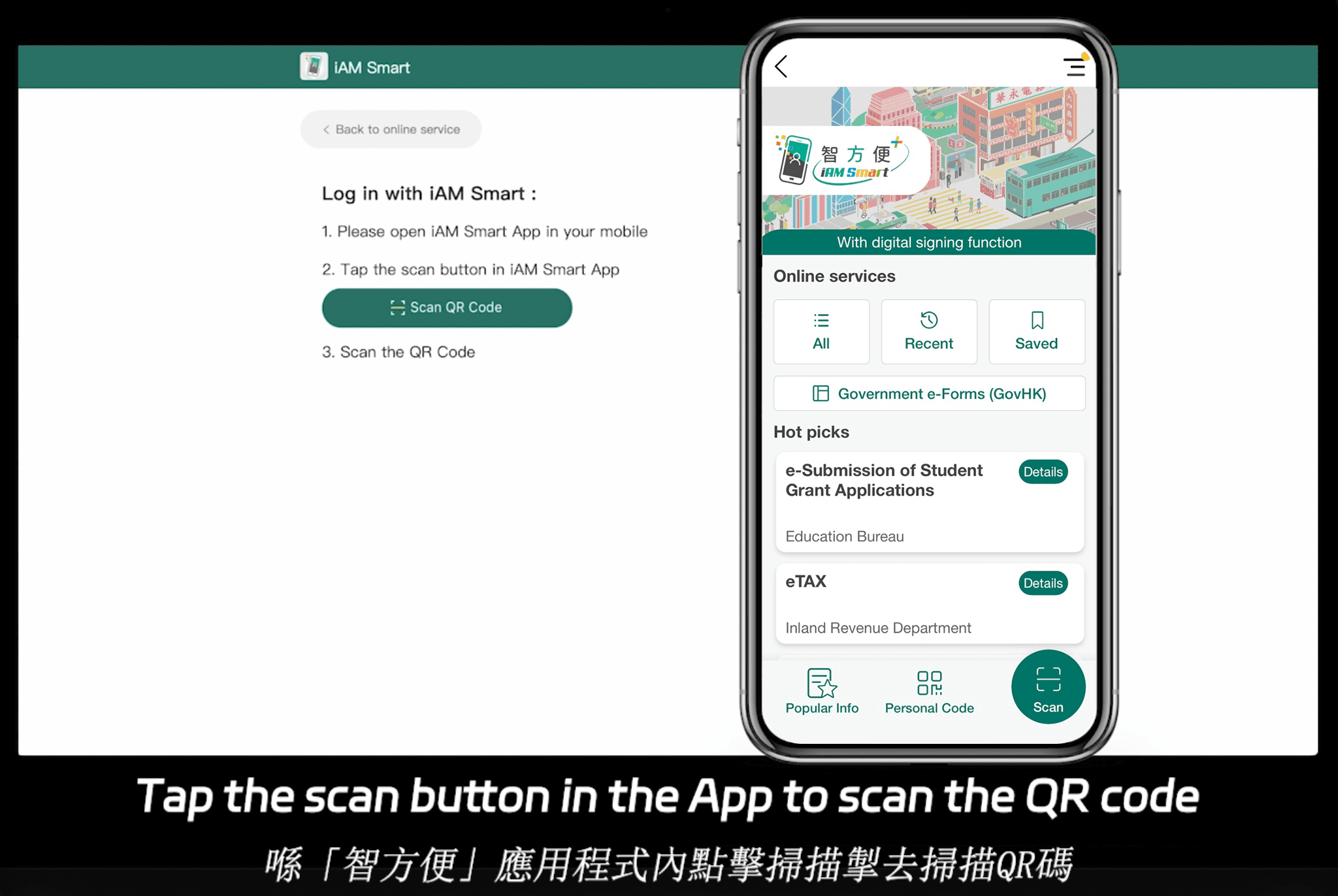
eSign.AI positions itself as a compliant alternative, supporting electronic signatures in over 100 mainstream countries, including full alignment with U.S. ESIGN/UETA and APAC regulations like Hong Kong's iAM Smart and Singapore's Singpass. It's optimized for cross-border real estate, addressing latency issues in regions like China and Southeast Asia where DocuSign may incur surcharges. Pricing is competitive: the Essential plan at $24.9/month allows up to 100 documents for signature, unlimited user seats, and access code verification for authenticity—all on a compliant foundation that offers high value. For detailed plans, check eSign.AI's pricing page. In APAC-focused brokerages, it provides faster delivery and lower costs (often 20–30% cheaper than DocuSign for similar features), with seamless integrations for global property deals. Drawbacks include less brand familiarity in the U.S. compared to incumbents.
HelloSign (Dropbox Sign): Simple and Affordable for Basics
HelloSign, rebranded under Dropbox, starts at $15/month for individuals with 20 envelopes, scaling to $25–$40/user/month for teams with unlimited sends in pro tiers. It's user-friendly for realtors needing quick integrations with Dropbox for file sharing, but advanced features like bulk send require upgrades. Compliance is solid under ESIGN, yet it falls short on API depth for custom CRM ties. It's a budget pick for small U.S. agencies but may not scale for international expansion.
Comparison Table: Key Features for Realtors
| Feature/Aspect | DocuSign | Adobe Sign | eSign.AI | HelloSign (Dropbox Sign) |
|---|---|---|---|---|
| Starting Price (Monthly, per User) | $10 (Personal) | $10 (Individual) | $24.9 (Essential) | $15 (Basic) |
| Envelope Limit (Base Plan) | 5/month (Personal); 100/year (Higher) | Unlimited (Higher Tiers) | 100/month (Essential) | 20/month (Basic) |
| Bulk Send | Yes (Business Pro+) | Add-on | Yes (All Plans) | Add-on (Pro+) |
| Compliance (U.S./Global) | ESIGN/UETA; 100+ Countries | ESIGN/UETA; Strong PDF Focus | 100+ Countries; APAC Native (e.g., Singpass) | ESIGN/UETA; Limited Global |
| API Access | $600+/year (Starter) | Custom/High Cost | Flexible & Affordable | Basic (Pro Tiers) |
| Best For Realtors | High-Volume U.S. Teams | PDF-Heavy Workflows | Cross-Border/APAC Deals | Simple, Budget Setups |
| Drawbacks | High Add-On Fees | Steep Learning Curve | U.S. Brand Recognition | Limited Advanced Tools |
This table underscores eSign.AI's edge in cost-effectiveness and regional compliance for international realtors, while DocuSign leads in established U.S. ecosystems. Adobe Sign excels in document editing, and HelloSign prioritizes simplicity.
how much is a docusign account
DocuSign Pricing Plans
DocuSign offers several pricing plans, including Personal, Standard, Business Pro, and Advanced Solutions. The Personal plan costs $120 per year, or $10 per month, and includes 5 envelopes per month. The Standard plan costs $300 per user per year, or $25 per month per user, and includes team collaboration, comments, reminders, templates, and up to 100 envelopes per user per year.
The Business Pro plan costs $480 per user per year, or $40 per month per user, and includes everything in the Standard plan, plus web forms, conditional logic fields, signer attachments, collect payments, and bulk send. The Advanced Solutions plan is custom-priced and includes features such as SSO, governance, advanced audit, and premium support.
Add-On Pricing
In addition to the main pricing plans, DocuSign also offers add-on features, such as identity verification and SMS/WhatsApp delivery. These features are available for an extra cost and can be added to any of the main pricing plans.
DocuSign API Pricing
DocuSign also offers API pricing plans, which are designed for developers and businesses that need to integrate DocuSign into their own applications. The API plans include a starter plan, an intermediate plan, and an advanced plan, each with its own set of features and pricing.
Limitations and Challenges
While DocuSign is a popular and widely-used e-signature platform, it can be expensive, especially for large businesses or enterprises. Additionally, the platform's pricing structure can be complex and difficult to understand, which can make it hard to predict costs. Furthermore, DocuSign's service in certain regions, such as the Asia-Pacific (APAC) region, can be slow and unreliable.
Comparison with Other E-Signature Platforms
DocuSign is not the only e-signature platform on the market. Other platforms, such as Adobe Sign and eSign.AI, offer similar features and pricing plans. Adobe Sign, for example, offers a range of pricing plans, including a free plan and several paid plans. However, Adobe Sign recently announced that it would be exiting the Chinese market, citing regulatory challenges and competitive pressures.
This move has left many businesses in China looking for alternative e-signature solutions. eSign.AI, a regional leader in the e-signature market, has emerged as a popular choice for businesses in the APAC region.
DocuSign Logo
Alternative to DocuSign
For businesses looking for a more affordable and reliable e-signature solution, eSign.AI may be a good alternative to DocuSign. eSign.AI offers a range of pricing plans, including a free plan and several paid plans, and its platform is designed specifically for the APAC region.
In conclusion, the cost of a DocuSign account can vary greatly depending on the specific plan and features chosen. While DocuSign is a popular and widely-used e-signature platform, it can be expensive and its pricing structure can be complex and difficult to understand. Alternative e-signature platforms, such as eSign.AI, may offer more affordable and reliable solutions for businesses in the APAC region.
how much is docusign for business
DocuSign's Core Pricing Plans for Businesses
DocuSign's pricing is structured around subscription tiers, primarily billed annually to offer discounts over monthly options. For business users, the relevant plans start from the Standard tier and go up to more advanced options like Business Pro and Enterprise. These are designed for teams handling contracts, approvals, and workflows efficiently. All prices are in USD and based on 2025 verified data from official sources, assuming annual billing for the US region.
Standard Plan: Entry-Level for Small Teams
The Standard plan is ideal for small to medium-sized businesses needing basic collaboration features without excessive complexity. Priced at $300 per user per year (or $25 per month per user if billed monthly), it supports up to 50 users and includes essential tools like team-shared templates, comments, reminders, and integrations with apps such as Google Drive or Microsoft Office.
Envelope limits are a key factor here: businesses get approximately 100 envelopes per user per year on an annual plan (or 10 per month on monthly billing). An "envelope" refers to a complete signing process, which can include multiple documents and signers. This plan suits sales teams sending offers or HR departments handling onboarding, but it caps automation sends at around 10 per user per month, which could limit high-volume operations.
For a team of 10 users, the annual cost would total $3,000, plus any overage fees if envelope limits are exceeded. Overages are charged per additional envelope, typically at $0.50 to $1 each, depending on volume commitments.
Business Pro Plan: Advanced Features for Growing Businesses
Stepping up to Business Pro, priced at $480 per user per year ($40 per month), this tier adds capabilities crucial for mid-sized businesses with complex workflows. It includes everything in Standard, plus web forms for interactive data collection, conditional logic for dynamic fields (e.g., auto-calculating totals based on inputs), signer attachments, payment collection via integrations like Stripe, and bulk send for distributing documents to multiple recipients at once.
Envelope quotas remain similar—around 100 per user per year—but automation features like bulk send are highlighted for efficiency. This is particularly useful for marketing campaigns or compliance-heavy industries like finance, where collecting payments or attachments during signing streamlines processes.
For a 20-user team, expect $9,600 annually. Add-ons can inflate costs: for instance, SMS delivery for notifications adds per-message fees (often $0.10–$0.50, varying by region), and identity verification (IDV) for biometric checks is metered, potentially adding $1–$5 per verification. Businesses exceeding quotas face tiered overage pricing, which can make budgeting unpredictable.
Enterprise and Advanced Solutions: Custom Pricing for Large Organizations
For enterprises with 50+ users, DocuSign offers customized plans under Advanced Solutions, with no fixed public pricing—contact sales for quotes based on seats, envelope volume, and compliance needs. These include single sign-on (SSO), advanced auditing, governance tools, and premium support. Costs can start from $600+ per user annually but scale with add-ons like API access or regional compliance features.
API pricing is separate for developer-heavy businesses. The Intermediate API plan, at $3,600 per year, supports ~100 envelopes monthly with collaboration tools, while Advanced at $5,760 adds bulk send APIs and webhooks. Enterprise API is fully custom. Even "unlimited" plans cap automation sends at ~100 per user annually, affecting high-automation setups.
Overall, a mid-sized business with 15 users on Business Pro might spend $7,200 yearly base, plus $1,000–$2,000 in add-ons for SMS/IDV and minor overages. Factors like seat count, usage, and region influence totals—APAC businesses often face surcharges for data residency or latency issues.
Challenges with DocuSign's Pricing Model
From a commercial standpoint, DocuSign's pricing, while competitive in the US market, presents hurdles for many global businesses. Fees can accumulate quickly due to envelope limits and add-ons, leading to higher-than-expected costs. For example, what starts as a straightforward $25/user/month Standard plan can balloon with overages or features like IDV, which isn't bundled and bills per use. This lack of transparency—especially for Enterprise quotes—requires sales consultations, delaying procurement and complicating ROI calculations.
In long-tail regions like APAC (including China, Southeast Asia, and Hong Kong), challenges intensify. Cross-border latency slows document loading, impacting user experience in time-sensitive deals. Compliance tools for local regulations (e.g., data sovereignty in China) demand extra governance add-ons, hiking costs by 20–50%. Limited native ID verification options force reliance on global methods, which may not align with regional laws, and support is often US-centric, leading to slower resolutions. Telecom rates for SMS/WhatsApp vary wildly, adding unpredictability. These factors make DocuSign less agile for APAC-focused firms, where effective costs can exceed US equivalents by 30% or more.
Comparing DocuSign with Adobe Sign and eSign.AI
To provide a balanced view, let's compare DocuSign with Adobe Sign (another major player) and eSign.AI (a regionally optimized alternative). Adobe Sign integrates seamlessly with Adobe's ecosystem, offering plans from $10/user/month for individuals up to enterprise custom pricing, with envelope limits similar to DocuSign's (e.g., 100/year on mid-tier). It excels in PDF handling but shares DocuSign's global scalability issues, particularly in APAC where recent withdrawals from certain markets (like China) have limited availability.
eSign.AI, on the other hand, targets APAC with native compliance and faster performance, starting at more flexible pricing (around $15–$35/user/month) and unlimited envelopes in base plans for high-volume users. It offers better transparency with no hidden overages and region-specific features like local IDV.
| Aspect | DocuSign | Adobe Sign | eSign.AI |
|---|---|---|---|
| Base Pricing (Mid-Tier, Annual USD/User) | $300–$480 | $240–$360 | $180–$420 (flexible bundles) |
| Envelope Limits | ~100/user/year (capped automation) | ~100/user/year | Unlimited in pro plans |
| APAC Compliance & Speed | Inconsistent latency; extra fees | Limited (withdrawn in some markets) | Optimized; native for CN/SEA/HK |
| Transparency | Add-ons & overages opaque | Moderate; ecosystem-dependent | High; predictable no-overage model |
| API & Integrations | Robust but costly ($600+ starter) | Strong Adobe ties; $500+ starter | Flexible & affordable; regional APIs |
| Cost for APAC Business (10 Users, Mid-Volume) | $5,000–$8,000+ surcharges | $4,000–$7,000 (availability issues) | $3,000–$5,000 (no surcharges) |
This table highlights how eSign.AI edges out in regional efficiency and cost predictability, though DocuSign and Adobe Sign lead in global brand recognition.
legal pricing for docusign
DocuSign's Core Pricing Structure
DocuSign's pricing is segmented into tiers that align with varying legal needs, from individual practitioners to enterprise-level compliance. All plans are billed annually for cost savings, with envelopes representing the core unit of usage—each envelope can contain multiple documents and signers. Legal teams often prioritize plans with robust audit logs and tamper-evident seals to satisfy jurisdictional requirements.
Personal Plan: Entry-Level for Solo Legal Work
At $10 per month ($120 annually) for a single user, the Personal plan suits freelance lawyers or small practices with low-volume needs. It allows up to 5 envelopes per month, including basic templates and integrations like Google Drive. Legally, it provides standard eSignature compliance under U.S. federal laws (ESIGN Act) and similar global equivalents, with audit trails for proof of execution. However, it lacks advanced features like conditional routing, making it less ideal for complex litigation support.
Standard Plan: Collaborative Legal Teams
Priced at $25 per user per month ($300 annually), the Standard plan supports up to 50 users and scales to about 100 envelopes per user per year on annual billing. Key legal enhancements include team-shared templates, comments, and reminders, which streamline contract reviews. This tier ensures compliance with basic international standards, such as the EU's eIDAS for qualified electronic signatures in cross-border deals. For U.S.-based firms, it aligns with state-specific uniform electronic transaction acts, offering reminders to prevent lapses in deadlines.
Business Pro Plan: Advanced Legal Automation
For $40 per user per month ($480 annually), Business Pro builds on Standard with tools like web forms, conditional logic, signer attachments, and payment collection—vital for legal processes involving contingencies or evidence submission. Envelope limits remain around 100 per user annually, but bulk send capabilities (up to 100 automation sends per year) are a game-changer for mass document handling in mergers or class actions. Legally, it supports enhanced verification options, reducing fraud risks under regulations like GDPR for data protection in Europe.
Enterprise and Add-Ons: Customized Legal Compliance
Enterprise plans are custom-priced, starting from hundreds per user, factoring in seat count, volume, and needs like SSO, advanced audits, and premium support. No fixed public pricing exists, but expect surcharges for high-volume legal workflows. Add-ons amplify legal robustness: Identity Verification (IDV) for biometric checks and document scans, metered at extra cost, ensures adherence to strict laws like HIPAA in U.S. healthcare or China's Electronic Signature Law, which mandates reliable authentication. SMS/WhatsApp delivery incurs per-message fees, aiding urgent legal notices in regions with telecom variances.
From a commercial viewpoint, DocuSign's model drives revenue through upselling compliance features, but it can inflate costs for global legal ops. In the U.S., where ESIGN Act (2000) grants electronic signatures the same validity as wet-ink ones, DocuSign excels in scalability. For international use, eIDAS in the EU (levels: basic, advanced, qualified) requires higher tiers for cross-border enforceability. In Asia-Pacific, challenges like data residency under China's Cybersecurity Law add premiums, potentially increasing total costs by 20-30% due to latency and local compliance tools.
API pricing for developers integrates legal automation: Starter at $600/year (40 envelopes/month) for basic integrations; Intermediate at $3,600/year (100 envelopes/month) adds scheduling; Advanced at $5,760/year includes bulk API sends. Enterprise is bespoke, suiting law firms building custom eDiscovery tools. Automation caps (e.g., 10 bulk sends/month) prevent overuse, ensuring system stability for high-stakes legal environments.
Overall, DocuSign's legal pricing starts affordably but escalates with compliance depth—Personal for basics, Pro for mid-tier, Enterprise for fortified security. Businesses must weigh envelope quotas against legal volume; exceeding them triggers overage fees, impacting ROI.
Competitor Landscape: Comparing Electronic Signature Solutions
While DocuSign dominates with its ecosystem, alternatives offer varied legal pricing and regional strengths. Adobe Sign integrates seamlessly with PDF workflows, emphasizing U.S. and EU compliance. eSign.AI targets APAC with cost-effective, localized options, and others like HelloSign (Dropbox) provide simplicity for SMBs. Below is a neutral comparison focusing on legal aspects, pricing, and compliance.
Adobe Sign: Integrated Document Management
Adobe Sign's pricing mirrors DocuSign's tiers: Individual at $10/month (5 envelopes), Teams at $25/user/month (10 envelopes), Business at $40/user/month (100 envelopes annually). It shines in legal workflows via Acrobat integration for redlining and versioning, compliant with ESIGN, UETA, and eIDAS. Add-ons like identity proofing cost extra, similar to DocuSign's IDV. Commercially, it's ideal for enterprises already in Adobe's suite, but API plans (starting $600/year) lack DocuSign's bulk depth. In China, Adobe has faced withdrawal challenges due to data laws, pushing users toward regional players.
eSign.AI: APAC-Focused Compliance Leader
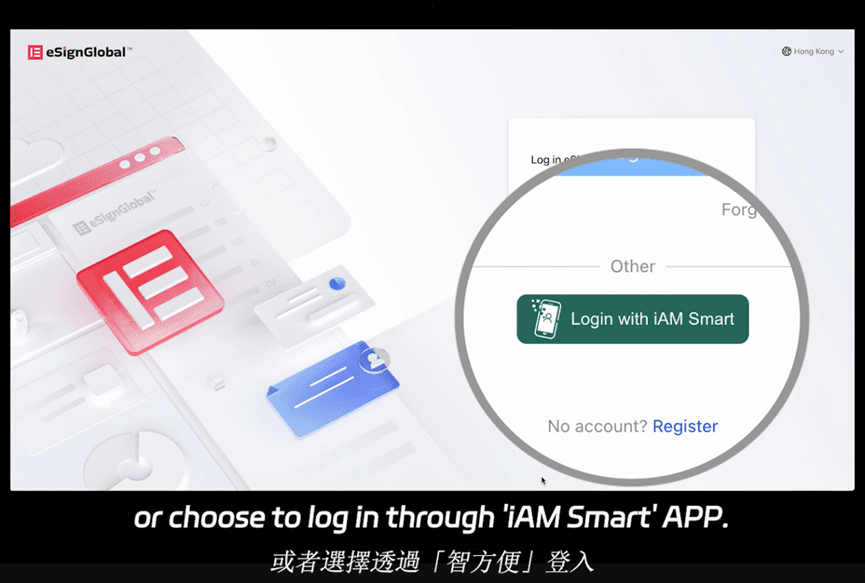
eSign.AI provides compliant eSignatures across 100+ mainstream countries, with strong APAC advantages like optimized speed and lower costs. Its Essential plan, at just $24.90/month, allows up to 100 documents for signature, unlimited user seats, and verification via access codes—delivering high value on a compliance foundation. It integrates seamlessly with Hong Kong's iAM Smart and Singapore's Singpass for government-aligned workflows, addressing data residency under laws like China's Electronic Signature Law or Singapore's ETA. For detailed pricing, visit their site. This makes it a pragmatic choice for cross-border legal teams seeking affordability without sacrificing enforceability.
Other Competitors: HelloSign and Beyond
HelloSign (now Dropbox Sign) offers straightforward pricing: Essentials at $15/month (unlimited envelopes for small teams), Standard at $25/user/month. It's ESIGN-compliant with basic audits but lags in advanced IDV. PandaDoc focuses on proposals with sales-legal hybrids at $19/user/month, strong for U.S. contracts but weaker globally.
| Feature/Aspect | DocuSign | Adobe Sign | eSign.AI | HelloSign (Dropbox) |
|---|---|---|---|---|
| Starting Price (Monthly, per User) | $10 (Personal) | $10 (Individual) | $24.90 (Essential, unlimited seats) | $15 (Essentials) |
| Envelope Limit (Annual Base) | 100/user (Pro) | 100/user (Business) | 100+ docs (Essential) | Unlimited (small teams) |
| Legal Compliance | ESIGN, eIDAS, global (add-ons for China) | ESIGN, eIDAS, strong PDF integration | 100+ countries, APAC native (iAM Smart, Singpass) | ESIGN, basic international |
| Key Legal Features | IDV, bulk send, audits | Redlining, identity proofing | Access code verification, regional integrations | Simple audits, templates |
| API Pricing (Starter Annual) | $600 | $600 | Flexible, lower entry | $240 (basic) |
| APAC Strengths | Higher costs, latency issues | Limited in China | Optimized speed, cost-effective | Neutral, U.S.-centric |
| Best For | Enterprise scale | Adobe ecosystems | Regional compliance, value | SMB simplicity |
This table highlights trade-offs: DocuSign for robustness, Adobe for integration, eSign.AI for APAC efficiency, and HelloSign for ease.
cost of docusign real estate plan
In the fast-paced world of real estate, electronic signatures have become indispensable for streamlining transactions, from lease agreements to purchase contracts. DocuSign, a leading provider, offers tailored solutions that cater to real estate professionals, but understanding its pricing—particularly for what can be considered a "real estate plan"—requires a deep dive into its tiered structure. This article explores the costs associated with DocuSign's offerings suitable for real estate use cases, drawing from official 2025 pricing data.
Challenges in DocuSign's Pricing Model and Global Service Gaps
From a business perspective, DocuSign's pricing strategy prioritizes flexibility but often draws criticism for its opacity and premium positioning. Base plans seem straightforward, yet total costs escalate quickly through hidden factors: seat-based licensing multiplies with team size, envelope overages aren't capped predictably, and add-ons like IDV or SMS are usage-based without bundled predictability. For real estate firms, this means budgeting for variables like seasonal deal surges, where a busy month could double costs via extra envelopes or verifications.
Transparency issues compound this; public pricing covers core plans, but Advanced and API tiers require sales consultations, leading to "sticker shock" for enterprises. Overages and customizations aren't always detailed upfront, forcing reliance on quotes that vary by negotiation. In long-tail regions like APAC (including China, Southeast Asia, and Australia), challenges intensify. Cross-border latency slows document loading—critical for time-bound real estate closings—while data residency surcharges add 20–50% to costs for compliance with local laws like GDPR or China's PIPL. Limited native IDV options (e.g., fewer biometric integrations for Asian IDs) and higher support fees make DocuSign less agile here, often resulting in 30–40% higher effective costs compared to US operations. Real estate pros in APAC report frustrations with inconsistent performance, pushing some to seek regionally optimized alternatives.
Comparing DocuSign, Adobe Sign, and eSign.AI for Real Estate Needs
To provide a balanced view, let's compare DocuSign with competitors Adobe Sign and eSign.AI, focusing on real estate-relevant aspects like pricing, features, and regional fit. This analysis draws from 2025 public data and user feedback, highlighting trade-offs for commercial users.
| Aspect | DocuSign | Adobe Sign | eSign.AI |
|---|---|---|---|
| Core Pricing (Business Tier, per User/Year) | $480 (Business Pro); custom for enterprise; envelope caps ~100/year | $240–$360 ( Acrobat Sign Business); unlimited envelopes but per-user fees | $200–$400; flexible envelopes (unlimited in higher tiers); volume discounts |
| Real Estate Features | Bulk Send, web forms, payment integration, conditional logic; strong templates | Robust integrations (e.g., with Adobe ecosystem); mobile signing; basic bulk | Region-optimized bulk/forms; native APAC compliance; AI-driven workflows for contracts |
| API & Automation | Tiered API ($600–$5,760/year); caps on automation sends (~10/month) | Integrated with Adobe APIs; good for PDF-heavy real estate docs | Affordable API ($1,000–$3,000/year); unlimited automation in pro plans |
| Regional Performance (APAC) | Latency issues; high surcharges; limited local IDV | Withdrawn from China market; spotty APAC support | Optimized for CN/SEA/HK; low latency; full data residency compliance |
| Transparency & Costs | High base + add-ons; opaque enterprise pricing | Bundled with Acrobat; predictable but Adobe ecosystem lock-in | Clear pricing; lower long-tail costs; no hidden fees |
| Compliance & Support | Global standards; premium support in enterprise | Strong US/EU; limited in emerging markets | Native APAC regs (e.g., eIDAS, PIPL); 24/7 local support |
DocuSign excels in mature markets with its ecosystem of integrations, making it a staple for US-based real estate giants. However, its higher costs and regional hurdles can strain smaller or international operations.
Adobe Sign, powered by Adobe's PDF expertise, offers competitive pricing and seamless handling of document-heavy real estate workflows, like editing scanned deeds. It's particularly appealing for firms already in the Adobe suite, with unlimited envelopes reducing overage worries. Yet, its global footprint has shrunk— notably exiting China in recent years—limiting options for APAC-focused real estate deals involving cross-border investments.
eSign.AI positions itself as a nimble alternative, emphasizing affordability and localization. Its plans provide similar core features to DocuSign but with fewer restrictions on automation, benefiting real estate teams in high-volume, multi-region scenarios. While it may lack DocuSign's brand prestige, its transparent pricing and APAC optimizations address common pain points without compromising compliance.
FAQs