
'%3e%3cpath%20fill-rule='evenodd'%20clip-rule='evenodd'%20d='M6.99935%2012.8327C10.221%2012.8327%2012.8327%2010.221%2012.8327%206.99935C12.8327%203.77769%2010.221%201.16602%206.99935%201.16602C3.77769%201.16602%201.16602%203.77769%201.16602%206.99935C1.16602%2010.221%203.77769%2012.8327%206.99935%2012.8327Z'%20stroke='%23666666'%20stroke-linecap='round'%20stroke-linejoin='round'/%3e%3cpath%20d='M1.16602%207H12.8327'%20stroke='%23666666'%20stroke-linecap='round'%20stroke-linejoin='round'/%3e%3cpath%20fill-rule='evenodd'%20clip-rule='evenodd'%20d='M6.99935%2012.8327C8.28802%2012.8327%209.33268%2010.221%209.33268%206.99935C9.33268%203.77769%208.28802%201.16602%206.99935%201.16602C5.71068%201.16602%204.66602%203.77769%204.66602%206.99935C4.66602%2010.221%205.71068%2012.8327%206.99935%2012.8327Z'%20stroke='%23666666'%20stroke-linecap='round'%20stroke-linejoin='round'/%3e%3cpath%20d='M2.875%202.95898C3.93063%204.01461%205.38896%204.66754%206.99978%204.66754C8.61062%204.66754%2010.069%204.01461%2011.1246%202.95898'%20stroke='%23666666'%20stroke-linecap='round'%20stroke-linejoin='round'/%3e%3cpath%20d='M11.1246%2011.0425C10.069%209.98691%208.61062%209.33398%206.99978%209.33398C5.38896%209.33398%203.93063%209.98691%202.875%2011.0425'%20stroke='%23666666'%20stroke-linecap='round'%20stroke-linejoin='round'/%3e%3c/g%3e%3cdefs%3e%3cclipPath%20id='clip0_1267_9109'%3e%3crect%20width='14'%20height='14'%20fill='white'/%3e%3c/clipPath%3e%3c/defs%3e%3c/svg%3e)


 Service Center
Webhook
- Trial Version: Does not support Webhook function
- Basic Version: Does not support Webhook function
- Professional Version: Supports Webhook function
Webhook is an asynchronous event notification service provided by eSign.AI, which allows users to receive various event notifications in the system by configuring callback URLs. When a specified event occurs, the system sends an HTTP POST request to the user-configured URL, containing detailed information about the event. Users can choose to subscribe to events from different trigger sources, including:
-
SaaS Page Initiated: Events triggered by user operations directly on the SaaS platform.
-
Third-Party System Integration Initiated: Data change events triggered by external systems integrated via APPID.
Webhook will push event data to your specified callback address in real-time, ensuring you can timely obtain business status changes and achieve automated process integration.
Adding Webhook
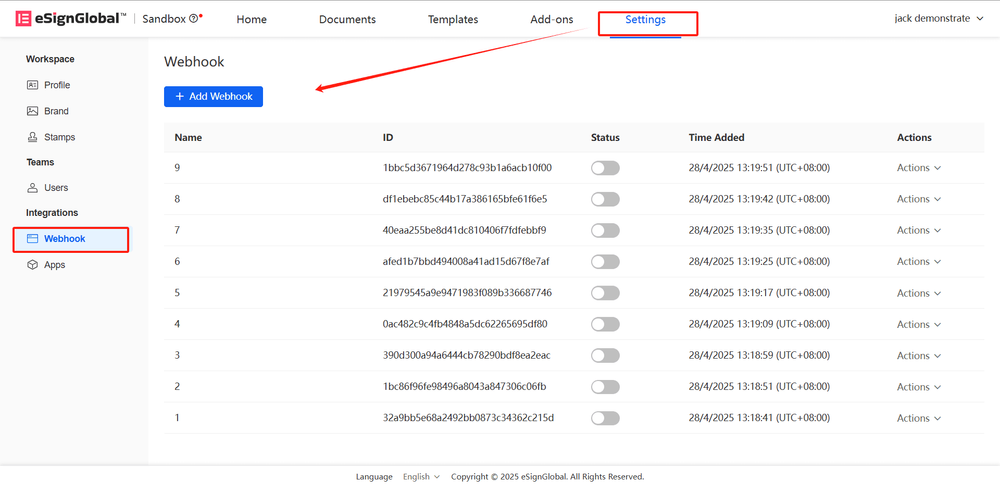
- Administrators can click the [Add Webhook] button in the [Settings - Webhook] menu to add a new Webhook.
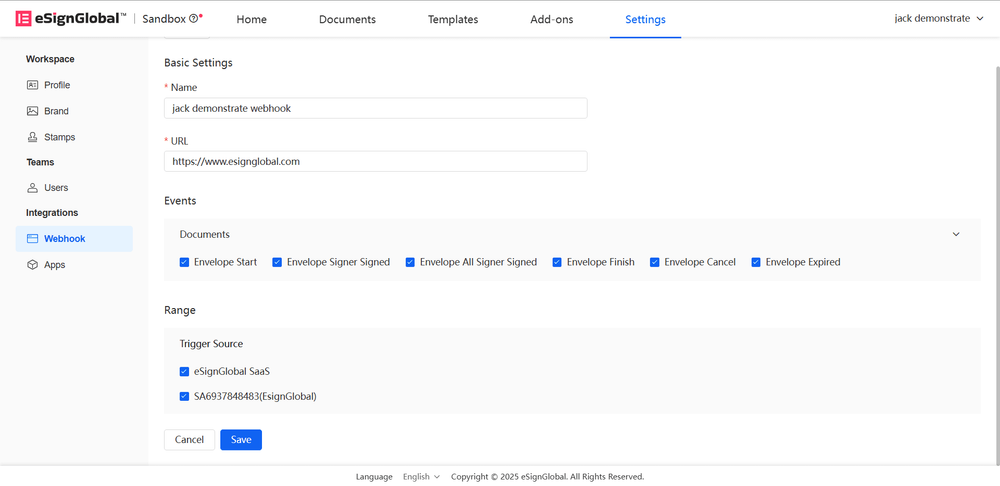
- Please enter the required information for the Webhook and click Save.
Explanation:
- Webhook Name: A name for easy recognition
- Callback URL: The callback address for receiving notifications
- Event Type: Select the events you want to subscribe to
- Trigger Source: You can choose to subscribe to events from different trigger sources
-
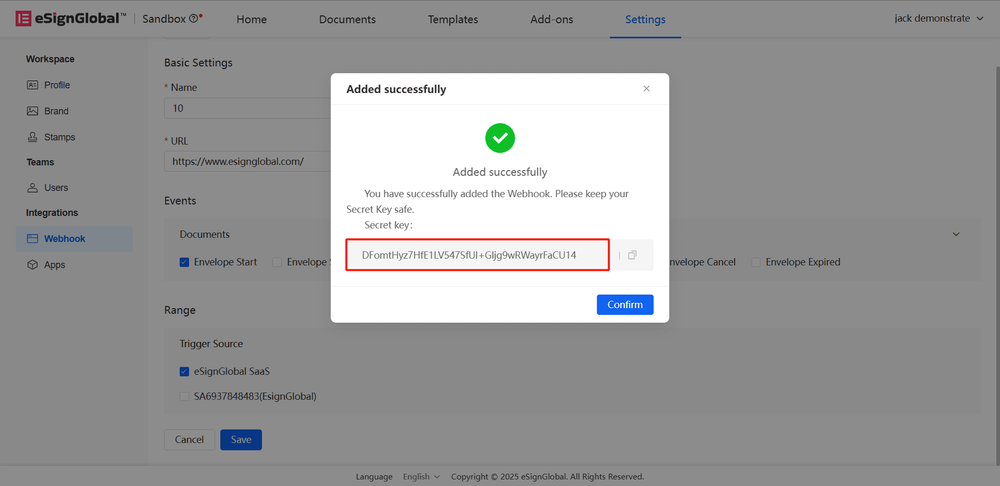
To ensure the credibility of the Webhook message source, the system provides a secret key verification mechanism. After successful saving, the system generates a secret key, please keep it properly.
Editing Webhook
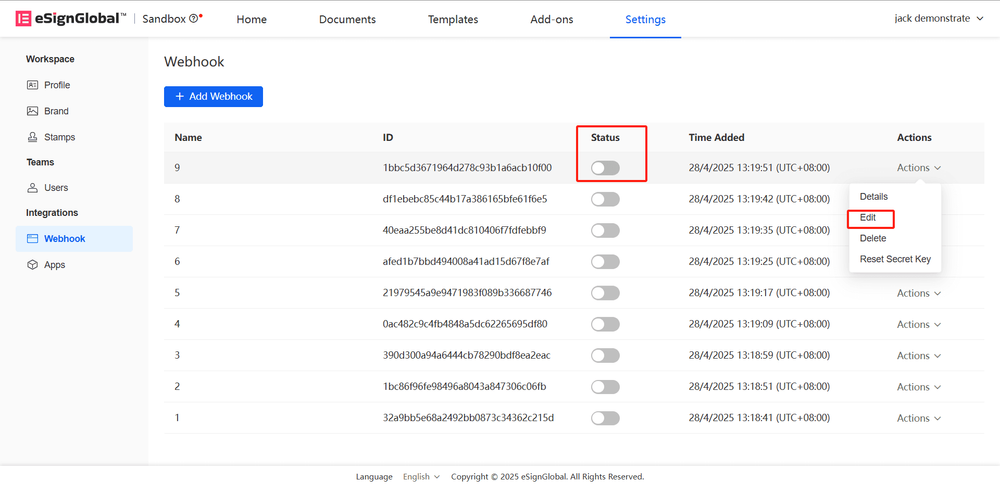
- In the management list, find the Webhook you want to adjust, and click the [Edit] button to update its settings.
Note:
- When the status is disabled, you can edit the webhook.
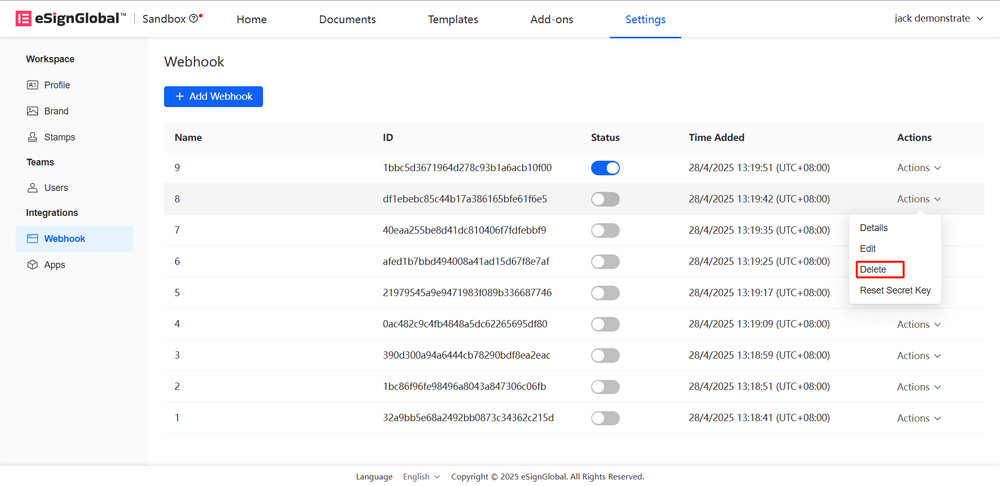
Deleting Webhook
- In the management list, find the Webhook you want to delete, and click the [Delete] button to update its settings.
Note:
- When the status is disabled, you can delete the webhook.
- Deletion requires double confirmation, please operate with caution.
Resetting Secret Key
-
In the management list, find the Webhook you want to delete, and click the [Reset Secret Key] button to regenerate a new secret key.

-
After the secret key is generated successfully, you can copy the key.

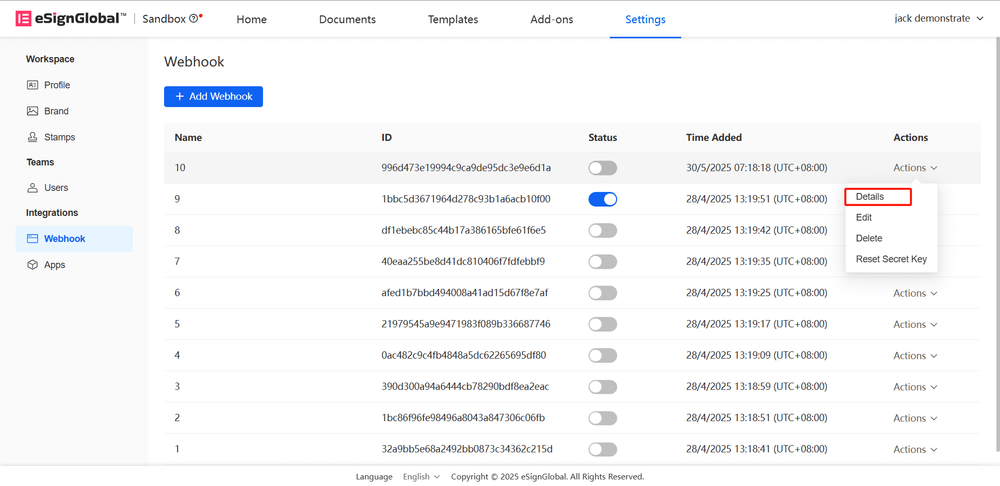
Viewing Webhook
- In the Webhook list, you can view the details of the Webhook.
Webhook Event Explanation: https://www.esignglobal.com/zh-CN/developer-center/document/vfj16znziy18o17n4sc5y7ng


