


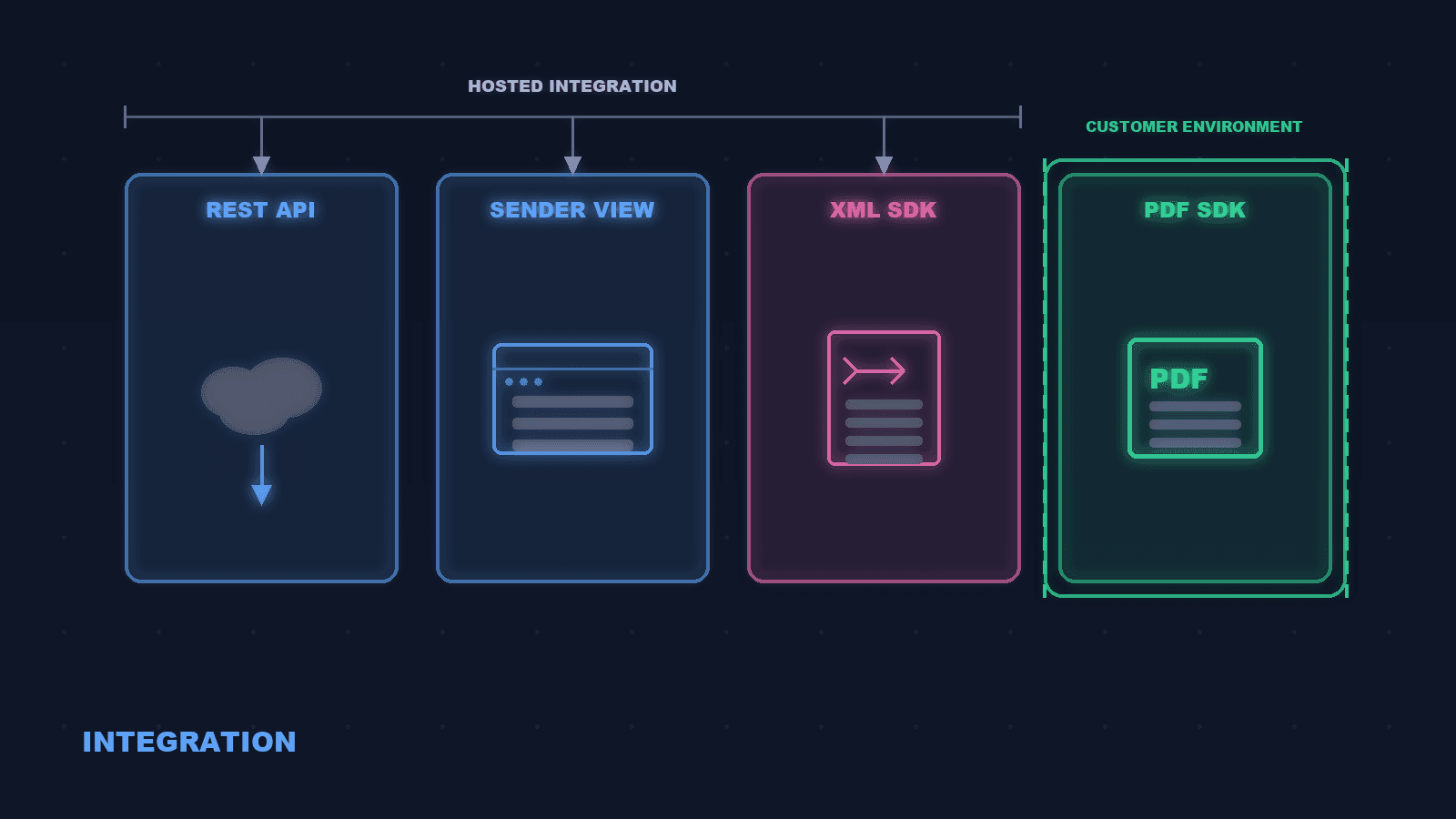
Four integration forms now exist, and the differences are about where the document lives
For most of the last decade there were two ways to embed electronic signature into a product: call a REST API from your backend, or hand the recipient an embedded signing view inside your own interface. That framing is now incomplete. A third form ships signatures as XML inside a document format, and a fourth runs the signing engine on customer infrastructure so the original file never leaves the local environment. The four forms differ less in how they sign than in where the document exists during signing, which is the question a security review actually asks. This guide separates the four, states what each requires, and gives a seven-item check to run before choosing.
The four integration forms, stated by where the document lives
Read the right-hand column first. It is the one that decides which forms are even admissible in your environment.
REST API: your backend sends the document to the vendor's service, which hosts it for the duration of signing and returns the completed file.
Embedded signing view: the vendor hosts the document and renders only the signing surface inside your product, so the recipient never leaves your interface.
XML-based sealing: the signature is applied as structured XML to a document format designed for machine processing, which suits trade and customs documents.
Local PDF SDK: the signing engine runs inside the customer's own environment and the original file does not leave it.
Where the file lives, who holds the key, and what each form costs you to operate
The middle column is the one that eliminates options. A regulated buyer cannot select a hosted form if the source document may not leave its network, no matter how good the API is.
| REST API | Embedded view | XML sealing | Local PDF SDK | |
|---|---|---|---|---|
| Document location during signing | Vendor cloud | Vendor cloud | Depends on the sealing service | Customer environment |
| Recipient experience | Vendor-hosted signing page | Your own interface | No interactive signing surface | Your own application |
| Who holds the signing credential | Vendor or a delegated trust service | Vendor or a delegated trust service | Configurable trust service | Customer-controlled |
| Data-residency fit | Requires an approved region | Requires an approved region | Depends on deployment | No data transfer of the source file |
| Typical integration effort | Backend endpoints and webhooks | Frontend embed plus backend token | Schema mapping and validation | On-premises deployment and key custody |
| Best fit | High-volume server-to-server flows | Product-embedded signing inside your UI | Structured documents for trade and customs | Documents that may not leave the network |
This is not a ranking, because the forms solve different constraints
A platform that offers only the REST API is not behind one that offers four forms; it is addressing a different customer. The useful question is which constraint binds first in your environment. If the source document is a trade certificate that a customs system must read, the XML form is the only one that produces a machine-consumable artefact, and a hosted signing page adds nothing. If the document is an employment contract that cannot leave a bank's network, the local SDK is the only admissible option and the API's convenience is irrelevant. If the requirement is to keep the recipient inside your own product interface while signing, the embedded view is the right form and the other three do not deliver that experience at all. Map the constraint to the form before comparing vendors, because a vendor comparison run in the wrong column produces a confident and wrong answer.
The local SDK exists because some documents are legally unable to travel
Data-residency rules are usually stated as a region requirement, but the stricter version forbids the file from leaving at all.
A region requirement says the document must be stored in a named jurisdiction. A no-egress requirement says the document may not leave the customer's own environment under any circumstances. The first is satisfied by choosing a cloud region. The second cannot be satisfied by any hosted service, however well located, because the file crosses a network boundary during signing even if it returns afterwards.
This distinction is what makes an on-premises signing engine a categorically different product rather than a deployment option. When the engine runs locally, the original document is read from local storage, the signature is computed against local keys, and the completed file is written back to local storage. The vendor's cloud may still participate in licence validation or trust-service calls, and those calls should be enumerated explicitly, because a buyer who requires no egress will want to know exactly what still leaves and in what form.
Ask the vendor to draw the network diagram with every outbound connection labelled, including licence checks, timestamp authority calls, revocation lookups and telemetry. A local SDK that phones home continuously is not equivalent to one that operates disconnected, and the difference is rarely stated in the marketing material. For regulated buyers this diagram is the evaluation, not a supporting document.
The companion question is key custody. A locally deployed engine that still relies on vendor-held signing keys has moved the document but not the trust. Establish whether keys reside in customer-controlled hardware, whether they are exportable, and what happens to signing capability if the vendor relationship ends.
XML sealing is for documents a machine has to read, not for documents a person signs
The XML form is frequently dismissed as a niche variant of PDF signing. It is a different output class entirely.
A PDF signature produces a visual artefact with an embedded cryptographic proof. An XML seal produces structured data where the signature is a node in the document itself, which means a downstream system can read the signed values without parsing a rendered page. That distinction matters for any document that is consumed by a machine rather than by a person: customs declarations, certificates of origin, invoices in a mandated schema.
For exporters this has become a practical requirement rather than an architectural preference. Where a regulatory framework introduces an electronic certificate of origin, the certificate is exchanged as structured data between two systems, and a signed PDF is not accepted in its place because the receiving system cannot extract the attested values from it. Buyers in that position should confirm two things: that the sealing service recognises the specific document schema in use, and that the signed output validates against the receiving system, which is a different test from validating the signature itself.
A secondary benefit is that XML signatures are designed for long-lived validation. Where a signature must remain verifiable years after issuance, the structured form carries its timestamp and revocation evidence inside the document rather than alongside it in a separate package. Ask how the signature is expected to be validated at the end of the retention period, not only at the moment of signing.
Most integration failures happen after the signature works, not before
The first successful signed document proves very little. These are the areas where integrations break in production.
Callback reliability is the first. A webhook that delivers a completion event once is a webhook that will silently fail during a network event, and the customer's envelope will show as pending in your system while it is complete in the vendor's. Ask whether failed deliveries are retried, whether failure events are surfaced to an operator rather than only logged, and whether callbacks can be reconciled by polling a status endpoint as a fallback.
Document transformation is the second. Files that arrive as something other than PDF typically need conversion before they can be signed, and that conversion may happen asynchronously. An integration that assumes a synchronous response will fail intermittently on exactly the inputs that matter, such as large scans or office formats. Establish the behaviour for non-PDF uploads explicitly, including how the integration learns that conversion has completed.
The third is observability. When an envelope does not reach its final state, the integration team needs to determine whether the failure is in your request, the vendor's processing, or the recipient's action. A callback log that the customer can inspect, with request and response pairs, converts a multi-day support escalation into a local debugging session. Without it, every anomaly becomes a vendor ticket.
A fourth, easily missed area is environment parity. Templates, seals and trust-service configuration created in a sandbox rarely transfer automatically to production, and an integration validated against sandbox assets will fail on first production send. Establish what has to be recreated, and whether a documented export and import path exists for the configuration assets.
Seven checks to run before writing the first line of integration code
Each check produces a written answer you can attach to the internal architecture review.
State the data boundary in one sentence
Either the document may leave the network or it may not. Write the sentence, then eliminate every form that contradicts it. Do not proceed with a form that requires a compromise here.
Confirm the output class the receiving system accepts
If a downstream system parses the document, confirm whether it accepts a signed PDF or requires structured XML. Validate a real sample against that system, not against the vendor's validator.
Map every outbound connection
For any local deployment, request the network diagram with licence checks, timestamp calls and revocation lookups labelled. Attach it to the security review.
Test callback failure, not callback success
Disable your endpoint during a send and observe what the vendor does. Confirm retry behaviour, failure events and a status endpoint you can poll for reconciliation.
Verify the non-PDF path
Send a scanned image and an office document, then measure how the integration learns of conversion completion. An undocumented synchronous assumption is a production defect.
Confirm environment parity
Ask what must be rebuilt between sandbox and production, and whether templates and trust configuration can be exported rather than recreated by hand.
Time a full reconciliation
Pick one completed envelope and reconstruct its entire history from logs alone, without contacting support. That elapsed time is your real operational cost.
Frequently asked questions
Yes, and mixed portfolios are common. The constraint is operational, not technical: each form carries its own deployment, key custody and upgrade process, so a second form roughly doubles the surface your team maintains. Adopt a second form only where the first genuinely cannot satisfy a documented requirement.

Keep reading
Buying Guides