
'%3e%3cpath%20fill-rule='evenodd'%20clip-rule='evenodd'%20d='M6.99935%2012.8327C10.221%2012.8327%2012.8327%2010.221%2012.8327%206.99935C12.8327%203.77769%2010.221%201.16602%206.99935%201.16602C3.77769%201.16602%201.16602%203.77769%201.16602%206.99935C1.16602%2010.221%203.77769%2012.8327%206.99935%2012.8327Z'%20stroke='%23666666'%20stroke-linecap='round'%20stroke-linejoin='round'/%3e%3cpath%20d='M1.16602%207H12.8327'%20stroke='%23666666'%20stroke-linecap='round'%20stroke-linejoin='round'/%3e%3cpath%20fill-rule='evenodd'%20clip-rule='evenodd'%20d='M6.99935%2012.8327C8.28802%2012.8327%209.33268%2010.221%209.33268%206.99935C9.33268%203.77769%208.28802%201.16602%206.99935%201.16602C5.71068%201.16602%204.66602%203.77769%204.66602%206.99935C4.66602%2010.221%205.71068%2012.8327%206.99935%2012.8327Z'%20stroke='%23666666'%20stroke-linecap='round'%20stroke-linejoin='round'/%3e%3cpath%20d='M2.875%202.95898C3.93063%204.01461%205.38896%204.66754%206.99978%204.66754C8.61062%204.66754%2010.069%204.01461%2011.1246%202.95898'%20stroke='%23666666'%20stroke-linecap='round'%20stroke-linejoin='round'/%3e%3cpath%20d='M11.1246%2011.0425C10.069%209.98691%208.61062%209.33398%206.99978%209.33398C5.38896%209.33398%203.93063%209.98691%202.875%2011.0425'%20stroke='%23666666'%20stroke-linecap='round'%20stroke-linejoin='round'/%3e%3c/g%3e%3cdefs%3e%3cclipPath%20id='clip0_1267_9109'%3e%3crect%20width='14'%20height='14'%20fill='white'/%3e%3c/clipPath%3e%3c/defs%3e%3c/svg%3e)


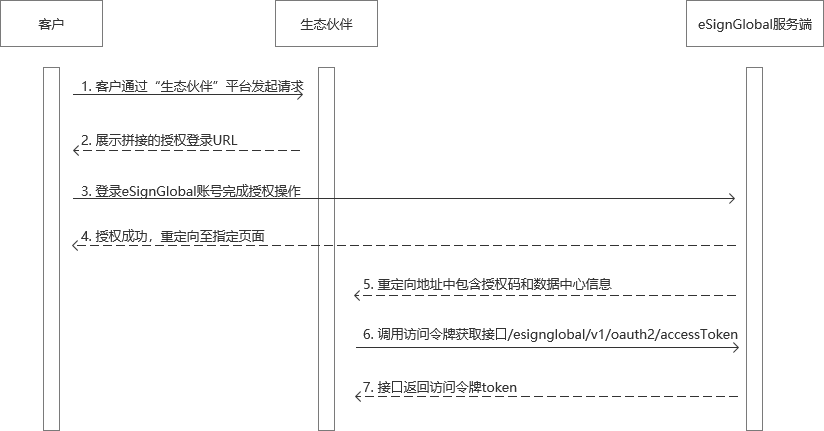
調用時序
概述
OAuth 2.0 是一種廣泛使用的授權協議,允許第三方應用程式透過用戶的授權來存取其資源,而無需暴露用戶的憑證。在 OAuth 2.0 的授權碼模式中,客戶端需要引導用戶造訪授權伺服器的授權端點(Authorization Endpoint),以取得用戶的授權許可。
本文檔旨在詳細說明如何根據 OAuth 2.0 協議拼接和使用授權地址,並提供實際的範例和注意事項。
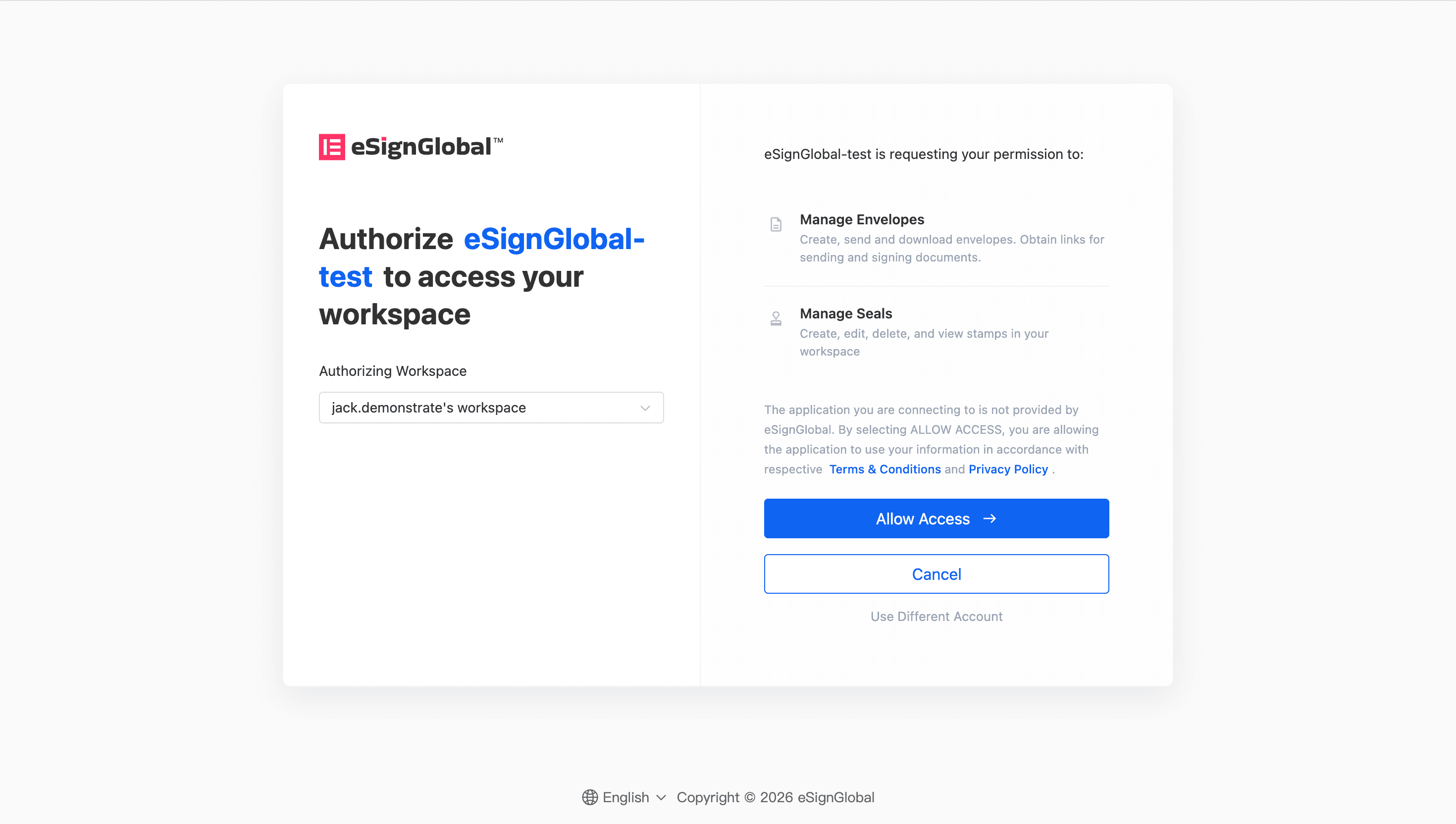
一、拼接URL獲取授權碼
授權地址的基本結構
授權地址是客戶端向授權伺服器發起請求時所使用的 URL。它由以下幾個部分組成:
https://<authorization-server-domain>/oauth?
    response_type=<response_type>&
    clientId=<client_id>&
    redirectUri=<redirect_uri>&
    scope=<scope>&
    state=<state>
參數說明
授權地址拼接步驟
- 確定授權伺服器位址 沙箱環境為:https://account-sml.esignglobal.com/oauth
正式環境為:https://account.esignglobal.com/oauth
- 設定參數值 根據實際需求,設定各個參數的值。以下是一個範例:
response_type:codeclientId:your-client-id-12345redirectUri:https://your-app.com/callbackscope:signaturestate:random-state-value
- 拼接查詢參數 將上述參數按照鍵值對的形式拼接到授權伺服器地址後,使用
&連接每個參數。注意,參數值需要進行 URL 編碼。範例拼接結果:
https://account-sml.esignglobal.com/oauth? response_type=code& clientId=your-client-id-12345& redirectUri=https%3A%2F%2Fyour-app.com%2Fcallback& scope=signature& state=random-state-value - 驗證拼接結果 確保拼接後的地址符合以下要求:
- 參數順序可以任意
- 參數值已正確進行 URL 編碼
- 所有必填參數均已包含
範例程式碼
以下是幾種常見程式語言中拼接授權地址的範例程式碼:
Python 範例
import urllib.parse

# 定义参数
base_url = "https://account-sml.esignglobal.com/oauth"
params = {
    "response_type": "code",
    "clientId": "your-client-id-12345",
    "redirectUri": "https://your-app.com/callback",
    "scope": "signature",
    "state": "random-state-value"
}

# 拼接地址
query_string = urllib.parse.urlencode(params)
authorization_url = f"{base_url}?{query_string}"
print(authorization_url)
JavaScript 範例
// 定义参数
const baseUrl = "https://account-sml.esignglobal.com/oauth";
const params = new URLSearchParams({
    response_type: "code",
    clientId: "your-client-id-12345",
    redirectUri: "https://your-app.com/callback",
    scope: "signature",
    state: "random-state-value"
});

// 拼接地址
const authorizationUrl = `${baseUrl}?${params.toString()}`;
console.log(authorizationUrl);
Java 範例
import java.net.URLEncoder;
import java.nio.charset.StandardCharsets;

public class OAuthUrlBuilder {

    public static void main(String[ ] args) throws Exception {

        // 定义参数
        String baseUrl = "https://account-sml.esignglobal.com/oauth";
        String responseType = "code";
        String clientId = "your-client-id-12345";
        String redirectUri = "https://your-app.com/callback";
        String scope = "signature";
        String state = "random-state-value";

        // 拼接查询参数
        String queryString = String.format(
            "response_type=%s&clientId=%s&redirectUri=%s&scope=%s&state=%s",
            URLEncoder.encode(responseType, StandardCharsets.UTF_8),
            URLEncoder.encode(clientId, StandardCharsets.UTF_8),
            URLEncoder.encode(redirectUri, StandardCharsets.UTF_8),
            URLEncoder.encode(scope, StandardCharsets.UTF_8),
            URLEncoder.encode(state, StandardCharsets.UTF_8)
        );

        // 生成完整的授权地址
        String authorizationUrl = baseUrl + "?" + queryString;
        System.out.println(authorizationUrl);
    }
}
注意事項
在拼接和使用授權地址時,需要注意以下幾點:
- URL 編碼的正確性 所有參數值必須經過 URL 編碼(
percent-encoding),以確保特殊字符(如:、/、?等)不會破壞 URL 的結構。例如,https://your-app.com/callback應編碼為https%3A%2F%2Fyour-app.com%2Fcallback。 - 回調地址的一致性
redirect_uri參數的值必須與客戶端在授權服務器上註冊的回調地址完全一致,包括協議(http或https)、主機名、端口和路徑。否則,授權服務器會拒絕請求。 state參數的安全性state參數用於防止跨站請求偽造(CSRF)攻擊。客戶端應生成一個隨機且不可預測的字串,並在用戶完成授權後驗證回調中的state值是否與最初發送的值一致。- 權限範圍的合理性
scope參數定義了客戶端請求的權限範圍。應根據實際需求選擇最小化的權限範圍,避免過度請求用戶資源,從而提高用戶信任度。 - 環境區分 在開發和測試階段,通常使用沙箱環境(如
account-sml.esignglobal.com),在正式上線後,需切換到生產環境(如account.esignglobal.com),確保在不同環境中使用正確的授權伺服器地址。 - 授權成功後的資訊處理 授權完成後,eSign.AI授權服務將通過
redirect_uri拼接返回code和baseUrl,通過baseUrl可識別授權方數據所在的數據中心,執行openapi請求時,需要根據對應的數據中心發起請求。 - 錯誤處理 如果用戶拒絕授權或發生其他錯誤,授權伺服器會通過
redirect_uri返回錯誤訊息(如error和error_description參數),客戶端應妥善處理這些錯誤,向用戶提供清晰的反饋。


